
oscars93987756
Inspiring
June 6, 2019
Answered

Saw tooth strokes, making me feel down.

  • June 6, 2019
  • 1 reply
  • 1595 views

Please look at the below screenshot of two pathlines, taken in Illustrator CC today,

The line of the left, when filled or stroked, produces a clean un-jaggered a.k.a. 'straight' line. So the left line is Good.

However, notice the line on the right. See how it is wobbly looking? When I fill or stoke this line, it appears not-straight, not-clean and jaggered, kinda like a saw you use to cut wood. When zoomed in, it becomes more obvious.

I have spent 3 hours using the Pen tool to change the perimeter of a font around so I can make it look more personalised. I've only noticed this problem when I finished that, and started stuffing around with grouping, fill, stroke, Object > Expand. Because I'm a moron, I didn't save my work till after I saw the above problem. Boy oh boy, maybe I'll give up and just die.

I've deselected the path and I'm left with this:
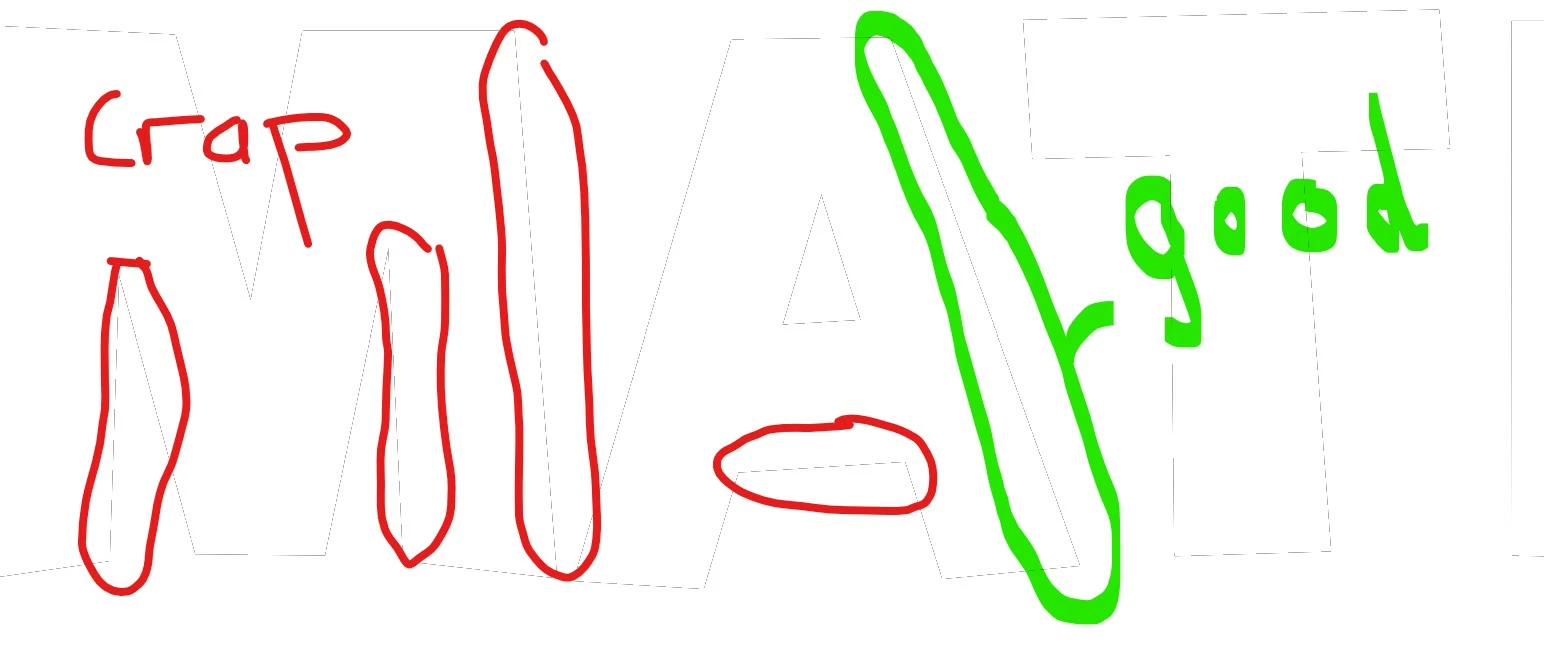
The spaced-ant-lines are all appear as jaggered when filled or stroked. The GREEN line - is a nice not-spaced-ant-line - works fine. How I ended up with some lines this and some lines that has got me depressed.

Thanks.

This topic has been closed for replies.
Correct answer oscars93987756

Oscar,

Most likely far too far out, but what happens if you Ctrl/Cmd+E (to toggle between GPU and CPU, just do it again if it fails to help)?


Dear Jacob,

I go View > View using CPU = Problem Solved.
When I go View > View using GPU = Problem stays a problem.

Interesting to me is this. I saved my work when I knew lines appeared like vectors (not just were but actually appeared like straight/smooth vector lines). However, I've noticed that when copy and paste my text work onto a Shape, the Crap will appear! In order to eliminate Crap, I switch to CPU which = Problem Solved.

Thanks to Jacob, now I'm more confident that what I'm seeing on screen is I'll be getting when I spend the next 16 hours making all my variations to the same logo.

I have a new CPU and a killer graphics card NVIDEA 1000. I was under the impression that Adobe should be using my NVIDEA graphics card because it's pretty expensive little unit. I guess I'm wrong.

Is it healthy to be using my CPU in lieu of my graphics card?

1 reply

Grant H
Community Expert
Community Expert
June 6, 2019

Hi Oscar. I see that you are having problems with a stroked path.

It Appears that you have pixel preview checked:

when that view option is selected the "saw" will look worse or better depending on the angle of the line. So 90° or 180° will look better than 45° for eg. Also the size of your artboard and zoom level will also change the saw tooth effect.

Uncheck the Pixel Preview and the edges will be perfectly crisp.

...

/G

oscars93987756
Inspiring
June 6, 2019

Thanks Grant,

I can't say if above solved my problem for I did solve the problem a short while ago.

Here was the solution that worked for me:

Select everything > Object > Path > Average > Clicked on both options available in the window that pops up > Ok.

This immediately made the jiggered effect go away.

I found this through trial and error. In my attempts to find a youtube video, I found that more than one youtuber was suffering the same affect, but they apparently weren't bothered by it, and not once did I see them identify my issue as an issue for them.

Youtube searches revealed Smoothing type solutions. None of which had worked.

oscars93987756
Inspiring
June 6, 2019

Object > Path > Average > Clicked on both options available in the window that pops up > Ok.

The above worked for a while only.

After an hour or so, the jaggerdness has crept back in.

This time the Object > Path > Average > Clicked on both options available in the window that pops up > Ok. DOES NOT WORK anymore.

It just cumbled the whole piece of work up into a small ball.

I'm not sure if it happens when I save the file. Then open it up again. Not sure at what point the jaggerdness crept its way back into my work.

The artwork is horrible and in not presentable, despite everything else being Good.

Who has a solution to this problem?