Scaling an Illustrator vector in a non-uniform way
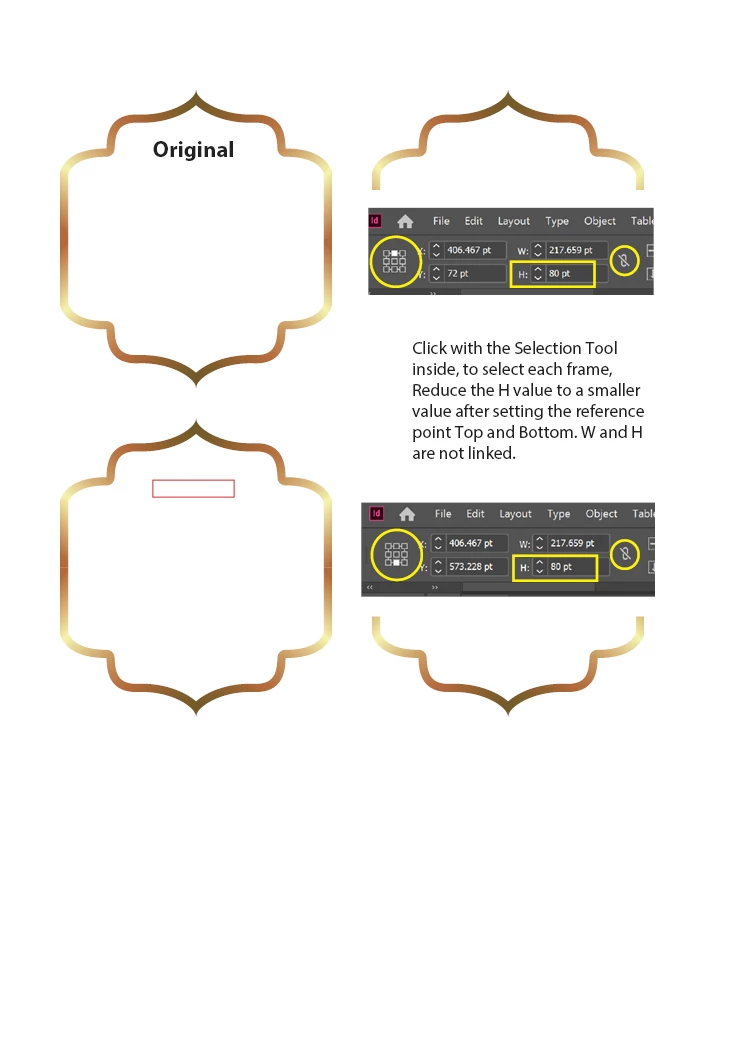
I am working on a manuscript in InDesign whose left-hand pages have a frame that surrounds text. The frame was created in Ilustrator, and I am new to both applications. The frame that surrounds the text on the text page does not act like I want it to when I change its size. Please see the downloadable video at the following link to get a feeling for what I mean (https://gofile.io/?c=hU3j43). As you can see from the video, when I make the frame smaller in order to border a small amount of text, the top and bottom portions of the frame become distorted. There is no longer a “pointy” design as is the case when the frame is quite large.
If possible, I would like this to be fixed so that when I change the size of the frame, the top and bottom portions do not change their look. I would just like the left and right vertical lines of the frame to be made smaller or larger, so that the top and bottom portions of the frame remain the same in all cases. I have been told by a person who has experience using Illustrator that this would require expert Illustrator skills.
Does anyone know how this could be done?
 AdChoices