
Inspiring
September 14, 2017
Answered

Scaling the object without distorting it

  • September 14, 2017
  • 3 replies
  • 19930 views

Hi!

I have an object with rounded corners at left top and right bottom. the whole thing is "bent" to right with 25%. It´s the background for short texts. Sometimes the text needs two lines, sometimes only one. The width is different as well.

Is it possible to change the width OR the hight of an object (created by me) without distorting it? And I am not meaning, with the "direct selection"-tool (white arrow) by marking each point I want to move.

hopfully my explanation is clear enough...

thanx
This topic has been closed for replies.
Correct answer Myra Ferguson

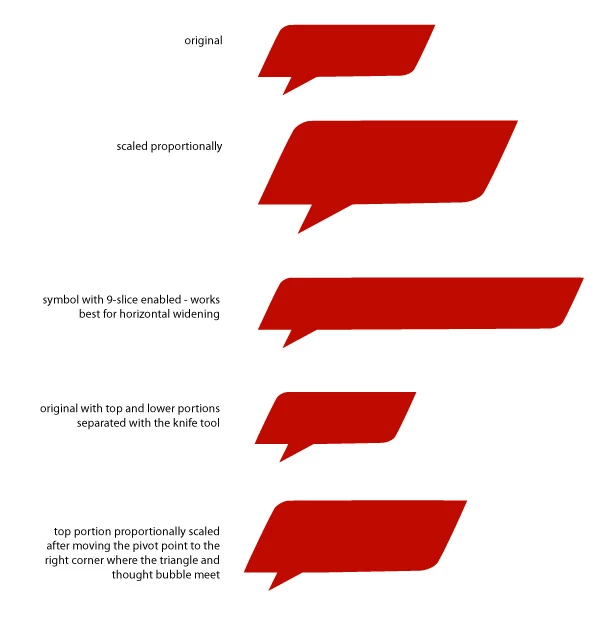
Maybe this image will help. The 9-slice will really only work with the horizontal scaling here, so you'll have to decide how you want vertical scaling to look. You could just proportionally scale it, but I don't think that's what you want. I think what you're looking for might be if you cut the bubble from the triangle and proportionally scale it. Before you scale, move the pivot point to the right corner where the triangle and bubble meet.

Also here's a video on 9-slice scaling Using 9-slice scaling options with symbols

3 replies

Myra Ferguson
Community Expert
Community Expert
September 14, 2017

Convert it to a symbol (F8) and select Enable Guides for 9-Slice Scaling. Then adjust the guides. What is outside the guides won't change when you scale the symbol.

cmoke73Author
Inspiring
September 14, 2017

It´s an interresting feature. Thanks Myra!

Unfurtunately I didn´t found out yet how to use it for solving my problem...

But I´m not giving up.

Myra Ferguson
Community Expert
Myra FergusonCommunity ExpertCorrect answer
Community Expert
September 14, 2017

Maybe this image will help. The 9-slice will really only work with the horizontal scaling here, so you'll have to decide how you want vertical scaling to look. You could just proportionally scale it, but I don't think that's what you want. I think what you're looking for might be if you cut the bubble from the triangle and proportionally scale it. Before you scale, move the pivot point to the right corner where the triangle and bubble meet.

Also here's a video on 9-slice scaling Using 9-slice scaling options with symbols

Monika Gause
Community Expert
Community Expert
September 14, 2017

Are the rounded corners created with the round corners widget?

Because then they wouldn't be such a pain.

But it would still be impossible to make it longer in this tilted direction without using the sirect selection tool.

You might want to show us before and after and provide a sample file, so that not everyone has to rebuild the thing.

cmoke73Author
Inspiring
September 14, 2017

... in InDesign it´s no problem.

Monika Gause
Community Expert
Community Expert
September 14, 2017

... in InDesign it´s no problem.

Not quite.

The sheared rectangle with rounded corners is no problem. But as soon as this triangle is added to the shape, you will get a problem.

angie_taylor
Legend
September 14, 2017

If it is a Vector image, select it all, Expand it and then use the Scale tool to scale it by however many times are necessary. If it has a stroke applied you may want to select the Scale Strokes option before doing so.

hope this helps

cmoke73Author
Inspiring
September 14, 2017

Hi theangietaylor

it is a vector. Maybe I was not that clear: I change only one parameter. Either the width or the height. The angle and the radius must stay the same!

here some exemples:

two lines (correct shape)

two lines (wrong shape)

one line (correct shape)

one line (wrong shape)