
Participant
October 9, 2020
Answered

Screen Blending Mode Produces Strange Behavior

  • October 9, 2020
  • 2 replies
  • 1179 views

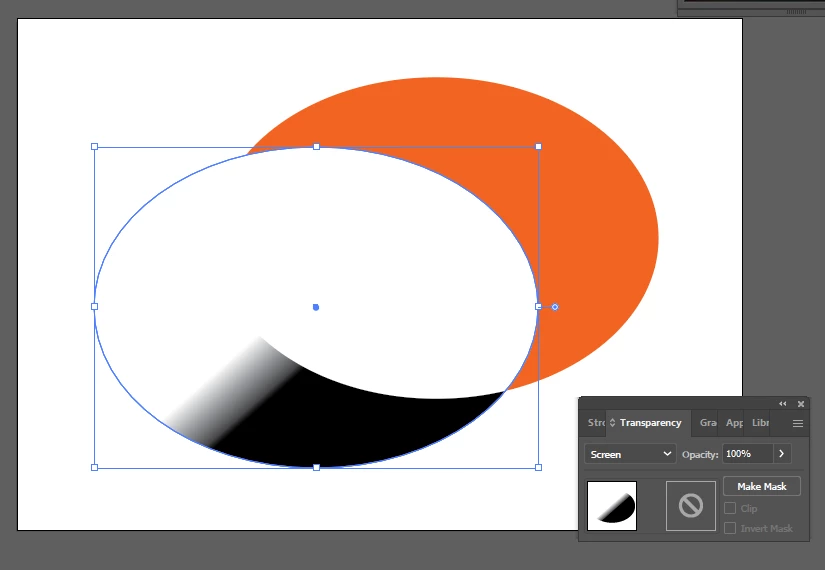
I just installed Illustrator to work on some personal projects, but quickly ran into a weird problem that I can't figure out. The screen blending mode (as well as lighten) don't actually lighten objects behind them, but instead, result in unexpected effects. As an example, I simply made a shape with a white-to-black gradient and set the blending mode to screen and another shape on the same layer behind the gradient shape. The result is shown in the attached image.


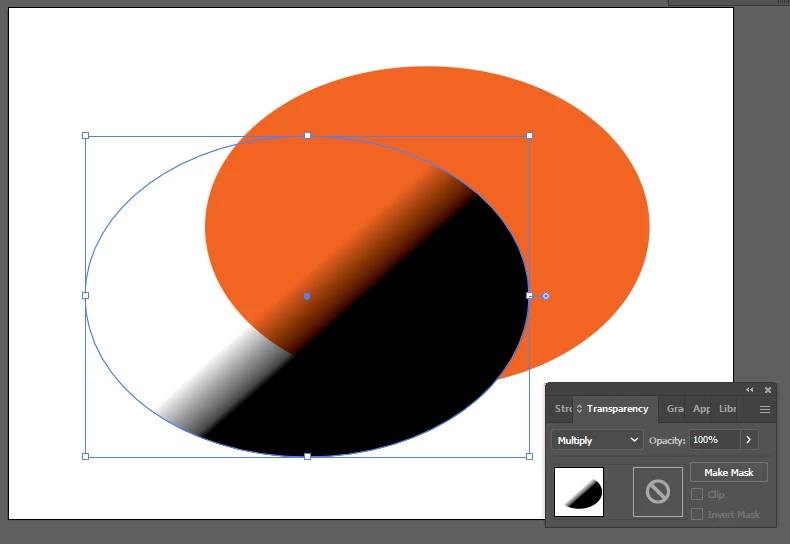
Things work totally as expected if I use the multiply blending mode.


Thanks for any suggestions!

Correct answer Doug A Roberts

Is your document CMYK?

Because (in CMYK) a black-to-white gradient only has one ink in it (from 0% K to 100%K), the equation for screen only works on the amount of K in the underlying shape. If there's no K there, you'll get white (zero times X equals zero).

2 replies

Doug A Roberts
Community Expert
Doug A RobertsCommunity ExpertCorrect answer
Community Expert
October 9, 2020

Is your document CMYK?

Because (in CMYK) a black-to-white gradient only has one ink in it (from 0% K to 100%K), the equation for screen only works on the amount of K in the underlying shape. If there's no K there, you'll get white (zero times X equals zero).

Participant
October 9, 2020

Yes, switching to RGB fixed it. Thank you for your explanation!

Monika Gause
Community Expert
Community Expert
October 9, 2020

Are you working in CMYK or RGB documents?