rogerv47782856
Participating Frequently
December 4, 2017
Answered

Screen printing shadows

  • December 4, 2017
  • 3 replies
  • 6212 views

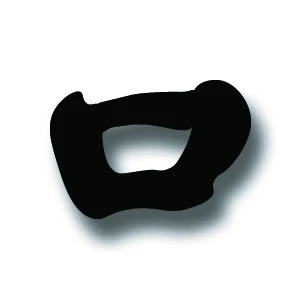
Need help! I am a new user of illustrator. I have been trying my hand at designs on t-shirts. I am having trouble screen printing this shadow (image below). Can anyone help? or is there a tutorial/video I can look at that can help me set up this process. I tried looking up past inquiries on this topic, but to no avail. Thank you 🙂
    This topic has been closed for replies.
    Correct answer happie_97

    Hi Roger,

    If you really want to learn all about t-shirt design and have a Lynda.com account, Sebastian Bleak has a step by step tutorial on T-Shirt Design and printing. You should check it out.

    Learn T-Shirt Printing and Design

    3 replies

    happie_97
    Community Expert
    happie_97Community ExpertCorrect answer
    Community Expert
    December 5, 2017

    Hi Roger,

    If you really want to learn all about t-shirt design and have a Lynda.com account, Sebastian Bleak has a step by step tutorial on T-Shirt Design and printing. You should check it out.

    Learn T-Shirt Printing and Design

    rogerv47782856
    Participating Frequently
    December 6, 2017

    Awesome! That's the ticket. I love tutorials; step by step. Much appreciated

    JonathanArias
    Legend
    December 4, 2017

    for screen printing to have to separate the layers/colors. so you will need a layer for each color, you have two tones in that photo, the solid black and the light one of the shadow.  so make a layer for each and the screen printer will be able to work with your file. 

    rogerv47782856
    Participating Frequently
    December 4, 2017

    Thank you for your reply as well. I am creating the images into .png. files in photoshop, therefore do not the images (created in illustrator) now become one static image? How can the printer tell that there are two layers?  Again, thank you!

    JonathanArias
    Legend
    December 5, 2017

    The printer will asked you for the illustrator file that is separated into layers.

    Monika Gause
    Community Expert
    Community Expert
    December 4, 2017

    You're doing the screen printing yourself?

    What do you expect to happen to the shadow?

    What equipment do you have?

    rogerv47782856
    Participating Frequently
    December 4, 2017

    Thank you for your reply. Like I said, I am new at this and may have the terminology reversed. I am strictly designing, but want to transfer the shadow on my monitor to the t-shirt for the printers. I tried screening the shadow but that only came out looking silverfish grey. Does that help any?

    Monika Gause
    Community Expert
    Community Expert
    December 4, 2017

    So you expect the shadow to be made into halftone dots?

    Have you talked to the printer and asked them how exactly they expect the artwork to be? They usually have the equipment to do this.