
Known Participant
November 9, 2024
Answered

Script Access to Variables and Datasets

  • November 9, 2024
  • 3 replies
  • 788 views

Script access to dataset variables


var idoc = app.activeDocument;
var vars = idoc.variables;

for (j=0; j<vars.length; j++)
    alert(vars.name + ' : ' + vars.pageItems[0].contents);


Looking for a way to access the variables and datasets but not sure where I'm getting it wrong. The above script from an earlier post did not seem to help.


This topic has been closed for replies.
Correct answer CarlosCanto

here you go, I added setting a dataset to my previous script


// cycle through DataSet variables
// https://community.adobe.com/t5/illustrator-discussions/script-access-to-variables-and-datasets/m-p/14971636#M426387

var idoc = app.activeDocument;

var vars = idoc.variables;

for (a=0; a<idoc.dataSets.length; a++) {

    idoc.activeDataSet = idoc.dataSets[a];
    
    for (j=0; j<vars.length; j++) {
        //$.writeln(vars[j].name + ' : ' + vars[j].pageItems[0].contents);
        alert(vars[j].name + ' : ' + vars[j].pageItems[0].contents);
    }
}

3 replies

CarlosCanto
Community Expert
CarlosCantoCommunity ExpertCorrect answer
Community Expert
November 11, 2024

here you go, I added setting a dataset to my previous script


// cycle through DataSet variables
// https://community.adobe.com/t5/illustrator-discussions/script-access-to-variables-and-datasets/m-p/14971636#M426387

var idoc = app.activeDocument;

var vars = idoc.variables;

for (a=0; a<idoc.dataSets.length; a++) {

    idoc.activeDataSet = idoc.dataSets[a];
    
    for (j=0; j<vars.length; j++) {
        //$.writeln(vars[j].name + ' : ' + vars[j].pageItems[0].contents);
        alert(vars[j].name + ' : ' + vars[j].pageItems[0].contents);
    }
}
nutradialAuthor
Known Participant
November 11, 2024

Merci beaucoup frère ...


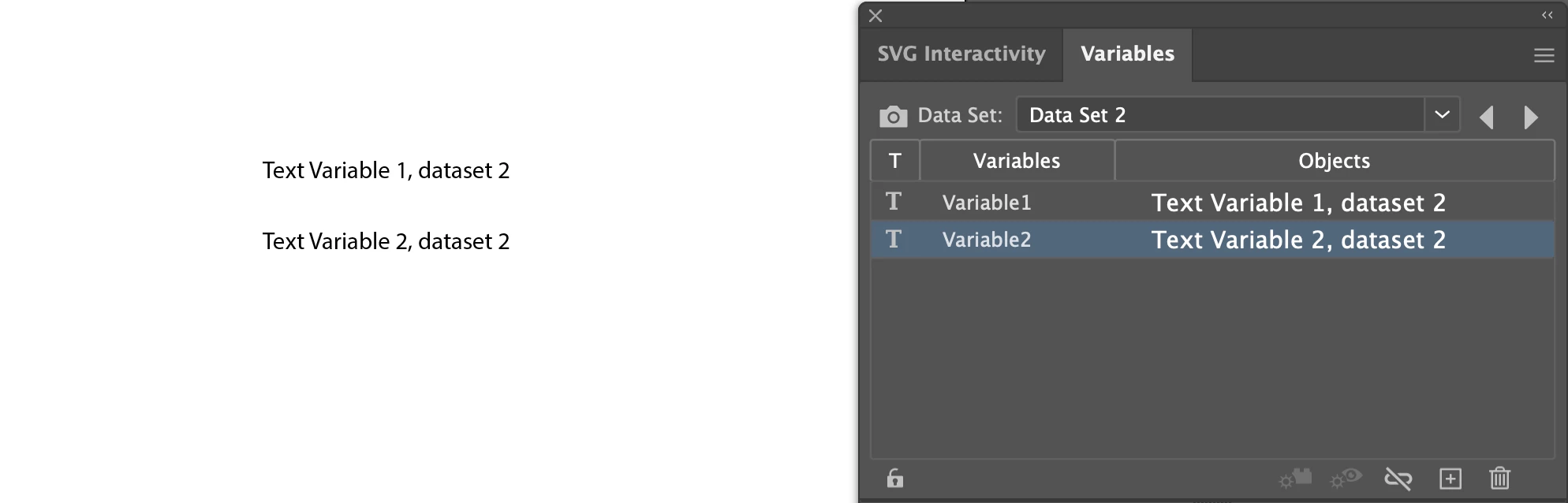
I am looking for a way to script the navigation of the datasets so I can use the information stored in different records ...  for Variable1 access the data from both Dataset1 and Dataset2.


nutradialAuthor
Known Participant
November 9, 2024

I was able to access the following::


// Data Set 1
app.activeDocument.dataSets[0].name;
 
 
// Variable1 of Data Set 2 because it is active
app.activeDocument.variables[0].pageItems[0].contents;
 
 
So the real question is how do I iterate thru the datasets so I can return the contents of any given variale from any given record.? Changing the dataset index dataSets[0] to dataSets[1]  did not change the pageItems focus.
renél80416020
Inspiring
November 10, 2024

Bonjour @nutradial 

Je ne connais pas grand chose sur les variables, mais je viens de faire un script qui pourra peut être vous aider...


// Propriétés  Variable et DataSet

  var idoc = app.activeDocument,
      Origin = idoc.rulerOrigin,
      largDoc =idoc.width,
      hautDoc =idoc.height,
      origX = -Origin[0],
      origY = (hautDoc)-Origin[1],
      vars = idoc.variables,
      text = "Variables";
  var nb, Pg, type;

        for (var j = 0; j < vars.length; j++){
           text  += propObj(vars[j])+"\r";
           nb = vars[j].pageItems.length;
           if (nb != 0) {
            for (var i = 0; i < nb; i++){
               Pg = vars[j].pageItems[i];
               type = Pg.typename;
               text += "PageItem = "+type+"\r";
               if (type == "TextFrame") text += "Text.contents = "+Pg.contents+"\r";
            }
           }
        }
  var textRef = idoc.textFrames.pointText([origX+5,origY-20]);
  var datas = idoc.dataSets;
      text += "\rDataSets";
       
        for (var j = 0; j < datas.length; j++){
           text += propObj(datas[j])+"\r";
        }
      textRef.contents +=text+"\r";
 // -------
function propObj(obj) {
     var l = "";
    for (k in obj) { 
    l += "\r"+k+" = "+eval("obj."+k);
    }
    return l;
}
// -------


renél80416020
Inspiring
November 10, 2024

Un autre script qui est dans le fichier "Illustrator Scripting Reference - JavaScript.pdf"

// Creates two variables, 1 visibility and 1 text,
// creates two datasets each with different values
// for the variables, then displays both datasets
var docRef = documents.add();
// Create visibility variable
var itemRef = docRef.pathItems.rectangle(600, 400, 150, 150);
var colorRef = new RGBColor;
    colorRef.red = 255;
    itemRef.fillColor = colorRef;
var visibilityVar = docRef.variables.add();
    visibilityVar.kind = VariableKind.VISIBILITY;
    itemRef.visibilityVariable = visibilityVar;
    // Create text variable
var textRef = docRef.textFrames.add();
    textRef.contents = "Text Variable, dataset 1";
    textRef.top = 400;
    textRef.left = 400;
var textVar = docRef.variables.add();
    textVar.kind = VariableKind.TEXTUAL
    textRef.contentVariable = textVar;
    redraw();
    // Create dataset 1
var ds1 = docRef.dataSets.add();
    // Change variable values and create dataset 2
    itemRef.hidden = true;
    textRef.contents = "Text Variable, dataset 2";
    redraw();
var ds2 = docRef.dataSets.add();
    // display each dataset
    ds1.display();
    redraw();alert("Text Variable, dataset 1")
    ds2.display();
    redraw();

René