LeoMari-eL6mBl
Inspiring
October 9, 2015
Question

Script Convert - Gray to CMYK

  • October 9, 2015
  • 3 replies
  • 1309 views

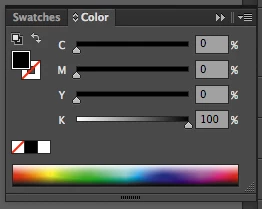
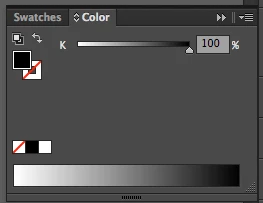
How do I convert a grayscale color item to CMYK, with k = 100% with overprint?
Thanks for helping!

This topic has been closed for replies.

3 replies

Stephen Marsh
Community Expert
Community Expert
October 10, 2015

I am guessing that it will never be this simple, the value could be a stroke or a fill and stroke at the same time, not just a fill only. Then there are tints of gray and not just solids…

Qwertyfly___
Legend
October 11, 2015

Ten A's solution will convert all GrayColor objects that are selected to CMYKColor.

this work for fills and strokes.

GrayColor does not have Tint, nor does CMYK. Tint is the domain of Spot colours.

Stephen Marsh
Community Expert
Community Expert
October 12, 2015

Thank you for the clarification Qwertyfly…

Perhaps this is a CS6 thing, however I have found that:

Post #2 from Ten A – “Convert and apply overprint sample” only converts solid 100% fills of grayscale to CMYK, lesser “tints” and or solid strokes are not converted. From the same post “More simple…” single line of code method does not change any value.

I have just tried Post #4 from Ten A – “More simple:” which does work on all selected fills or strokes!

Thanks Ten A and Qwertyfly!

Alexander Ladygin
Inspiring
October 10, 2015

function grayToCMYK(color){

    if(color.typename !== 'GrayColor') return false;

    var CMYK = new CMYKColor(),

        convertColor = app.convertSampleColor(ImageColorSpace.GrayScale, [color.gray], ImageColorSpace.CMYK, ColorConvertPurpose.defaultpurpose);

        CMYK.cyan = convertColor[0];

        CMYK.magenta = convertColor[1];

        CMYK.yellow = convertColor[2];

        CMYK.black = convertColor[3];

    return CMYK;

}

selection[0].fillColor = grayToCMYK( selection[0].fillColor );

alert( 'Color type: ' + selection[0].fillColor.typename + '\nCyan: ' + selection[0].fillColor.cyan + '\nMagenta: ' + selection[0].fillColor.magenta +'\nYellow: ' + selection[0].fillColor.yellow + '\nBlack: ' + selection[0].fillColor.black );

Ten A
Community Expert
Community Expert
October 10, 2015

More simple:

app.executeMenuCommand("Colors8");

LeoMari-eL6mBl
Inspiring
October 9, 2015

If you can apply overprint in grayscale mode (k100). It would be helpful!

Ten A
Community Expert
Community Expert
October 10, 2015

Convert and apply overprint sample:

if (app.selection[0].fillColor.gray===100) {

  cmyk = new CMYKColor;

  cmyk.cyan = 0;

  cmyk.magenta = 0;

  cmyk.yellow = 0;

  cmyk.black = 100;

  app.selection[0].fillColor = cmyk;

  app.selection[0].fillOverprint = true;

  }

More simple...

if (app.selection[0].fillColor.gray===100) app.selection[0].fillOverprint = true;

LeoMari-eL6mBl
Inspiring
October 14, 2015

Thanks so much!