Participant
September 11, 2022
Answered

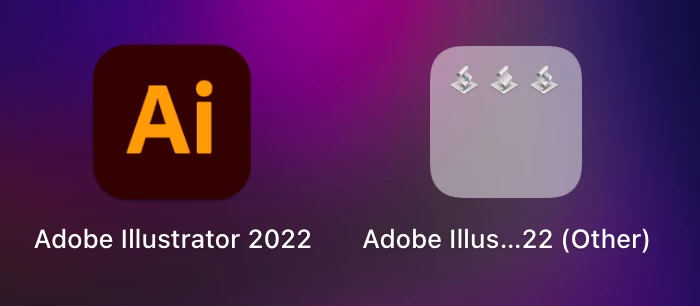
Script files get installed to launch pad, installing on fresh MacOS along with the AI app icon

  • September 11, 2022
  • 1 reply
  • 1508 views

Installing AI from Adobe CC on fresh MacBook Air M2. Along with AI app icon on launch there are some script files too appearing separately cluttering the launch pad. Is this expected of AI installer? (see screenshot)

This topic has been closed for replies.
Correct answer Manan Joshi

Hi @rju,

The three icons represent the files with .app extension that Illustrator places inside the Applications folder. Any .app file present inside the Applications folder or its subfolders is shown in Launchpad and hence you see these icons. The only way these can be removed is either deleting these files or moving them out from the Applications folder, both of these would be very extreme steps if you plan to use these apps or probably some other scripts that you use referenced these apps.

The path to these files is mentioned below for your reference


/Applications/Adobe Illustrator 2021/Scripting.localized/Sample Scripts.localized/AppleScript.localized/Web Gallery.localized/Web Gallery.app
/Applications/Adobe Illustrator 2021/Scripting.localized/Sample Scripts.localized/AppleScript.localized/Calendar.localized/Make Calendar.app
/Applications/Adobe Illustrator 2021/Scripting.localized/Sample Scripts.localized/AppleScript.localized/Contact Sheet Demo.localized/Contact Sheets.app


-Manan

1 reply

Manan JoshiCommunity ExpertCorrect answer
Community Expert
September 12, 2022

Hi @rju,

The three icons represent the files with .app extension that Illustrator places inside the Applications folder. Any .app file present inside the Applications folder or its subfolders is shown in Launchpad and hence you see these icons. The only way these can be removed is either deleting these files or moving them out from the Applications folder, both of these would be very extreme steps if you plan to use these apps or probably some other scripts that you use referenced these apps.

The path to these files is mentioned below for your reference


/Applications/Adobe Illustrator 2021/Scripting.localized/Sample Scripts.localized/AppleScript.localized/Web Gallery.localized/Web Gallery.app
/Applications/Adobe Illustrator 2021/Scripting.localized/Sample Scripts.localized/AppleScript.localized/Calendar.localized/Make Calendar.app
/Applications/Adobe Illustrator 2021/Scripting.localized/Sample Scripts.localized/AppleScript.localized/Contact Sheet Demo.localized/Contact Sheets.app


-Manan
-Manan
rjuAuthor
Participant
September 12, 2022

Thanks Manan.