
Participating Frequently
November 28, 2019
Question

Script for adding a sequential number to multiple layer names in Illustrator 2020?

  • November 28, 2019
  • 1 reply
  • 6007 views

Hi there


I was wondering if anyone knew of a script that would allow me to add a sequential numbering to multiple layers? i'm am working on files that have layers (some up to 200+) that are already named by their pantone refs, i have to organise them into their correct order and then add a sequential prefix of '1_', '2_' , '3_' etc (the underscore needed to seperate them from the numbers of the pantones) this is needed to be done from the bottom layer going up. I have included a screengrab of 10 layers to show you what i am currently doing manually, any help would be much appreciated as i have hundreds of artworks with hundreds of layers to sort and automation would literally save me weeks of time.
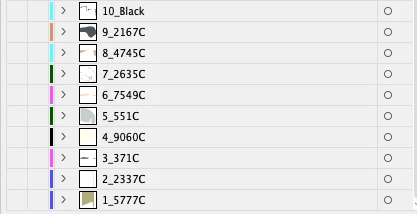
 

many thanks in advance


Nick

1 reply

Participating Frequently
June 13, 2021

#target illustrator

var doc = app.activeDocument;
var layerCount = doc.layers.length;
for (var j = 0; j < layerCount; j++) {
layer = doc.layers[j];
layer.name = j.toString() + "_" + layer.name;
}

renél80416020
Inspiring
June 13, 2021

Salut!

"cela doit être fait à partir de la couche inférieure qui monte"


#target illustrator
var doc = app.activeDocument;
var layerCount = doc.layers.length;
for (var j = layerCount-1, k = 1;  j >= 0;  j--, k++) {
    var layer = doc.layers[j];
    layer.name = k + "_" + layer.name;
}


Participating Frequently
June 14, 2021
same thing in reverse

#target illustrator
var doc = app.activeDocument;var layerCount = doc.layers.length;for
(var j = 0; j < layerCount; j++) {
layer = doc.layers[layerCount-1-j];
layer.name = j.toString() + "_" + layer.name;
}

--
Adam Goddard | Video | Motion Graphics | Design
m. +61 402 966 860
e. adam@adamgoddard.com.au
www.adamgoddard.com.au
Please upload files to me using this link:
Upload files to Adam Goddard