


Merry_thinking5E35
Participating Frequently
November 24, 2020
Question

Script for automatically changing path directions

  • November 24, 2020
  • 8 replies
  • 1711 views

I need a script for Illustrator that does the following:

  1. First path follows clockwise direction
  2. Second path inside the 1. Path follows a countclockwise direction
  3. Third path inside the 2. path follows clockwise direction .... and this cycle repeats...

To Illustrate what I mean see the picture:
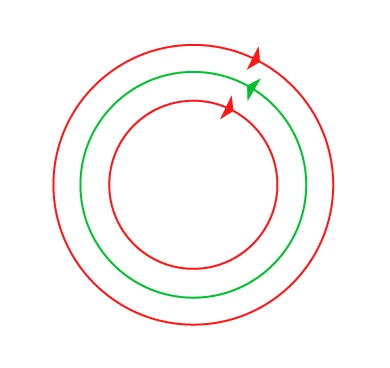
and this follows, depending on the amount of paths inside each other.

Does anyone knows how to solve this?

Thank you in advance!

8 replies

pixxxelschubser
Community Expert
Community Expert
November 25, 2020

But honestly?
This is a job for the laser software (but not Illustrator)

Inspiring
September 10, 2025

Fill toggle is a very common computer graphics technique dat Illustrator should honor. Unfortunately, Illustrator stops with toggling after 3 overlapping shapes. A letter 'O' works. An O with a dot in the middle works, but when adding a fourth concentric circle, Illustrator gives up and let the user struggling to select and change path direction manually via the Attributes. I need to toggle hundreds of concentric circles, kind of like the OP asks a solution for.


Monika Gause
Community Expert
Community Expert
September 10, 2025

Just select them all and click Exclude in the Pathfinder panel. This will get the direction correctly.


And then please post this to illustrator.uservoice.com

pixxxelschubser
Community Expert
Community Expert
November 25, 2020

Hi all,

just to play:

app.activeDocument.pathItems[0].polarity = (app.activeDocument.pathItems[0].polarity == PolarityValues.NEGATIVE)  ? PolarityValues.POSITIVE : PolarityValues.NEGATIVE;


Inventsable
Legend
November 25, 2020

A shorthand to doing this is to rely on the native menu item via Object > Path > Reverse Path Direction:

(function() {
  var actionString =
    "/version 3 /name [ 11 7265766572736550617468 ] /isOpen 1 /actionCount 1 /action-1 { /name [ 11 7265766572736550617468 ] /keyIndex 0 /colorIndex 0 /isOpen 1 /eventCount 1 /event-1 { /useRulersIn1stQuadrant 0 /internalName (ai_plugin_reversePathDirection) /localizedName [ 22 	52657665727365205061746820446972656374696f6e ] /isOpen 0 /isOn 1 /hasDialog 0 /parameterCount 0 } }";
  function runActionFromString(actionName, actionSet, contents) {
    var tmp = File(Folder.desktop + "/reversePath.aia");
    tmp.open("w");
    tmp.write(contents);
    tmp.close();
    app.loadAction(tmp);
    app.doScript(actionName, actionSet, false);
    app.unloadAction(actionSet, "");
  }
  runActionFromString("reversePath", "reversePath", actionString);
})();
CarlosCanto
Community Expert
Community Expert
November 25, 2020

or 

app.executeMenuCommand("Reverse Path Direction");
Inventsable
Legend
November 25, 2020

I looked for that! But I didn't see it on this list so I assumed we had to do it via action. Where do you go to look for the canonical list of menu commands?

Kurt Gold
Community Expert
Community Expert
November 24, 2020

Clint Eastwood had some good shots in the dark some years ago.


But he was always careful and clear-sighted.


Nonetheless, your snippet is very good.


Merry_thinking5E35
Participating Frequently
November 25, 2020

Hi Kurt, Like I said in the previous comments,


I will be editing hundreds of different vector files, and I need to be able to follow this "logic" I've described above.

Outer Path must follow clockwise. First inner paths must follow counterwise, and so on and on.

See an example 😄


Merry_thinking5E35
Participating Frequently
November 25, 2020

https://we.tl/t-DQwWveLHb3v Here is the example file of what I described above

Kurt Gold
Community Expert
Community Expert
November 24, 2020

Femkeblanco, do you think that your approach is a reliable way without checking a sample file?


I'm not sure.


femkeblanco
Legend
November 24, 2020

I agree.  It's a shot in the dark. 

Merry_thinking5E35
Participating Frequently
November 25, 2020

Here is an example file 😄


https://we.tl/t-DQwWveLHb3

femkeblanco
Legend
November 24, 2020
var d1 = prompt("diameter (in points) of outer circle");
var n = prompt("number of circles");
var d = app.activeDocument.artboards[0].artboardRect;
var paths = app.activeDocument.pathItems;
var direction = false;
for (var i = 0; i < n; i++) {
    var d2 = (d1/n) * (n-i) ;
    direction = !direction;
    var circle1 = paths.ellipse(d[3]/2+d2/2, d[2]/2-d2/2, d2, d2, direction);
    circle1.stroked = true;
    circle1.filled = false;
}
Kurt Gold
Community Expert
Community Expert
November 24, 2020

Which version of Illustrator are you using?


Also, in cases like this one it is often recommendable to provide at least one meaningful sample Illustrator file (.ai) to demonstrate a representative situation. This way, it is much easier to brood about possible automated ways.


Merry_thinking5E35
Participating Frequently
November 25, 2020

I am using the lastest Illustrator version.


I need an automated way of doing this since I am not editing one file specifically but figuring out how to edit hundreds of files.

Paths need to be organised this way I've described because it will be used for laser marking and the software for that reads the data this way for correct lasermarking.

Merry_thinking5E35
Participating Frequently
November 25, 2020
CarlosCanto
Community Expert
Community Expert
November 24, 2020

Is doing it by hand an option?


- select all your circles

- grab the Shape Builder Tool

- puch holes with it

- apply PathFinder Unite

- ungroup

- release Compound Paths


Carlos

Merry_thinking5E35
Participating Frequently
November 25, 2020

Hey Carlos,


doing by hand is not an option because I need to edit hundres of vector data and this would take me a lot of time to do everything manually.