

Nicky G.
Known Participant
September 30, 2023
Question

[Script HELP] Import file to artboards and flatten trasparency

  • September 30, 2023
  • 2 replies
  • 1074 views

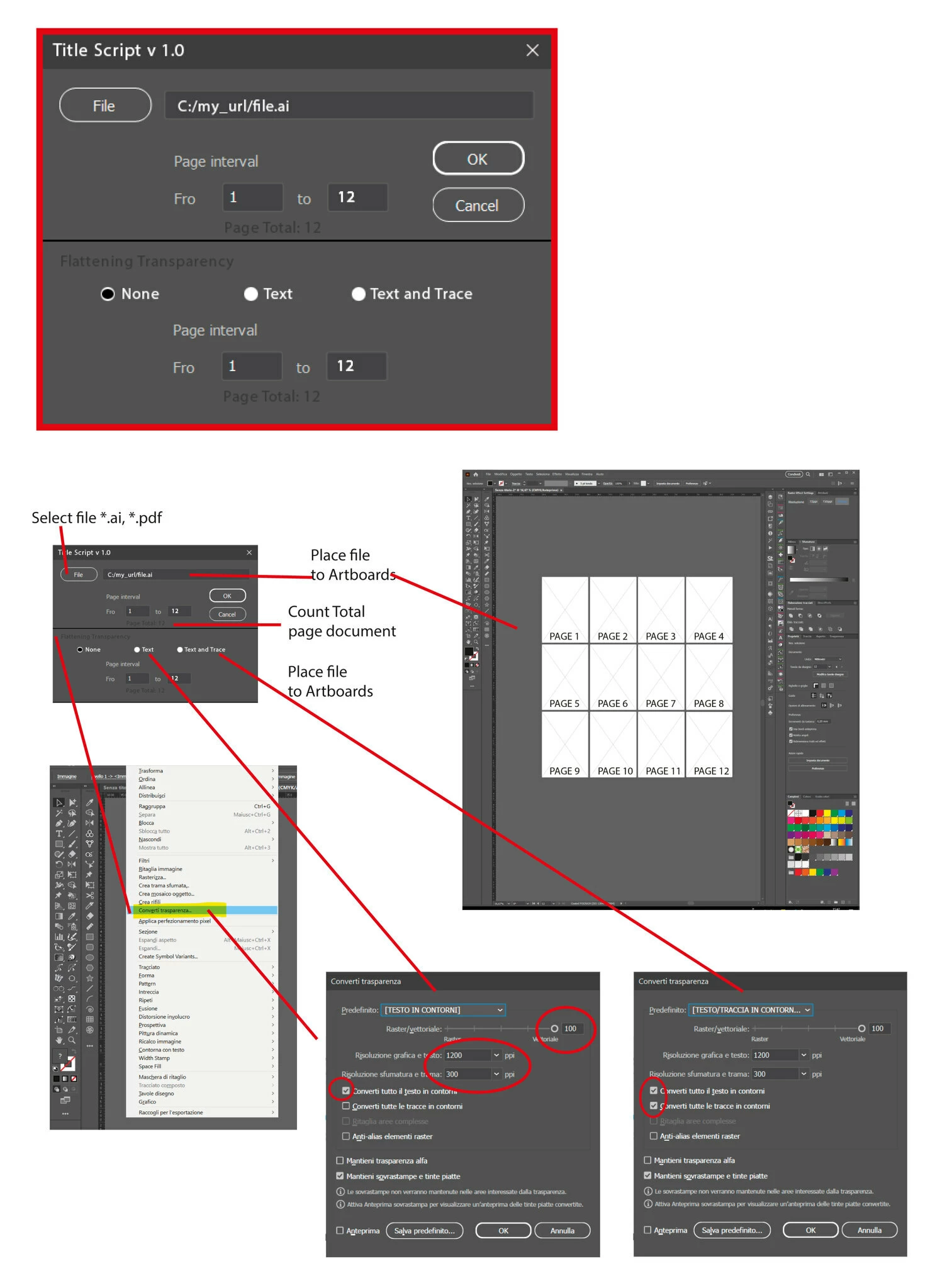
Hi, I'm looking for a script that can IMPORT files (AI, PDF, EPS) by inserting these files, or multipage PDFs, onto multiple illustrator tables in a connected way.
Then let me select eg. from table 1 to 5 (of 200) and apply a preset registered in the CONVERT TRANSPARENCY panel.

Can someone help me?
 

This topic has been closed for replies.

2 replies

Nicky G.
Nicky G.Author
Known Participant
May 18, 2024

In the end no one who is capable of making this script.
I thought it was very simple to apply and that a programmer could be able to do it quickly and easily.
Apparently I was wrong.
:'( 

Egor Chistyakov
Inspiring
October 1, 2023

Tables? Perhaps you mean a layout with a specified parameters?

Cna you share a sketch or example demonstrating the result you are after?

And by 'Convert Transparency' you probably mean 'Flatten Transparency?

Nicky G.
Nicky G.Author
Known Participant
October 1, 2023

Forgive my Google English 🙂 .

Tables = illustrator pages, let's call them that.
yes I mean Flatten Transparency.

The scheme is more or less summarized in this image.
Ability to select the files to insert into the pages, with choice of pages to insert (example: sometimes not always the entire file of a PDF).
Once the pages are imported, you should select the Flatten Transparency command.

Inspiring
April 30, 2024

if the option of pdf page is not all, you can write as below,

pdfOptions.pageRangeToOpen = "5-10";

pdfOptions.pageRangeToOpen = "1, 3, 5";