
Community Expert
March 7, 2024
Question

Script: insert folder name as text on open or saving document

  • March 7, 2024
  • 2 replies
  • 576 views

I have a scenario where I need to insert the folder name on to the artboard/s within Illustrator 


For example

"Project Name>Illustrator>project name_version_01.ai"

on the artboard there is a placeholder that automatically updates
"Project Name"


then when a new document is required and is duplicated 


"New Project>Illustrator>New Project_version_01.ai"

the variable for "Project Name" updates to

"New Project"


Any ideas? 

For the record I use a script to save the file as a PDF

I'd be looking to add to this so when the file saves the text is updated automatically

this script already updates the date and time on the document automatically


as you see here i have text here called Folder Name

I'd like this text to dynamically update to the Folder Name
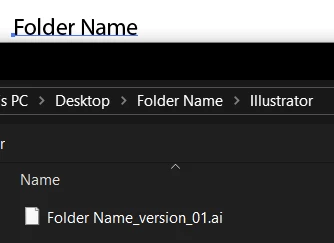
 

So the text Folder Name updates to Folder Name 2
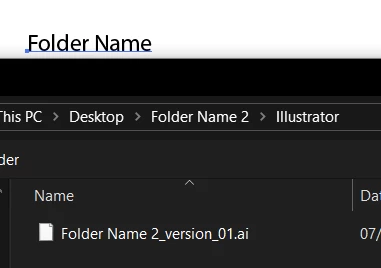


Is this even possible? 


This topic has been closed for replies.

2 replies

CarlosCanto
Community Expert
Community Expert
March 7, 2024

you can get the active document full path as long as the file exists (it has been saved at least once)

var docRef = app.activeDocument.fullName // returns a file object


from here you can get the folder location 

var folder = docRef.parent; // returns a folder object


Let me know if you need additional help

Community Expert
March 8, 2024

Thanks @CarlosCanto 

Took me a while to get it right, but it is going back 3 folders now
<Folder>>Proof>Files>File.ai

And it returns <Folder> into the text marked on the page with Attributes through text marked with a Note

I've added this code to another script that saves the file and updates date/time and it seems to work quite well.

Code I came up with to fetch the folder name

// Main Code [Execution of script begins here]
try {
    if (app.documents.length > 0) {
        var sourceDoc = app.activeDocument;
        
        // Get the file path of the Illustrator document
        var filePath = sourceDoc.fullName.fsName;
        
        // Get the parent folder name
        var parentFolderName = getParentFolderName(filePath);
        
        // Log the retrieved parent folder name
        $.writeln("Retrieved Parent Folder Name: " + parentFolderName);
        
        // Update the text object with the folder name
        updateTextWithFolderName(parentFolderName);
        
        // Your existing code to save the document as PDF
        // ...
    } else {
        throw new Error('There are no documents open!');
    }
} catch(e) {
    alert(e.message, "Script Alert", true);
}

/** Retrieves the parent folder name from the file path.
    @param filePath The file path of the Illustrator document.
    @return The parent folder name.
*/
function getParentFolderName(filePath) {
    var pathComponents = filePath.split("/");
    var folderName = null;
    if (pathComponents.length > 3) { // Ensure there are enough components in the path
        // The parent folder is the fourth-to-last component in the path
        folderName = pathComponents[pathComponents.length - 4];
    }
    return folderName;
}

/** Updates the text object with the folder name.
    @param folderName The name of the folder.
*/
function updateTextWithFolderName(folderName) {
    var doc = app.activeDocument;
    var textObjectFound = false;
    for (var i = 0; i < doc.pageItems.length; i++) {
        var item = doc.pageItems[i];
        if (item.note === "Folder") {
            textObjectFound = true;
            item.contents = folderName;
            break; // Exit the loop once the folder name is updated
        }
    }
    if (!textObjectFound) {
        alert("Text object labeled 'Folder' not found in the document.");
    }
}


CarlosCanto
Community Expert
Community Expert
March 8, 2024

awesome! thanks for sharing!

Community Expert
March 7, 2024

Apologies there is another folder level


Folder name ..version 01...illustrator...filename.ai