
Question
[Script] Manipulate and copy SVG Code from selected Objects
Hi all,
I am trying to create my first Illustrator Script and it seems that I need some help.
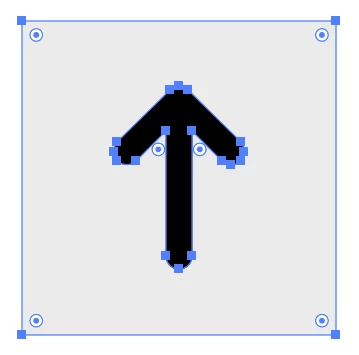
When selecting and copying two objects (like in the image above) and pasting them into a text editor, the following SVG code will be pasted:
<?xml version="1.0" encoding="UTF-8"?>
<svg id="Layer_1" xmlns="http://www.w3.org/2000/svg" viewBox="0 0 24 24">
<defs><style>.cls-1{fill:#ebebeb;}</style></defs>
<rect class="cls-1" width="24" height="24"/>
<path d="M16.71,9.29c.2,.2,.29,.45,.29,.71s-.1,.51-.29,.71-.45,.29-.71,.29-.51-.1-.71-.29l-2.29-2.29v9.59c0,.55-.45,1-1,1s-1-.45-1-1V8.41l-2.29,2.29c-.39,.39-1.02,.39-1.41,0-.2-.2-.29-.45-.29-.71s.1-.51,.29-.71l4-4c.2-.2,.45-.29,.71-.29s.51,.1,.71,.29l4,4Z"/>
</svg>
The script should help me by manipulating the SVG code so I will only paste the text inside the quotes of
<path d=""/>so that the result looks like this:
M16.71,9.29c.2,.2,.29,.45,.29,.71s-.1,.51-.29,.71-.45,.29-.71,.29-.51-.1-.71-.29l-2.29-2.29v9.59c0,.55-.45,1-1,1s-1-.45-1-1V8.41l-2.29,2.29c-.39,.39-1.02,.39-1.41,0-.2-.2-.29-.45-.29-.71s.1-.51,.29-.71l4-4c.2-.2,.45-.29,.71-.29s.51,.1,.71,.29l4,4Z
Does anyone have an idea how to solve this?
Thanks a lot!
 AdChoices