

Qwertyfly___
Legend
January 27, 2015
Question

Script Panel - Work in progress

  • January 27, 2015
  • 2 replies
  • 9990 views

Hi All,

Working on a Script Panel to make scripts simpler to run in illustrator.

This is a work in progress...
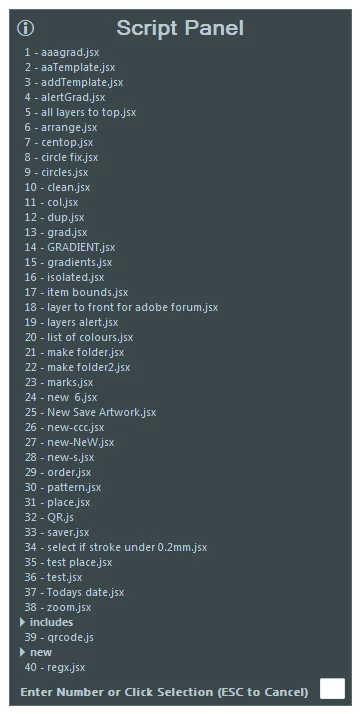
Looking for some people to help test and make suggestions.

at the moment this is a Windows only program... Sorry Mac users

and right now it is still an AHK file.

so I'm looking for people who already use AHK (AutoHotKey)

both files need to be saved in the same directory. would be best if they had their own folder.

Settings file needs to be manually updated at this point and will need the path to your desired script folder and the path to your illustrator updated for it to work.


once AHK file is running it will scan the script folder for scripts.

will also scan sub folders but only 1 deep, this way groups of scripts can be organized.

Window will appear center screen, just drag the panel to where you want it.

so far you can mouse click any script to run it.

it is also tied to the "Tilde" or "Back Tick" / "~" or "`" no shift needed.

This will make the window active and allow you keyboard access to the scripts. ie. "Tilde 24 Enter" will run script 24


I have plans for settings window so any variable such as paths, font etc. can be set from the program.

And also will make the sub folders collapsible for simpler viewing.


Can't wait for thoughts and suggestions.


http://qwertyfly.com/files/Script%20Menu/


This topic has been closed for replies.

2 replies

Inspiring
February 2, 2015

Hi,

Tested it now, it loads all the scripts ok, but the list is too long to fit on my screen, I have too many scripts!

Some things that I would like to see:

  • Collapsing folders would be nice, also to exclude certain folders
  • It would also be nice to sort often used scripts on the top, which means that the script would need to keep track of that
  • Custom defined shortcuts (letters instead of numbers?) for scripts that one uses often. I wouldn't mind having that in settings.txt to be edited manually
  • For my long list of scripts, I would need a scrollable window, multi-column or collapsable folders

Great work, looking forward to how this proceeds! Have you considered putting it on e.g. GitHub?

Qwertyfly___
Legend
February 3, 2015

I'll have a play with it and see if I can get a few of those suggestions incorporated.

Thanks for the feedback.

Zantcor
Inspiring
February 16, 2015

On the pallet that I created for my other fellow artists I was able to create a variable that would load the scripts such as

var calendars = new File("S:/Illustrator JS Palette/Scripts/Art Share Server/Construct/Calendars.jsx");

then I added buttons to the pallet

//////////////

var calicon = File ("S:/Illustrator JS Palette/Palette Icons/cal.png");

/////////////

So the buttons where pulled up like follows

/////////////////

var calPanel = doAllGroup.add("group",undefined,undefined,{borderStyle:"no"});

        calPanel.orientation = "column";

        //calPanel.alignment = "left";

        calPanel.margins = 0;

        calPanel.spacing = 0;

        calPanel.add ("iconbutton", undefined, calicon,{style:"toolbutton"});

//////////////

So now all you have left is the following to make it work

//////////////////

calPanel.children[0].onClick = function(){

       calendars.open("r");     

       var bt = new BridgeTalk;

            bt.target = "illustrator";         

       var script = calendars.read();

            calendars.close();              

       bt.body = script;

       bt.send();  


///////////////////


We artists are a visual bunch so by making it so we have icons we can see and click it had increased production here quite a bit.  So you call your script, and your icon and assign them to variable, then when the button is added he icon is assigned and the target script is set on the .onClick function to run with illustrator is the target.

Hope this helps you out with your pallet some.

Silly-V
Legend
January 27, 2015

Hi!

This is a great replacement for ScriptBay for CC users on Windows, I will recommend it to anyone who would like to use it.

It works pretty nice.  Will there be a close , or minimize button for the panel?

What kind of distribution are you intending on for this?

Qwertyfly___
Legend
January 27, 2015

Thanks for the feedback.

Had not thought about a minimize... I work on 3 monitors so screen space is not an issue.

I will add a "Collapse Window" option.

Distribution for this has not been thought about at all. Once I get all the featurs working I will compile it so it can be used by all windows users. not just the AHK fans.

Then I will look at how to make it run for the Macsters.

If the response is good then I will see if it is worth taking it further.

So far it is to fill a hole in my workflow that I thought others would gain benefit from.

Qwertyfly___
Legend
January 28, 2015

Ok, I have added the "Collapse Window" Button.

the keyboard shortcut stays active so as long as you know what script you want to run, ie. 22. then the "Tilda 22 enter" will still run the script even when panel is collapsed.

Use same link above to get new files.

I will start posting versions as we go on from here.