

Max Mugen
Inspiring
February 10, 2023
Answered

Script - Rename Artboards + Number suffix

  • February 10, 2023
  • 2 replies
  • 3863 views

Hello 
I was about to post, and thanks to chat gpt I've had a working solution. 
Just posting so users can find the solution for themselves later on 

Script is on second post 🙂 

Cheers pals!

This script will rename the artboards in the active document by using the name of the document and adding a suffix number. 
The suffix number will have a fixed width of 2 digits and be zero-padded if necessary. 
For example, if the document name is "Myfilename.ai", the first artboard will be renamed to "Myfilename 01", 
the second artboard to "Myfilename 02", and so on.
Correct answer Sergey Osokin

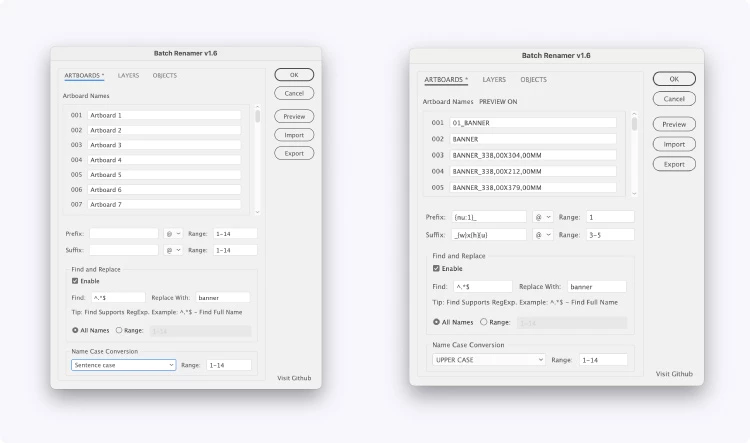
BatchRenamer v1.6

  • Placeholders like {w} and {h} are now available in a dropdown menu, making them easier to insert than manual typing.

  • Add prefixes or suffixes to specific items by entering their numbers (e.g., 1, 5-8) in the new "Range" fields, eliminating the need for separate toggles.

  • Case Conversion (e.g., snake_casecamelCase) to standardize names instantly

  • The Preview function now displays the final names directly in the Artboards and Layers panels


2 replies

Sergey Osokin
Inspiring
February 13, 2023

I added a {fn} placeholder to my BatchRenamer script to insert the filename after reading your question. The original artboard name is deleted from the Find & Replace fields.

Max Mugen
Max MugenAuthor
Inspiring
February 13, 2023

looks good ! I'll def check what you are coding also 
Thanks for sharing 🙂 

-- maxmugen.com
Max Mugen
Max MugenAuthor
Inspiring
February 10, 2023
/*
This script will rename the artboards in the active document by using the name of the document and adding a suffix number. 
The suffix number will have a fixed width of 2 digits and be zero-padded if necessary. 
For example, if the document name is "Myfilename.ai", the first artboard will be renamed to "Myfilename 01", 
the second artboard to "Myfilename 02", and so on.

By chat GPT
*/

function artBoardName_serial() {
  var doc = app.activeDocument;
  for (var i = 0, l = doc.artboards.length; i < l; i++) {
    // THIS IS WHERE THE RENAMING HAPPENS
    var suffix = (i + 1).toString();
    while (suffix.length < 2) {
      suffix = "0" + suffix;
    }
    var newName = doc.name.replace(".ai", "") + " " + suffix;
    doc.artboards[i].name = newName;
  }
}

function renameArtBoard_MAIN() {
  if (app.documents.length == 0) {
    alert("No Open / Active Document Found");
  } else {
    artBoardName_serial();
  }
}

renameArtBoard_MAIN();
-- maxmugen.com
m1b
Community Expert
Community Expert
February 10, 2023

Cool, Max! I got ChatGPT to tailor an algorithm for me the other day. It took a lot of iterating, but that was because my specification was lacking, and the final result was useful, if not perfect. Amazing tool. - Mark

Max Mugen
Max MugenAuthor
Inspiring
February 11, 2023

well i'm trying out GPT for sure !
I'm IT enthusiast so I can understand, tweak and experiment in scripting but lack full programming skills
GPT surely fill the gap here 

Interestingly, it would still take some trial and error, say 10 iterations, before getting a good output. 
most of the time, no luck at all and no solution at the end without base material

Some factors to consider here, aiming towards a final good answer 
- User specification does not state or clarify the request clearly enough (so fine-tuning the question fine-tune the script) 
- It works way better when providing base material to work from. So in this example I already found a script to rename all artboards to the same name, pasted the code, and asked GPT to add a suffix system. 
- On rare occasions, GPT just doesn't get it right on the first trial, just re-roll the question. 


-- maxmugen.com