


Participant
November 30, 2022
Answered

Script that auto click button "OK" from an executeMenuCommand function

  • November 30, 2022
  • 1 reply
  • 1024 views
Hello There !


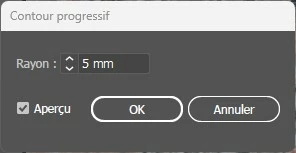
Is there a way to auto-click the "OK" button for a choice asking when calling a menu command ?

I'm about to die about that... Here is the part of my code that runs the feather effect which opens a window asking me to choose the radius of the effect  :

app.executeMenuCommand("Live Feather");
→ You can see the window that appear and need to be auto-clicked in attached picture.
 
Eventually, if someone have an idea if, in the same time, I can set a value for this AND auto-click...


thx
 
This topic has been closed for replies.
Correct answer m1b

You can apply a Live Effect with settings you supply that won't invoke a dialog. Please have a look at my Live Effect functions for Illustrator repo. Its a free collection of functions that apply the Live Effects. So the one you would want is this one:

//@include 'LE.js'

var item = app.activeDocument.selection[0],
    mm = 2.834645669;

LE_Feather(item, { radius: 5 * mm });


// from https://github.com/mark1bean/live-effect-functions-for-illustrator
function LE_Feather(item, options) {
    try {
        var defaults = {
            radius: 10,
            expandAppearance: false
        }
        var o = LE.defaultsObject(item, defaults, options, arguments.callee)
        var xml = '<LiveEffect name="Adobe Fuzzy Mask"><Dict data="R Radius #1 "/></LiveEffect>'
            .replace(/#1/, o.radius);
        LE.applyEffect(item, xml, o.expandAppearance);
    } catch (error) {
        LE.handleError(error);
    }
};


But it relies on another file "LE.js" which must be in the same folder as the script file (or you can target it with the include path of course). It's simplest to just download the whole release. Hope it helps.

- Mark

1 reply

m1b
Community Expert
m1bCommunity ExpertCorrect answer
Community Expert
November 30, 2022

You can apply a Live Effect with settings you supply that won't invoke a dialog. Please have a look at my Live Effect functions for Illustrator repo. Its a free collection of functions that apply the Live Effects. So the one you would want is this one:

//@include 'LE.js'

var item = app.activeDocument.selection[0],
    mm = 2.834645669;

LE_Feather(item, { radius: 5 * mm });


// from https://github.com/mark1bean/live-effect-functions-for-illustrator
function LE_Feather(item, options) {
    try {
        var defaults = {
            radius: 10,
            expandAppearance: false
        }
        var o = LE.defaultsObject(item, defaults, options, arguments.callee)
        var xml = '<LiveEffect name="Adobe Fuzzy Mask"><Dict data="R Radius #1 "/></LiveEffect>'
            .replace(/#1/, o.radius);
        LE.applyEffect(item, xml, o.expandAppearance);
    } catch (error) {
        LE.handleError(error);
    }
};


But it relies on another file "LE.js" which must be in the same folder as the script file (or you can target it with the include path of course). It's simplest to just download the whole release. Hope it helps.

- Mark

ThidaDevAuthor
Participant
November 30, 2022

It seems really interesting !!
I'm going to study that way to do it (and how you do it)
Thank you very much for your quick reply !

m1b
Community Expert
Community Expert
November 30, 2022

Good! 🙂