
Known Participant
September 27, 2024
Question

Script to automate specific Export As settings

  • September 27, 2024
  • 3 replies
  • 568 views

Hello, my workflow for my current job is to first save as an AI file, and then save as jpg file.

Everytime I save a jpg, I have to go through a dialogue box. I'd specifically like to automate the Exporting As a jpg file.


1. On Export As, I always check the box "Use Artboards"

2. Dialogue Box:
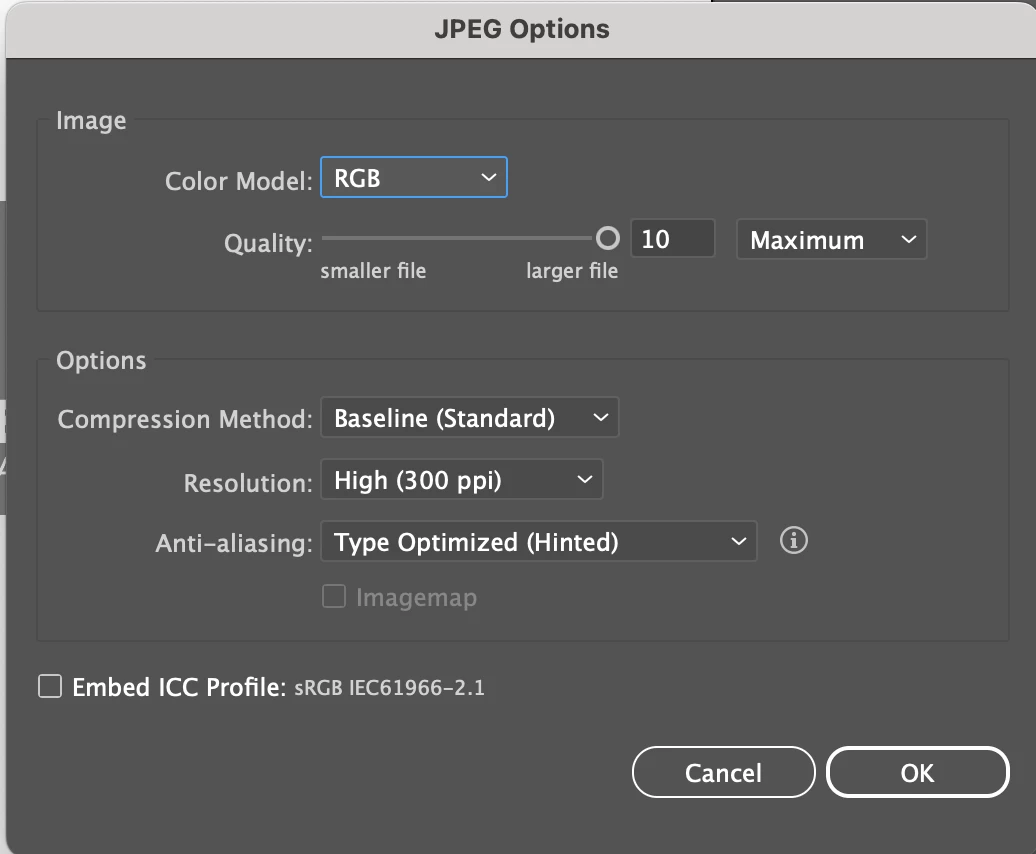

3. I always save the jpg to my current folder that the AI file is already saved in.

Is there a way for a script to automate these exact Export As settings, saved in the current folder, as the same/current file name?

This topic has been closed for replies.

3 replies

paloma95Author
Known Participant
October 2, 2024

Still hoping to see if a script like this, or something close to it, is possible.

Charu Rajput
Community Expert
Community Expert
September 27, 2024

Hi,
Please refer the following link if that script helps.


https://community.adobe.com/t5/illustrator-discussions/export-jpg-as-300-ppi/m-p/11244200


It may require few chnages based on the settings

Best regards
paloma95Author
Known Participant
September 27, 2024

Thanks for helping but it didn't work for me. I get an infinite loading wheel and have to close down Illustrator.

Sergey Osokin
Inspiring
September 27, 2024

Not all settings are available in the scripting language. For example, JPG export does not have a Resolution (ppi) property in scripts. I used a script that performs an action with the required JPG settings

paloma95Author
Known Participant
September 27, 2024

Good to know. When I record an action to Export is seems to keep my settings. Problem is getting it to save to my current folder, and also to not add numbers at the end of the file name.