karth80472045
Inspiring
November 8, 2018
Answered

script to check svg files is corrupted or not

  • November 8, 2018
  • 1 reply
  • 1070 views

Hello all,

i am having 1000 svg files in a folder , i want to know which svg files is corrupted (Not opening in Adobe Illustrator).
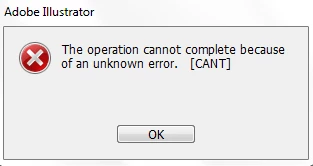
Just i want store doc name in .txt format later on i will create newsvg file .

i have tried in .net and VB script but nothing is working

C# code

string[] dataFiles = System.IO.Directory.GetFiles(textBox1.Text, "*.svg");

            try

            {

                for (var i = 0; i < dataFiles.Length; i++)

                {

                    Illustrator.Application illuApp = new Illustrator.Application();

                    try

                    {

                        Illustrator.Document illuDoc = illuApp.Open(dataFiles, Illustrator.AiDocumentColorSpace.aiDocumentRGBColor, null);

                    }

                    catch (Exception ex)

                    {

                        MessageBox.Show(ex.Message.ToString());

                    }

                    Process[] processes12 = Process.GetProcesses();

                    foreach (Process p1 in processes12)

                    {

                        if (p1.MainWindowTitle.Contains("Adobe Illustrator"))

                        {

                            SetForegroundWindow(p1.MainWindowHandle);

                            System.Threading.Thread.Sleep(1000);

                            SendKeys.Send("O");

                            System.Threading.Thread.Sleep(3000);

                        }

                    }

                }

            }

            catch (Exception ex)

            {

                MessageBox.Show(ex.Message.ToString());

            }

        }


    }

}

VBA Script

Sub macro_test()

Set fso = CreateObject("Scripting.FileSystemObject")

For Each myfile In fso.GetFolder("d:\LocalData\z015266\Desktop\New folder (9)\New folder (3)").Files 'looping all AI files

If Right(myfile.Name, 2) = "AI" Or Right(myfile.Name, 2) = "ai" Or Right(myfile.Name, 3) = "svg" Then ' end if

Set iapp = New Illustrator.Application

On Error GoTo Loop1

Set idoc = iapp.Open(aifile)

Set myDoc = iapp.ActiveDocument

aifile = myfile

End If

Next myfile

Loop1:

MsgBox ("H1")

End Sub

Thanks and Regards,

Yogesh

This topic has been closed for replies.
Correct answer karth80472045

i have got the code and it is working fine

sourceFolder = Folder.selectDialog( 'Select the folder with Illustrator files', '~' );

error_file_name=sourceFolder.path+'/File error List.csv';

  file_output=new File (error_file_name);

         file_output.encoding="UTF-8";

        file_output.open ('a');

         file_output.writeln ("File Name");

         var i=0;

files = sourceFolder.getFiles(/\.(svg|ai)$/i);

if ( files.length > 0 )

     {

     //    //alert(files.length);


      for ( var file_iteration = 0; file_iteration < files.length; file_iteration++ )

     {


             var compare_title_name_fn_called  = 0;

           fileArray_title=[];

           try

           {

               app.userInteractionLevel = UserInteractionLevel.DONTDISPLAYALERTS;


     sourceDoc=app.open(files[file_iteration]);


      sourceDoc.close(SaveOptions.DONOTSAVECHANGES);

       }

   catch(err)

   {


      i=i+1;

              file_output.writeln (files[file_iteration].name);

  }


           }

       alert("Completed and Number of Corrupted files are  " + i);

       file_output.close();

       }

1 reply

karth80472045
karth80472045AuthorCorrect answer
Inspiring
November 9, 2018

i have got the code and it is working fine

sourceFolder = Folder.selectDialog( 'Select the folder with Illustrator files', '~' );

error_file_name=sourceFolder.path+'/File error List.csv';

  file_output=new File (error_file_name);

         file_output.encoding="UTF-8";

        file_output.open ('a');

         file_output.writeln ("File Name");

         var i=0;

files = sourceFolder.getFiles(/\.(svg|ai)$/i);

if ( files.length > 0 )

     {

     //    //alert(files.length);


      for ( var file_iteration = 0; file_iteration < files.length; file_iteration++ )

     {


             var compare_title_name_fn_called  = 0;

           fileArray_title=[];

           try

           {

               app.userInteractionLevel = UserInteractionLevel.DONTDISPLAYALERTS;


     sourceDoc=app.open(files[file_iteration]);


      sourceDoc.close(SaveOptions.DONOTSAVECHANGES);

       }

   catch(err)

   {


      i=i+1;

              file_output.writeln (files[file_iteration].name);

  }


           }

       alert("Completed and Number of Corrupted files are  " + i);

       file_output.close();

       }

CarlosCanto
Community Expert
Community Expert
November 9, 2018

thanks for finding your own answer and thanks for sharing