
Participant
October 10, 2018
Answered

Script to Draw a Box relative to Two Other Objects

  • October 10, 2018
  • 1 reply
  • 739 views

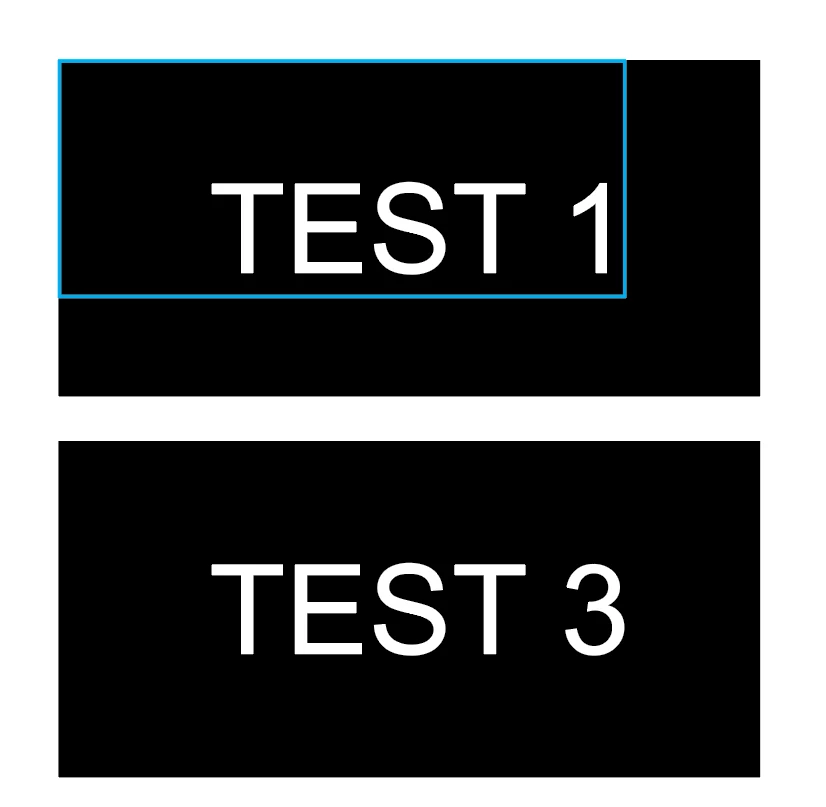
Test 1 Image shows what I want my result to be.

Test 3 Image shows my starting point.

I am looking to draw a rectangle that aligns with the top and left edge of a Black Box and extends 1/8" to the right and bottom of White text. I've mostly worked with VBScripting in Corel and Illustrator feels like a different beast with the way it handles Paths vs Corel's shapes.

An issue I have is that the White object may sometimes be Text, Paths or a combination of both. I would like to iterate across all block boxes on one page, creating the blue box on each one. A page may contain hundreds of these boxes.

I'm assuming I need to first find all black boxes then loop through them, finding overlapping white objects. Use a combination of their bounding boxes to create the blue box. It feels like it should be simple however I am stuck trying to find the overlapping white objects.

Any help selecting an object by both color and within a specific bounding box would be appreciated.
This topic has been closed for replies.
Correct answer CarlosCanto

do these black boxes overlap other black boxes? do other white text items partially bite into the black boxes?

there are many ways of accomplishing that, if you have hundreds of items to test, one way to do it would be to identify one black box, then create a temporary artboard the size of the black box, then you can use "selectObjectsOnActiveArtboard()". That would select everything that touches the artboard, then you would loop through all selected objects and test whether each one is fully contained within the bounds of the black box, how?

var blackBoxBounds = bb.geometricBounds;

bbLeft = blackBoxBounds[0];

bbTop = blackBoxBounds[1];

bbRight = blackBoxBounds[2];

bbBottom = blackBoxBounds[3];

then you do the same for every selected item

var selBounds = selection[0].geometricBounds;

selLeft = selBounds[0];

selTop = selBounds[1];

selRight = selBounds[2];

selBottom = selBounds[3];

then is a matter of comparing if the item's left is more than the box left and if the items right is less than box right...etc, you need to compare all box bounds to all sel bounds.

1 reply

Silly-V
Legend
October 10, 2018

Have you tried to use the geometricBounds or visibleBounds of your shapes to determine whether your white objects are contained inside the black ones?

nbmeistAuthor
Participant
October 10, 2018

That's where I'm having the issue. I've been able to find all the black boxes and create a loop that iterates through them, however I'm unsure how to select shapes within the Bounds of the black boxes without also selecting the black boxes themselves. Thanks for your reply.

CarlosCanto
Community Expert
CarlosCantoCommunity ExpertCorrect answer
Community Expert
October 11, 2018

do these black boxes overlap other black boxes? do other white text items partially bite into the black boxes?

there are many ways of accomplishing that, if you have hundreds of items to test, one way to do it would be to identify one black box, then create a temporary artboard the size of the black box, then you can use "selectObjectsOnActiveArtboard()". That would select everything that touches the artboard, then you would loop through all selected objects and test whether each one is fully contained within the bounds of the black box, how?

var blackBoxBounds = bb.geometricBounds;

bbLeft = blackBoxBounds[0];

bbTop = blackBoxBounds[1];

bbRight = blackBoxBounds[2];

bbBottom = blackBoxBounds[3];

then you do the same for every selected item

var selBounds = selection[0].geometricBounds;

selLeft = selBounds[0];

selTop = selBounds[1];

selRight = selBounds[2];

selBottom = selBounds[3];

then is a matter of comparing if the item's left is more than the box left and if the items right is less than box right...etc, you need to compare all box bounds to all sel bounds.