Martin Michaelsen
Participant
October 5, 2019
Answered

Script to generate color information textboxes for selected paths

  • October 5, 2019
  • 4 replies
  • 32456 views

Hello Community!


I am looking for a way to generate textboxes on top of paths that contain fill color information:

- Hex (probably not possible?)

- CMYK values

- RGB values.


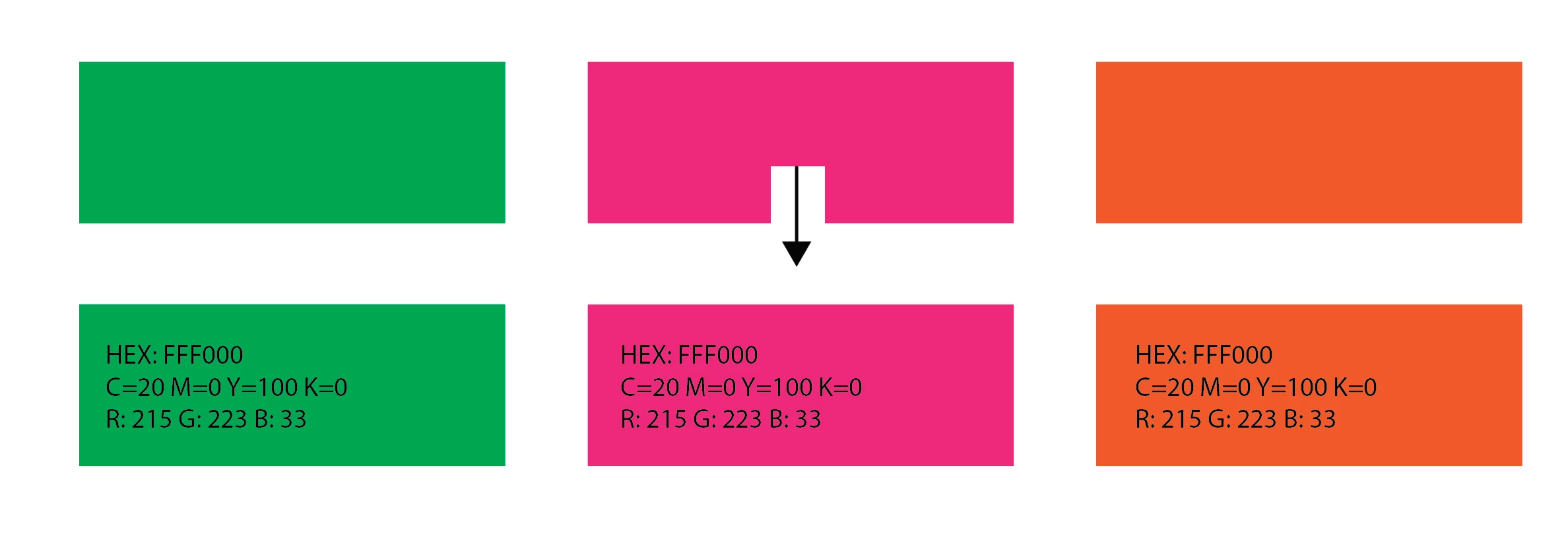
Ideally you would select paths on your artboard, run the script and text boxes would be generated as such:
 This script comes close, but does it for swatches in the document. However, I need it for the fill color for paths already on the artboard:

http://fashionclassroom.com/blog/handy-illustrator-script-for-printing-out-color-chips

https://github.com/johnwun/js4ai/blob/master/renderSwatchLegend.jsx

Also here is some discussion that touches on the subject: https://webcache.googleusercontent.com/search?q=cache:fLUn9JnVfDkJ:https://forums.adobe.com/thread/623432+&cd=8&hl=en&ct=clnk&gl=us


Any help would be greatly appreciated!


Best regards,

Martin

Correct answer schroef

Amazing thank you, the interface you added are so essential! And it seems the fix for me was to stop converting .rtf to .jsx, had to turn my textedit on mac into a plain text from Format > Make Plain Text..... did not realize the syntax error that illustrator was yelling about was me saving as rich text. 


One question, is there a way to make the HEX render not have spaces? It comes out as "HEX  xx xy 23" instead of "HEX xxxy23" for instance. Guessing this is a quirk of the script and a tradeoff for having CMYK and other values render with spaces? Regardless, this script will save SO MUCH time. 


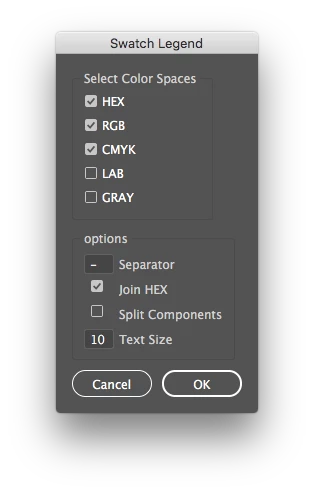
I got it working now as i think you asked for. Ive added an extra option, to join HEX values, this can keep other values split

Here's a link to the RAW script on my gitHub.  Remember when saving from browser, remove .txt at the end

4 replies

Creaktor
Participating Frequently
November 20, 2024

For some reason when I place the renderSwatchLegend.jsx I downloaded into the Illustrator 2025 / Presets / en_US / Scripts folder, and start Illustrator 2025, I dont see it listed. The other 3 default script are listed. Also using "file > Scripts > Other scripts" doesnt seem to work.

Monika Gause
Community Expert
Community Expert
November 20, 2024

Is it a TXT file?

Does it have the correct file extension?

schroef
Inspiring
December 30, 2022

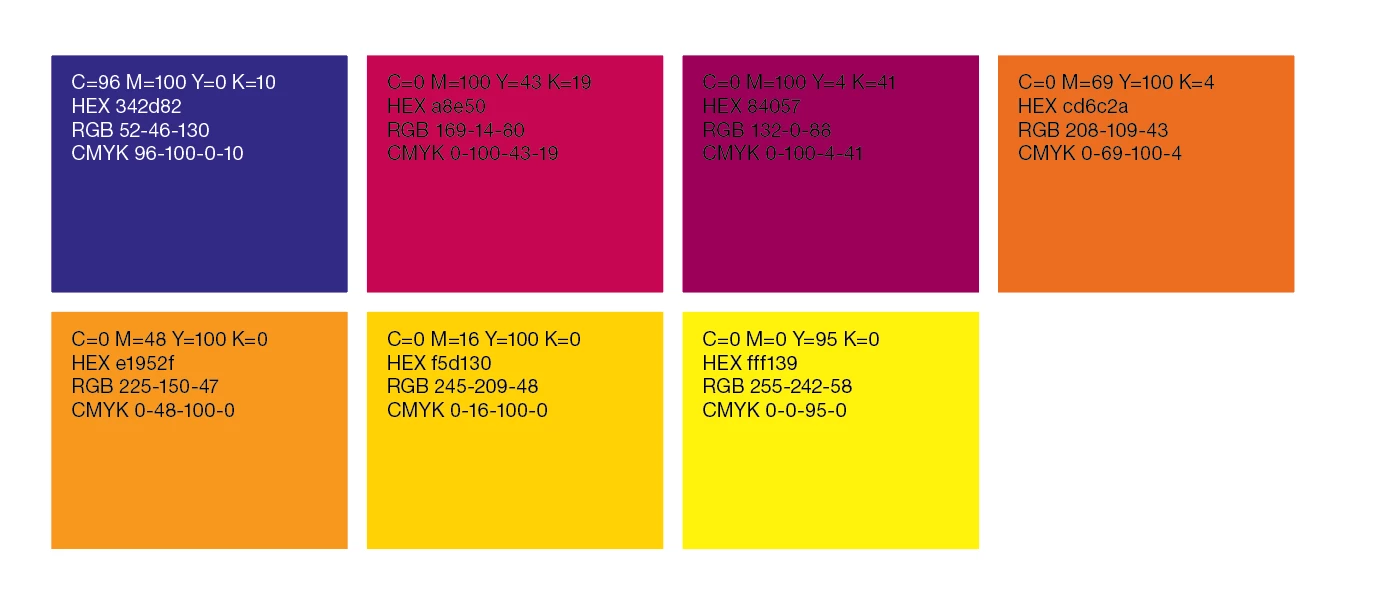
I see you have HEX in the legend now as well. Ive added some extra features to this script, like HEX. That version did not have it yet back then. Ive also made an interface so you can choose what to show. Idea is to make it even more customizable in the feature. Wundes has updated to 4.4 with two of my adds, but not the one with the dialog and save settings


Here's a preview

AVDAdobe
Known Participant
January 29, 2023

Hi @schroef ! 

Where can your script with the interface be downloaded from? Also, couldn't seem to edit the one from johnwun at https://github.com/johnwun/js4ai/blob/master/renderSwatchLegend.jsx  to work properly.


For the johnwun script I'm not sure where to download the jsx file directly (I can usually manage to find the download on github but not this time) so I've copied the text, saved as text edit on mac, changed the file to jsx and can get it to run in illustrator but it doesn't work. Attached the text file I converted to jsx here as well. Tried fiddling with the x/y values but it gives me this error. Tried selecting the shape with the colour, have them in the swatch panels or nothing selected and other variations. Also tried the solution above for generating the colour palette as a group and selecting the group, no luck. 


I'm clearly missing something about how to use this script even with the basic instructions on the github that say "// This script will generate a legend of rectangles for every swatch in the main swatches palette." and the ones in this thread. Attached screenshot of the error I get. Help!

schroef
Inspiring
February 3, 2023

You can directly save that Jax by clicking "vier raw". Then add .ksx


His script lacks one more update I added, he didn't want that. I have added code so it saves all settings.


I'll post a link later today when I'm at work.


Ps it should work when you select swatches in the swatch panel. That's one of the edits I've made.

Tom Winkelmann
Inspiring
October 5, 2019

Did you know that you can create a new color group from the selected paths?

Simply select your paths and push the "new color group" button at the swatch panel...

Then you can use the rederSwatchLegend.jsx from wundes


Maybe you have to modify it first...

Martin Michaelsen
Participant
October 7, 2019
Thank you Tom Winkelmann, your reply lead me to a workable solution without diving too much into scripting.
Legend
October 5, 2019

Hex is EXACTLY the same thing as RGB; it's just a different way of writing the same thing.

For instance, hex FF means 255, hex 80 means 128.  So hex FF80FF means RGB 255, 128, 255.