Known Participant
November 8, 2024
Answered

Script to merge layers that have the same name into sublayers

  • November 8, 2024
  • 1 reply
  • 619 views

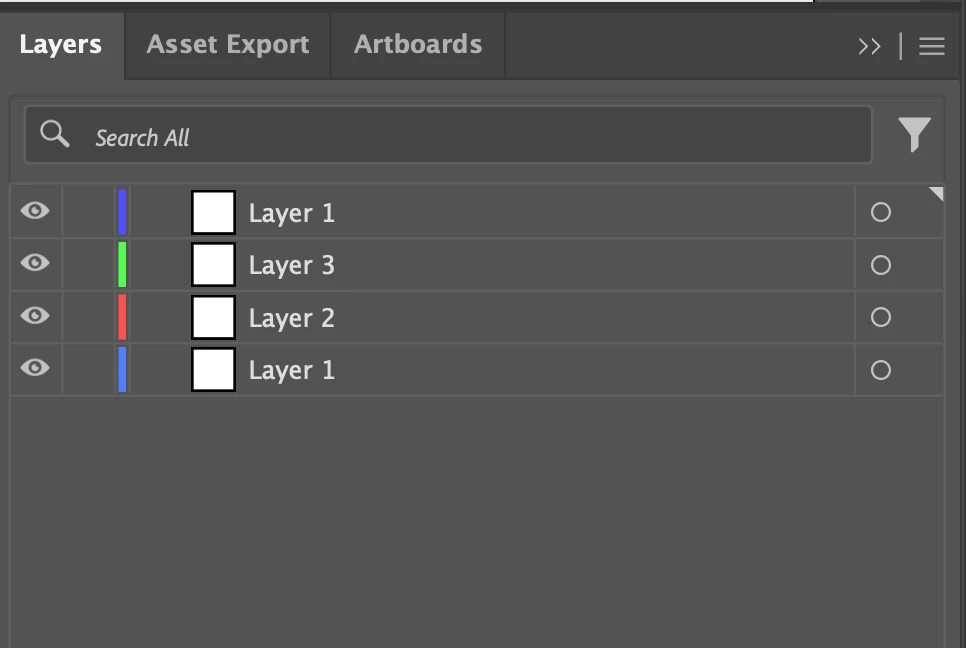
Surely there is a soltion out there but I just coulnt find it. I need a simple script that iterates thru all layers and those with the same name get merge together into a new layer. The original layers end up as sublayers without having their contents comingled or names changed.


This topic has been closed for replies.
Correct answer Sergey Osokin

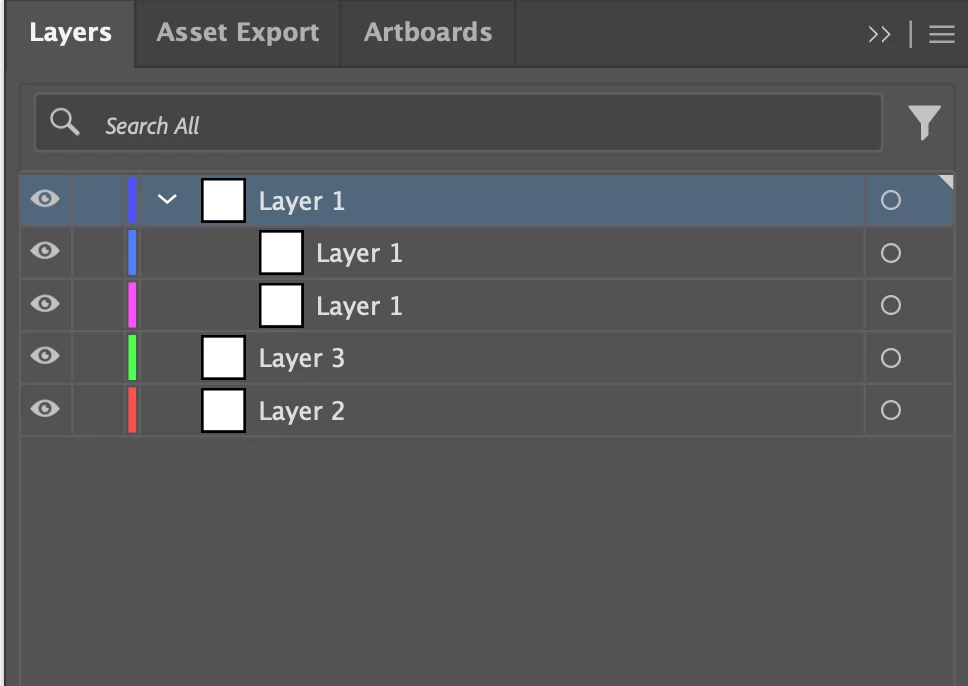
New layers with sublayers are created on top of other layers.


// Script to merge layers that have the same name into sublayers
// https://community.adobe.com/t5/illustrator-discussions/script-to-merge-layers-that-have-the-same-name-into-sublayers/td-p/14968548

function main() {
  if (!documents.length) return;
  var doc = app.activeDocument;
  var layerGroups = collectSameLayers(doc);
  moveLayersToNew(doc, layerGroups);
}

// Collect layers with the same name
function collectSameLayers(doc) {
  var layerGroups = [];

  for (var i = 0; i < doc.layers.length; i++) {
    var currLayer = doc.layers[i];
    var currName = currLayer.name;
    var isFound = false;

    for (var j = 0; j < layerGroups.length; j++) {
      if (layerGroups[j].name === currName) {
        layerGroups[j].layers.push(currLayer);
        isFound = true;
        break;
      }
    }

    if (!isFound) {
      layerGroups.push({
        name: currName,
        layers: [currLayer]
      });
    }
  }

  return layerGroups;
}

// Create new layer and move inside original layers
function moveLayersToNew(doc, layerGroups) {
  for (var i = layerGroups.length - 1; i >= 0; i--) {
    var currGroup = layerGroups[i];

    // Only process if there are multiple layers with the same name
    if (currGroup.layers.length > 1) {
      var newLayer = doc.layers.add();
      newLayer.name = currGroup.name;

      for (var j = currGroup.layers.length - 1; j >= 0; j--) {
        currGroup.layers[j].move(newLayer, ElementPlacement.INSIDE);
      }
    }
  }
}

try {
  main();
} catch (e) {}



1 reply

Sergey Osokin
Sergey OsokinCorrect answer
Inspiring
November 8, 2024

New layers with sublayers are created on top of other layers.


// Script to merge layers that have the same name into sublayers
// https://community.adobe.com/t5/illustrator-discussions/script-to-merge-layers-that-have-the-same-name-into-sublayers/td-p/14968548

function main() {
  if (!documents.length) return;
  var doc = app.activeDocument;
  var layerGroups = collectSameLayers(doc);
  moveLayersToNew(doc, layerGroups);
}

// Collect layers with the same name
function collectSameLayers(doc) {
  var layerGroups = [];

  for (var i = 0; i < doc.layers.length; i++) {
    var currLayer = doc.layers[i];
    var currName = currLayer.name;
    var isFound = false;

    for (var j = 0; j < layerGroups.length; j++) {
      if (layerGroups[j].name === currName) {
        layerGroups[j].layers.push(currLayer);
        isFound = true;
        break;
      }
    }

    if (!isFound) {
      layerGroups.push({
        name: currName,
        layers: [currLayer]
      });
    }
  }

  return layerGroups;
}

// Create new layer and move inside original layers
function moveLayersToNew(doc, layerGroups) {
  for (var i = layerGroups.length - 1; i >= 0; i--) {
    var currGroup = layerGroups[i];

    // Only process if there are multiple layers with the same name
    if (currGroup.layers.length > 1) {
      var newLayer = doc.layers.add();
      newLayer.name = currGroup.name;

      for (var j = currGroup.layers.length - 1; j >= 0; j--) {
        currGroup.layers[j].move(newLayer, ElementPlacement.INSIDE);
      }
    }
  }
}

try {
  main();
} catch (e) {}


nutradialAuthor
Known Participant
November 8, 2024

Thanks brother ... I'll take it from here.