Participant
June 21, 2016
Question

Script to pull pantone colors from a dataset and recolor selected areas

  • June 21, 2016
  • 2 replies
  • 1779 views

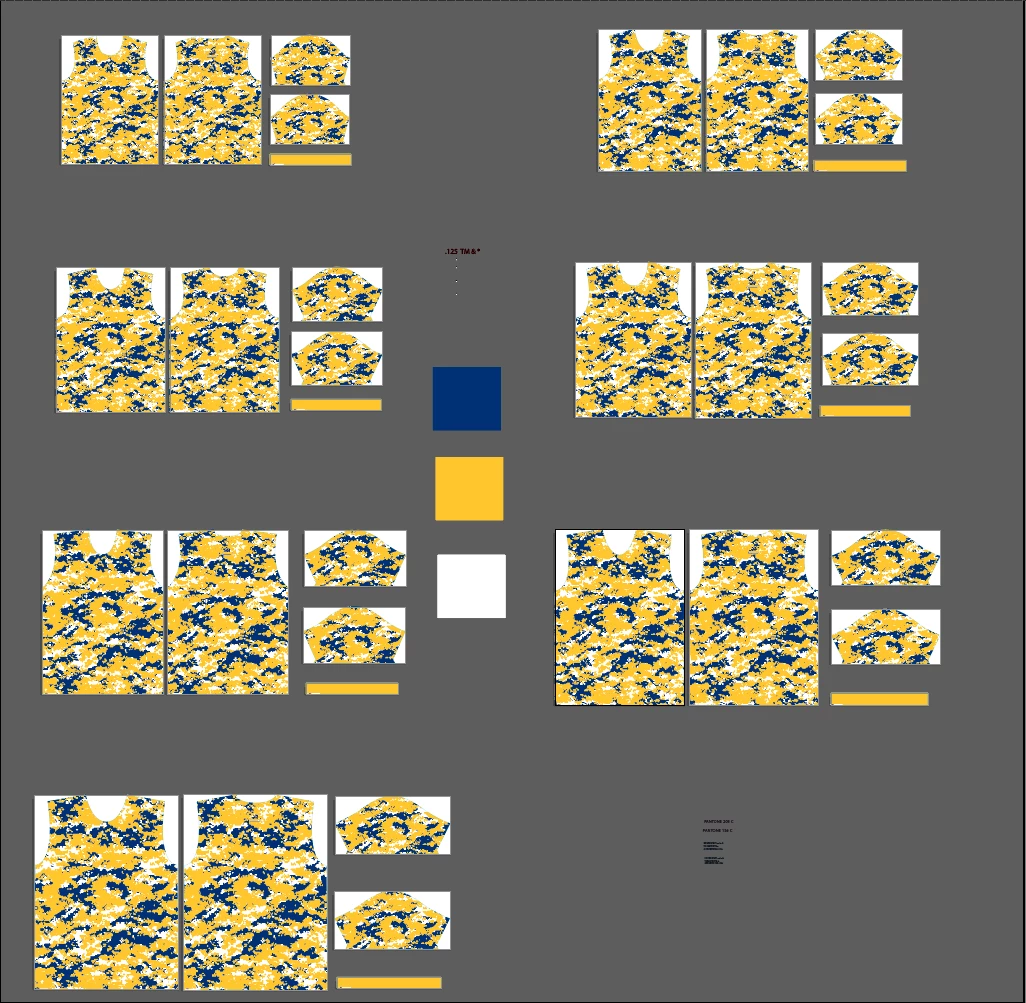
I am looking for a script that will pull information from a dataset and apply those colors to the necessary paths/compound paths. I am just starting to try an work with scripting so my knowledge level is low. Is there a way to have a path with a pre determined attribute note (ex. a) selected then to select same fill color and change those selected objects to the colors assigned to "a" in the dataset and do the same thing with a secondary color as well? As seen in the image, the blue block in the center would be "a" and the yellow would be "b" , then select same color fill would be executed from those two base points.
This topic has been closed for replies.

2 replies

Disposition_Dev
Legend
June 23, 2016

Man, lots of you guys in this community are doing THE EXACT SAME kind of work i do every day.. fascinating.

Imagine how much easier this task would be if we had access to the stupid friggin' MERGE SWATCHES method..

are you listening adobe?!?!

Silly-V
Legend
June 23, 2016

Hmm, can you list your workflow on merging swatches? And, in this world, by workflow - I mean the detailed steps in the UI. We may have a chance to do a workaround!

Disposition_Dev
Legend
June 23, 2016

In the file, there exists each shirt piece of each size (much like @jhurstML showed in his/her screenshot).

The templates/blank files are stored with placeholder (spot) colors. One placeholder color represents the main body of the shirt. One placeholder color represents side panels, and another for accent/trim colors etc.

Scenario: I need to change all PHC1 colors to Royal Blue.

In the Interface: Select "Royal Blue" in the swatches panel > cmd/ctrl select "PHC1" color in the swatches panel > click swatch menu item, "Merge Swatches". This removes PHC1 from the swatches panel, and applies Royal blue to any and all objects in the document (including any locked or hidden objects as well as live pattern fills).

The problem in javascript: In order to change the color of an object with javascript, I must access the lowest level Path Item and update its fillColor property. As stated above, this goes very slowly in any document with a large number of pageItems since the script must find and evaluate every element.

The obvious, but not good enough, solution: access the PHC1 swatch in the swatches panel, update the name to Royal Blue, and update the display color to match the royal blue swatch from the color library.

The problem with this solution: If target color is already used elsewhere in the document (which it always will be since the mockup exists in the same document, so every color i need to change already exists), you cannot modify another swatch to have the same name as an existing swatch. RUNTIME ERROR: YOU LOSE, SUCKER! (i think that's what it says when you try).

Thoughts?

Silly-V
Legend
June 21, 2016

You are super-welcome to try my very convoluted and user-unfriendly method! The pros? It's readily available! Cons: complicated setup!

Interestingly you describe the exact scenario where this would be used.

Illustrator Variable Data Advanced Techniques: Recoloring art from data column. | Vasily Hall | LinkedIn

jhurstMLAuthor
Participant
June 21, 2016

Believe it or not, I actually have been trying to tweak yours already (unsuccessfully, I should add) to account for compound paths. Right now, as I am attempting to teach myself Java Script, my latest attempt at something that works is to label the blue block as "primary" in its notes and create an action that selects that object, and insert a menu command "select same fill color" and change it to "colorA" as is pre determined by the dataset then repeat the same process with the yellow block as "secondary" and "colorB" . In the script I will ( try to) initiate the actions with Application.doScript.  Silly-V  Is that something you think would work or should I quit while I am ahead?

Silly-V
Legend
June 21, 2016

I think the new version I put up the other day does compound paths. Get the new one from the github.

You should definitely learn more in scripting, it's a fun thing - until it takes over you life!

But, you don't really need any actions with this - unless you're talking about calling this script from actions in the first place - as mostly intended for batch-processing.

I see that you want to label the notes in your action, which is really not what this script is intended for - you ideally have your one dynamic document and your art items would need the notes applied only 1 time, manually, so that the batch processing will work for the rest of the items regarding the recoloring.

If you have a single document and are using this technique to bring in a single dataset just for this purpose, it's really not the way to go - you may need to take a different approach and focus on something that's only custom to your workflow rather than trying to accommodate this particular technique.

However if you are bringing in multiple datasets, it may be more useful and worth the time to set up the setup layer, etc.

Still, to put your note label everywhere, you'd just manually select the same fill and write it into the attributes - no need to make an action to do this.