Participant
May 6, 2020
Answered

Script to read layers not working as expected (?)
  • May 6, 2020
  • 4 replies
  • 2318 views

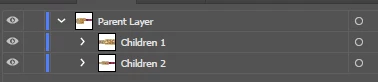
I have this layers /\ and this script \/
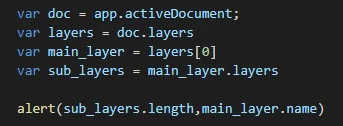
However, when I run...
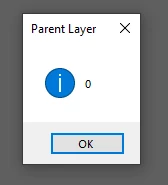
The length show in alert window should be 2


What is wrong?

This topic has been closed for replies.
Correct answer CarlosCanto

your script seems correct, there's a chance "Children 1" and "Children 2" are Groups instead of Layers

4 replies

CarlosCanto
Community Expert
Community Expert
May 6, 2020

groups sample

var idoc = app.activeDocument;
var layers = idoc.layers;
var main_layer = layers[0];
var main_groups = main_layer.groupItems;

alert(main_groups.length);
Charu Rajput
Community Expert
Community Expert
May 6, 2020

Hi,

Children 1 and Children 2 are not layers. You can check by blue color left to the layer name. When we create a layer, by default each layer have different color inless and untill you make it as same color.


Thanks

Best regards
Disposition_Dev
Legend
May 8, 2020

ooooooh i feel so stupid. i've been using the appearance panel to tell the difference between layers and groups.. I never considered the color coding..

CarlosCanto
Community Expert
Community Expert
May 8, 2020

william, also if you need this a lot, you can turn Layer Thumbnails off to quickly tell what's what.

Silly-V
Legend
May 6, 2020

Are you sure those are sub-layers and not groups?

HerikleAuthor
Participant
May 6, 2020

No... I'm not sure. 


If that's true, I should treat then like group or "convert" then to layers?


It's a SVG file

CarlosCanto
Community Expert
CarlosCantoCommunity ExpertCorrect answer
Community Expert
May 6, 2020

your script seems correct, there's a chance "Children 1" and "Children 2" are Groups instead of Layers

Silly-V
Legend
May 6, 2020

Beat me to it, again! 😉