
Inspiring
July 25, 2024
Question

Script to rearrange all artboards?

  • July 25, 2024
  • 1 reply
  • 783 views

Hi everyone,

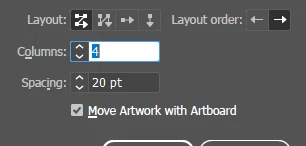
I was wondering if anyone has a script to rearrange all arboards in a document? I know there's a feature for that in Illustrator, but I intent to "merge" it with another code that I am currently working on. The script should follow the specs below:
- Layout - Grid by Row, Order - Left-to-Right,
- 4 columns, spacing 20 pt
- Move Artwork with Artboard
Thanks in advance,
Rogerio

This topic has been closed for replies.

1 reply

Sergey Osokin
Inspiring
July 26, 2024

Of course it is possible to write a script, but there are many problems with moving artboards: calculating the correct coordinates, moving hidden or locked objects, moving objects with transparency masks.

I would also suggest to think about an alternative solution. Call a native rearrange window inside the script where you can enter values manually. Yes, it will take time, but this native command is free of scripting problems.


(function () {
  // .. do something
  app.executeMenuCommand("ReArrange Artboards");
  // .. do something
})();


Inspiring
July 26, 2024

Hi @Sergey Osokin, thanks for checking! 🙂

I found some guidance on this link and was able to code it - adding here just in case anyone need:

doc.rearrangeArtboards(DocumentArtboardLayout.GridByRow , 4 , 20 , true);

Best,
Sergey Osokin
Inspiring
July 27, 2024

You're right. I've never needed this feature, so I didn't think to look at the Object Model Viewer.


<method name="rearrangeArtboards">
  <shortdesc>Rearrange Artboards in the document.</shortdesc>
  <parameters>
    <parameter name="artboardLayout" optional="true">
      <shortdesc>Layout of artboards for rearrangement.</shortdesc>
      <datatype>
        <type href="#/DocumentArtboardLayout">DocumentArtboardLayout</type>
        <value>DocumentArtboardLayout.GridByRow</value>
      </datatype>
    </parameter>
    <parameter name="artboardRowsOrCols" optional="true">
      <shortdesc>Number of rows (for rows layout) OR column(for column layouts)of artboards.Range is 1 to (docNumArtboards - 1) or 1 for single row or column layouts.</shortdesc>
      <datatype>
        <type href="#/Int32">Int32</type>
        <value>1</value>
      </datatype>
    </parameter>
    <parameter name="artboardSpacing" optional="true">
      <shortdesc>Spacing between artboards.</shortdesc>
      <datatype>
        <type>number</type>
        <value>20.0</value>
      </datatype>
    </parameter>
    <parameter name="artboardMoveArtwork" optional="true">
      <shortdesc>Whether to move artwork with artboards.</shortdesc>
      <datatype>
        <type>bool</type>
        <value>true</value>
      </datatype>
    </parameter>
  </parameters>
  <datatype>
    <type>bool</type>
  </datatype>
</method>