Inspiring
April 30, 2020
Answered

script to save as png

  • April 30, 2020
  • 1 reply
  • 9175 views

Is there any script to save illustrator file to png in same directory. once saved AI file should be closed without saving. Also file naming of PNG should be as per AI file. please help me on this

resolution on png: 72

 

This topic has been closed for replies.
Correct answer Charu Rajput

Hi, 
While exporting PNG via script, it is not possible to give resolution when exporting AI document either by ExportOptionPNG8 or ExportOptionsPNG24. For reference please see below screenshot
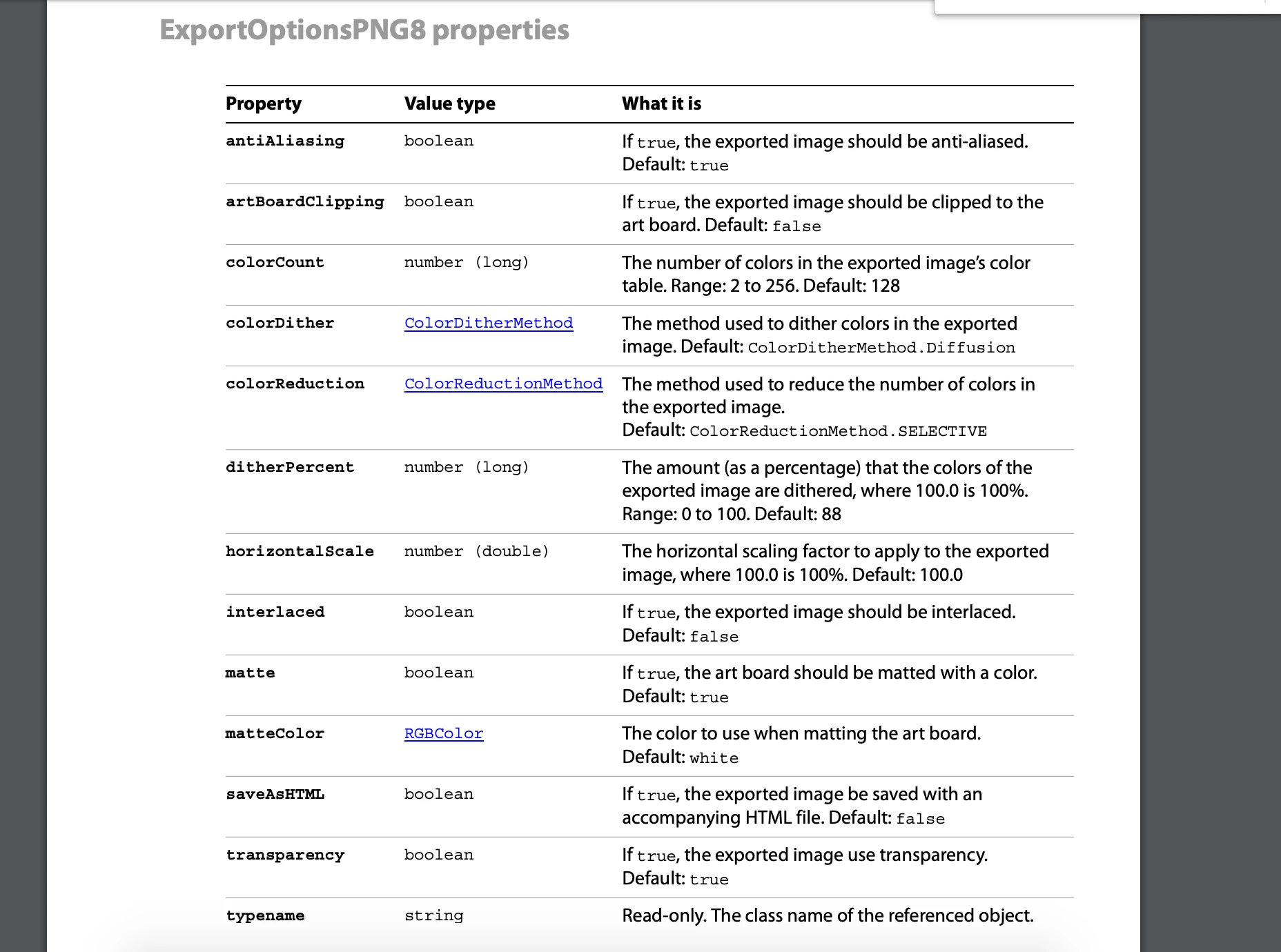


But you can use option ImageCaptureOptions to export AI document into png while specifying the resolution. See below screenshot.
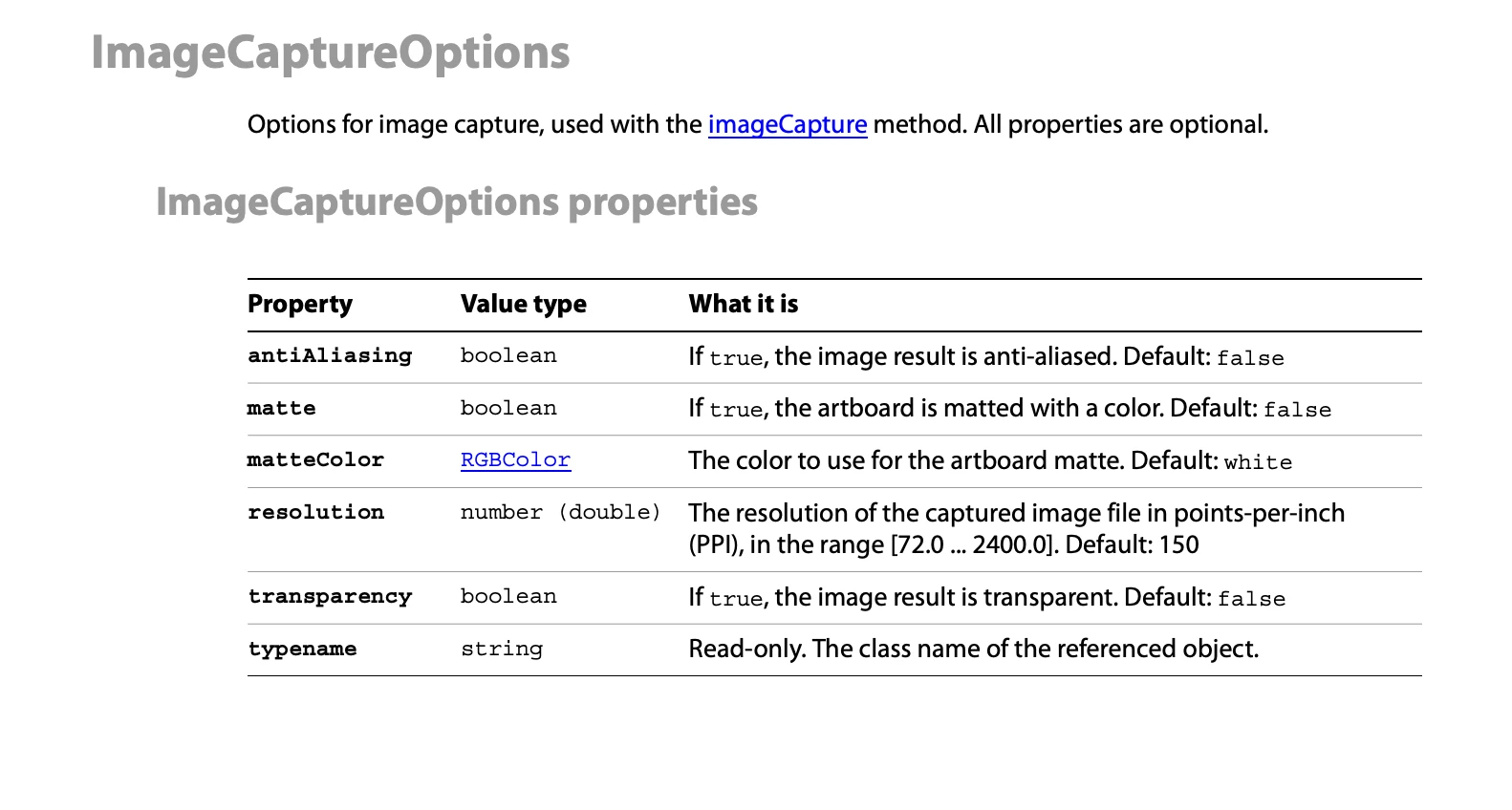


So, for your problem solution will be,


function saveAsPNG() {
    var pngFile = new File(app.activeDocument.path + "/" + app.activeDocument.name.split('.')[0] + '.png');
    var resolution = 72;
    var opts = new ImageCaptureOptions();
    opts.resolution = resolution;
    opts.antiAliasing = true;
    opts.transparency = true;
    try {
        app.activeDocument.imageCapture(pngFile, app.activeDocument.geometricBounds, opts);
        app.activeDocument.close(SaveOptions.DONOTSAVECHANGES);
    } catch (e) {

    }
}

saveAsPNG();


You can change value of resolution here as per your requirements.

Let us know if this helps you.


Thanks

Charu

1 reply

Charu Rajput
Community Expert
Charu RajputCommunity ExpertCorrect answer
Community Expert
May 1, 2020

Hi, 
While exporting PNG via script, it is not possible to give resolution when exporting AI document either by ExportOptionPNG8 or ExportOptionsPNG24. For reference please see below screenshot


But you can use option ImageCaptureOptions to export AI document into png while specifying the resolution. See below screenshot.


So, for your problem solution will be,


function saveAsPNG() {
    var pngFile = new File(app.activeDocument.path + "/" + app.activeDocument.name.split('.')[0] + '.png');
    var resolution = 72;
    var opts = new ImageCaptureOptions();
    opts.resolution = resolution;
    opts.antiAliasing = true;
    opts.transparency = true;
    try {
        app.activeDocument.imageCapture(pngFile, app.activeDocument.geometricBounds, opts);
        app.activeDocument.close(SaveOptions.DONOTSAVECHANGES);
    } catch (e) {

    }
}

saveAsPNG();


You can change value of resolution here as per your requirements.

Let us know if this helps you.


Thanks

Charu

Best regards
Participating Frequently
June 2, 2021

Hi,


Great script, thank you!

I have 2 requests, if possible:

1. Is there a way to add an option to save the PNG as a clipped artbourd? I have Illustrator files with content outside the artboard an when using the script the saved image is showing all content not the artboard itself.

I tried to add a line:

opts.artBoardClipping = true;

but no results, the image saved contains entire file content no clipped to artboard.


and 
2. Is there a way to add an option to save the file in a different size from the original Illustrator artboard? For example I have files at 850x1134 px and I want to save PNGs as 1500x2000 px

Can be done with scripting? Maybe by using scaling in percentage (e.g. saved at 150%) or by using absolute values (e.g. 1500x2000 px).


Looking forward for your ideas 🙂


Best,

Adrian

femkeblanco
Legend
June 3, 2021
function saveAsPNG() {
    var pngFile = new File(app.activeDocument.path + "/" + app.activeDocument.name.split(".")[0] + ".png");
    var type = ExportType.PNG24;
    var opts = new ExportOptionsPNG24();
    opts.antiAliasing = false;
    opts.transparency = false;
    opts.artBoardClipping = true;
    opts.horizontalScale = 150;
    opts.verticalScale = 150;
    try {
        app.activeDocument.exportFile(pngFile, type, opts);
        app.activeDocument.close(SaveOptions.DONOTSAVECHANGES);
    } catch (e) {}
}
saveAsPNG();

(But, as @Charu Rajput said, you cannot change the resolution now.)