Participant
June 15, 2022
Answered

script to select path based on spot color

  • June 15, 2022
  • 13 replies
  • 1457 views

Hello, i'm new in scripting. I want my script to select paths based on the spot color named "CutContour"

I copied it on similar scripts i found in this community, but it doesn't work.

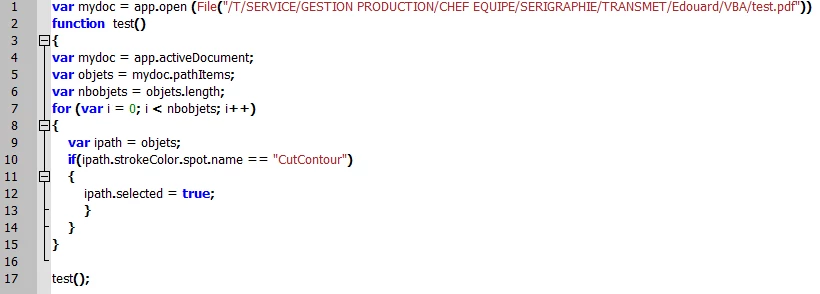
here's the script :

I keep getting this error "undefined is not an object" on line 10 and can't find any solution.

Can somebody help me, please ?


This topic is closed to new replies. Start a new post to keep the conversation going.
Correct answer Disposition_Dev

so are there multiple cutcontour shapes, some of which are not located on the "cutcontour" layer?

could you just select the artwork on the cutcontour layer and call it a day?


If not, you'll likely need a recursive approach, because if the cutcontour lines you're looking for are nested inside of groups (potentially deeply nested), the only way to find them is to search each nested group to see if it contains any cutcontour paths.


Another possible option is to set your selection to null, then set the "default stroke color" to cut contour, then use executeMenuCommand to select all same strokes. that should select all of the cut lines for you (but depending on what you want to do with them later, selecting them this way is not always the best choice). 


mydoc.selection = null;
mydoc.defaultStrokeColor = mydoc.swatches["CutContour"].color;
app.executeMenuCommand("Find Stroke Color menu item");



13 replies

renél80416020
Inspiring
June 15, 2022

Bonjour,


  obj = selection[0]
  color = obj.fillColor;
    if (color.typename == "SpotColor") {
      if (color.spot.name == "CutContour") alert("CutContour");
    }


Je pense que cela peut convenir.

REné


Edouard76Author
Participant
June 15, 2022

Bonjour et merci de votre réponse. Malheureusement je ne sais pas comment integrer votre code dans mon script...

dans la boucle ? obj et color sont-elles des variables? j'ai aussi peut-être oublié de préciser dans mon descriptif qu'il s'agit de la couleur de contour (strokeColor) et non celle de fond (fillColor). 

renél80416020
Inspiring
June 16, 2022

Désolé je n'ai pas fait attention...

// JavaScript Document for Illustrator
var mydoc = app.activeDocument; //app.open.....
    app.selection = null;
function test(relativeObjet) {
  var objets = relativeObjet.pathItems;
    for (var i = 0; i < objets.length; i++) {
      var ipath = objets[i];
      var color = ipath.strokeColor;
        if (color.typename == "SpotColor") {
          if (color.spot.name == "CutContour") {
            ipath.selected = true;
          }
        }
    }
}
test (mydoc);
femkeblanco
Legend
June 15, 2022

Change line 9 to

var ipath = objects[i];
Edouard76Author
Participant
June 15, 2022

thanks for the reply. It works but there's another path in a 2nd layer also named "CutContour" that hasn't been selected in my test file.

and i still get the error after

All files (7000 !) I have to upgrade are made like this one. 

Disposition_Dev
Disposition_DevCorrect answer
Legend
June 15, 2022

so are there multiple cutcontour shapes, some of which are not located on the "cutcontour" layer?

could you just select the artwork on the cutcontour layer and call it a day?


If not, you'll likely need a recursive approach, because if the cutcontour lines you're looking for are nested inside of groups (potentially deeply nested), the only way to find them is to search each nested group to see if it contains any cutcontour paths.


Another possible option is to set your selection to null, then set the "default stroke color" to cut contour, then use executeMenuCommand to select all same strokes. that should select all of the cut lines for you (but depending on what you want to do with them later, selecting them this way is not always the best choice). 


mydoc.selection = null;
mydoc.defaultStrokeColor = mydoc.swatches["CutContour"].color;
app.executeMenuCommand("Find Stroke Color menu item");