
Script to work around Illustrator bugs
Newbee here, We are working in Illustrator CS5. I have put together some scripts & Actions to automate several parts of our work.
I'll start with what we have now. Plus what we have now works on both Mac & PC & if there is a way to work around these BUGS it will need to work on both the Mac's & PC's.
1) We have an .ai file (our default format) that we can open up & inside some text will automatically fill in when we run a script. (see custom script at bottom) Some text boxes will fill in the date based on the present date on our computer, some text boxes will fill in a name based on the name of the electronic .ai file.
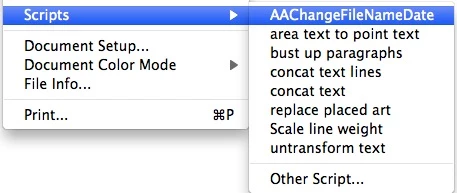
See red boxes.
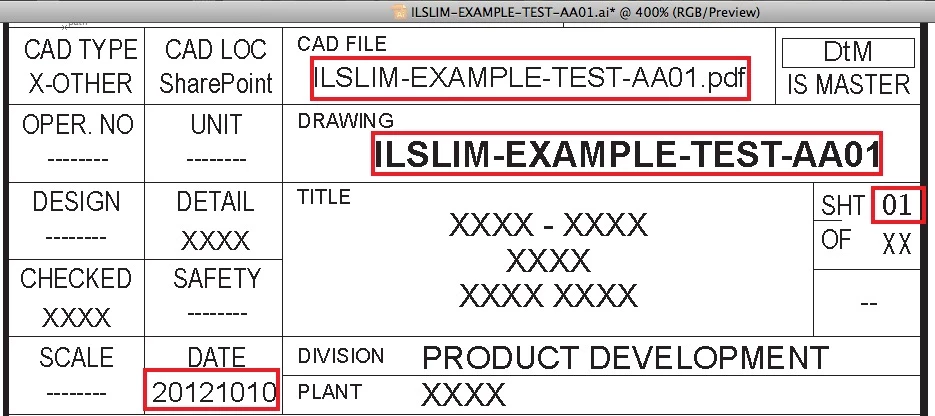
One difficulty that I worked out is, sometimes in one of the fields in the file, it needs to have a name consisting of only 4 sections (or 3 dashes). In example: ILSLIM = 1, EXAMPLE = 2, TEST = 3, & AA01 = 4.

So when this happens then the last dash in this one text box on our format (Not any of the other text boxes) will need the 3rd dash removed (now it is only 3 sections because TESTAA01 are now one).
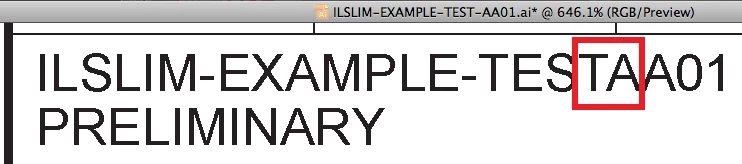
So I created an Illustrator "Action" that will after the "ChangeFileNameDate" script is run, the "Action" will select the one text box & then run the "Find and Replace" to delete the 3rd dash as seen above.
NOW THE PROBLEMS! (Illustrator bugs)
1) In the Illustrator "Actions" when you record an "Action" & use the "Insert Menu Item..." to put a Script in, it will work. BUT when you quit out of Illustrator & then relaunch it the custom Script will disappear. I looked into this & this is a known bug for years in Illustrator that is still not fixed.
http://js4ai.blogspot.com/2012/03/how-to-permanently-tie-script-to-action.html

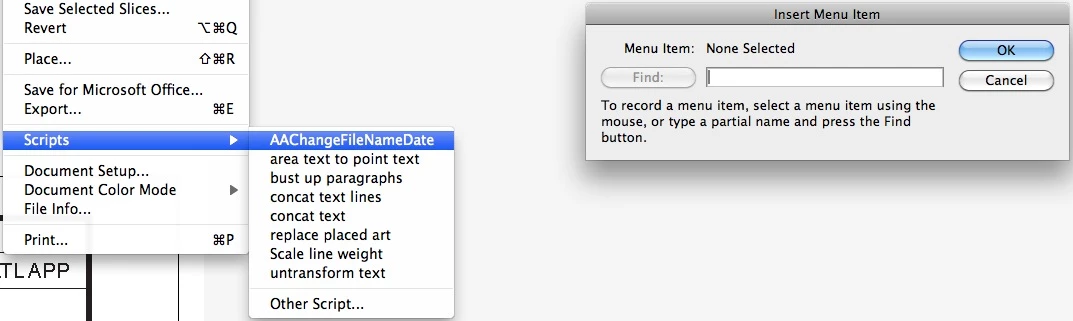
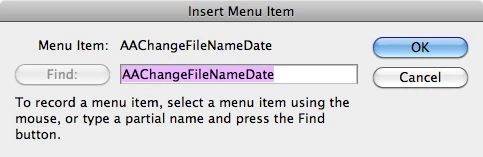
Works untill you quit out & relaunch.
BEFORE QUIT.

AFTER RELAUNCH.

SO the only work around I can get to work for now is to "Insert Menu Item..." "Other Script..." & this will stay even after relaunch BUT then every time we run the "Action" we have to manually select the script. (CRAP)
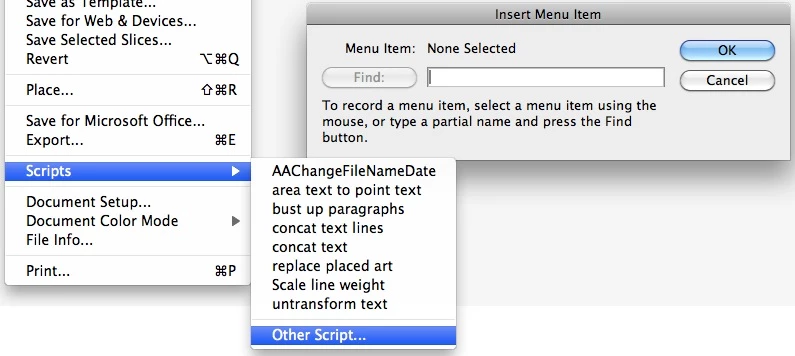
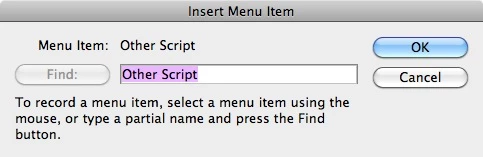
Still here after relaunch.

PLUS A BUG with recording the "Find and Replace". In case you do not know, when you save "Actions" in Illustrator you can; save any of the actions that require a dialog box; 1) to either have the dialog box come up so you can enter whatever you need into it or 2) you can have the dialog box NOT come up & the action will just do what it had in it when you recorded it. This feature is turned on or off by clicking the box next to the check mark on or off (see pic).

So the BUG is, for my "Actions" that use the "Find and Replace" to delete the dash to work for some reason I have to have the first "Find and Replace" steps dialog botton ON so that the "Find and Replace" dialog box will open up.
Let me explain, when you record to use the "Find and Replace" it will work fine even with the dialog box option clicked off; but if you quit Illustrator & then relaunch it & try to run the "Actions" that have the "Find and Replace" in them then Illustrator will crash. So the only work around that I found for this CRAPPY BUG is to simply have the 1st "Find and Replace" in the recorded "Action" with the dialog box set to on (to open up when Action is run) & then we have to manually close it. We don't have to type anything inside of it. We simply have to have it open & then close. Then for some reason the rest of the recorded "Actions" will run with out the dialog boxes opening with the deleteing of the 3rd dash as like when I 1st recorded it.
So basically, if I want the "Actions" to work at this point I would have to do this; every time I relaunch Illustrator I would need to manually load the custom script into the "Actions" & I would need to open & close the "Find and Replace" box. This is CRAP the whole point of "Actions" & Scripts are so I can do everything MANUALLY, NO. We should be able to have it work for us!
OR maybe this would be the best solution!
If inside the "ChangeFileNameDate" custom script it could simply open & then close the "Find and Replace" box (that would solve the crashing with "Find and Replace" in "actions") then the custom script could cause the "Action" to play instead of the "Action" causing the custom script to play. Then all we would have to do is drag down to the custom script from "File" & run that. No crashing, No babysitting.
DOES ANYONE KNOW HOW OR IF THIS IS POSSIBLE? To add to the attached script:
1) At the beginning to open & close the "Find and Replace" box.
2) At the end to cause a saved "action" to run.
WE WOULD BE SO VERY, INCREDIBLY, EXTREMELY GRATEFUL!
//////////////////////////////////////////////////////////// english //
// ----------------------
// -=> WR-DateAndTime <=-
// ----------------------
//
// A Javascript for Adobe Illustrator
// by Wolfgang Reszel (ai-js@rumborak.de)
//
// Version 0.9 from 22.9.2011
//
// This script inserts the actual date or the actual time to a
// predefined position in the document.
//
// To define the position, you'll have to create an textobject and
// execute this script while the object is selected. The whole object
// has to be selected and not words or letters. You can mark more
// objects, if you select each object separate and execute
// the script on it.
//
// With the placeholders {DATE} and {TIME} you are able to define a
// particular point, where the date or the time should be replaced.
// If there is no placeholder in the textobject
// "{FILENAME}{FILEEXT} ({DATE}, {TIME})" will be used as standard placeholders.
//
// To update the date and time execute this script without any object
// selected.
//
// There are some additional placeholders:
// {FILE} - complete document-filename with path
// {FILEPATH} - only the documents filepath
// {FILENAME} - the filename of the document
// {FILEEXT} - the file extension of the document inclusive dot
//
// On my system this script can't see the path of the document, when
// it was opened directly from windows Explorer (double click).
//
// In Illustrator CS it is now possible to edit a DateAndTime-Object.
//
// To enable the english messages and date-format change the "de"
// into "en" in line 90.
//
// Sorry for my bad english. For any corrections send an email to:
//
//////////////////////////////////////////////////////////// Deutsch //
// ----------------------
// -=> WR-DateAndTime <=-
// ----------------------
//
// Ein Javascript fuer Adobe Illustrator
// von Wolfgang Reszel (ai-js@rumborak.de)
//
// Version 0.9 vom 30.9.2011
//
// Dieses Skript fuegt das aktuelle Datum und die aktuelle Uhrzeit an
// eine vorher bestimmte Stelle im Dokument ein.
//
// Um eine Stelle zu bestimmen, muss man ein Textobjekt erzeugen, es
// markieren und dann dieses Skript aufrufen. Es muss das gesamte Objekt
// ausgewaehlt sein, nicht etwa Buchstaben oder Woerter. Es lassen sich
// nacheinander auch mehrere Objekte als Datum/Uhrzeit markieren.
//
// Mit den Platzhaltern {DATE} und {TIME} (in geschweiften Klammern)
// kann man bestimmen, wo genau im Text das Datum und die Uhrzeit
// erscheinen soll. Sind die Platzhalter nicht vorhanden, wird
// automatisch "{FILENAME}{FILEEXT} ({DATE} - {TIME})" verwendet.
//
// Zum Aktualisieren des Datums/Uhrzeit muss man dieses Skript aufrufen
// wenn kein Objekt ausgewaehlt ist.
//
// Es gibt noch einige zusaetzliche Platzhalter:
// {FILE} - kompletter Dateiname mit Pfad
// {FILEPATH} - nur der Verzeichnispfad des Dokuments
// {FILENAME} - der Dateiname des Dokuments
// {FILEEXT} - die Dateiendung des Dokuments inklusive Punkt
//
// Auf meinem System kann der Pfad nicht ermittelt werden, wenn das
// Dokument vom Windows Explorer geoeffnet wird (Doppel-Klick).
//
// InÿIllustrator CSÿkann man nun ein Datum/Uhrzeit-Objekt bearbeiten.
//
// Um dieses Skript mit deutschen Meldungen und Datumsformat zu
// versehen, muss in Zeile 90 das "en" durch ein "de" ersetzt werden.
//
// Verbesserungsvorschlaege an: ai-js@rumborak.de
//
//$.bp();
// -------------------------------------------------------------------
var language="en"; // "de" fuer Deutsch
// -------------------------------------------------------------------
var WR="WR-DateAndTime v0.9\n\n";
var AIversion=version.slice(0,2);
if (language == "de") {
var format_preset = "{FILENAME}{FILEEXT} ({DATE} - {TIME})";
var MSG_unsetmark = WR+"Dieses Objekt ist als aktuelles Datum/Uhrzeit markiert, soll die Markierung aufgehoben werden?";
var MSG_setmark = WR+"Soll dieses Textobjekt als aktuelles Datum/Uhrzeit markiert werden?";
var MSG_askformat = WR+"Soll das Textobjekt als Datum/Uhrzeit formatiert werden? Formate:\n{DATE}, {TIME}, {FILE}, {FILEPATH}, {FILENAME} und {FILEEXT}:"
var MSG_editformat = WR+"Datums-/Uhrzeitformat bearbeiten (Leer = entfernen). Formate:\n{DATE}, {TIME}, {FILE}, {FILEPATH}, {FILENAME} und {FILEEXT}:"
var MSG_notexto = WR+"Kein Textobjekt!";
var MSG_selectedmany = "Zum Markieren als aktuelles Datum/Uhrzeit darf nur ein Textobjekt ausgew\xE4hlt sein und falls Sie die Daten aktualisieren wollen, darf kein Objekt ausgew\xE4hlt sein.";
var MSG_nodocs = WR+"Kein Dokument ge\xF6ffnet."
var Timeformat = 24;
var TimeSep = ":";
var AM = " am";
var PM = " pm";
var Dateformat = "dd.mm.yyyy";
} else {
var format_preset = "{FILENAME} ({DATE}, {TIME})";
var MSG_unsetmark = WR+"This object is marked as actual date'n'time, do you want to remove the mark?";
var MSG_setmark = WR+"Do you want to mark the selected textobject as actual date'n'time?";
var MSG_askformat = WR+"Do you want to mark the textobject as actual date'n'time? Formats:\n{DATE}, {TIME}, {FILE}, {FILEPATH}, {FILENAME} and {FILEEXT}:"
var MSG_editformat = WR+"Edit date'n'time (empty = remove). Formats:\n{DATE}, {TIME}, {FILE}, {FILEPATH}, {FILENAME} and {FILEEXT}:"
var MSG_notexto = WR+"No textobject!";
var MSG_selectedmany = "To mark as actual date'n'time, you have to select only one textobject. If you want to update the date'n'time-objects, there must be no object selected.";
var MSG_nodocs = WR+"You have no open document."
var Timeformat = 12;
var TimeSep = ":";
var AM = " am";
var PM = " pm";
var Dateformat = "yyyymmdd";
}
var error=0;
if (documents.length<1) {
error++;
alert(MSG_nodocs)
}
if (error < 1) {
date_n_time();
}
function TodayDate()
{
var Today = new Date();
var Day = Today.getDate();
var Month = Today.getMonth() + 1;
var Year = Today.getYear();
var PreMon = ((Month < 10) ? "0" : "");
var PreDay = ((Day < 10) ? "0" : "");
if(Year < 999) Year += 1900;
var theDate = Dateformat.replace(/dd/,PreDay+Day);
theDate = theDate.replace(/mm/,PreMon+Month);
theDate = theDate.replace(/d/,Day);
theDate = theDate.replace(/m/,Month);
theDate = theDate.replace(/yyyy/,Year);
theDate = theDate.replace(/yy/,Year.toString().substr(2,2));
return theDate;
}
function TodayTime()
{
var Today = new Date();
var Hours = Today.getHours();
var Minutes = Today.getMinutes();
var Suffix = "";
if (Timeformat == 12) {
if (Hours >= 12 ) {
Suffix = PM;
} else {
Suffix = AM;
}
if (Hours >= 13) {
Hours = Hours - 12;
}
if (Hours < 1) {
Hours = Hours + 12;
}
}
var PreHour = ((Hours < 10) ? "0" : "");
var PreMin = ((Minutes < 10) ? "0" : "");
return PreHour+Hours+TimeSep+PreMin+Minutes+Suffix;
}
function DateUpdate(Name) {
var docpath = activeDocument.path.fsName;
var docname = activeDocument.name.replace(/(.*?)(?:\.([^.]+))?$/,'$1');
var extension = activeDocument.name.replace(/(.*?)(?:(\.[^.]+))?$/,'$2');
if (docpath.slice(2,3) == "\\") {
docsep = "\\";
} else {
docsep = ":";
}
var content = Name.slice(11);
var content = content.replace(/\{FILE\}/,docpath+docsep+docname);
var content = content.replace(/\{FILEPATH\}/,docpath);
var content = content.replace(/\{FILENAME\}/,docname);
var content = content.replace(/\{FILEEXT\}/,extension);
var content = content.replace(/\{DATE\}/,TodayDate());
var content = content.replace(/\{TIME\}/,TodayTime());
return content;
}
function date_n_time()
{
if (selection.length == 1) {
if (selection[0].typename == "TextArtItem" || selection[0].typename == "TextFrame") {
if (selection[0].name.slice(0,11) == "actualDate:") {
dateformat = selection[0].name.slice(11);
Check = false;
if (AIversion == "10") {
Check = confirm( MSG_unsetmark );
} else {
dateformat = prompt(MSG_editformat, dateformat);
}
if(dateformat != "" && Check) {
selection[0].contents = selection[0].name.slice(11);
selection[0].name="";
selection[0].selected = false;
}
if(dateformat == "" && !Check) {
selection[0].name="";
selection[0].selected = false;
}
if(dateformat && dateformat !="" && !Check) {
selection[0].name="actualDate:"+dateformat;
selection[0].contents = DateUpdate(selection[0].name);
}
} else {
dateformat = selection[0].contents;
if(dateformat.search(/\{DATE\}/) == -1 && dateformat.search(/\{TIME\}/) == -1 && dateformat.search(/\{FILE[A-Z]*\}/) == -1) dateformat = format_preset;
Check = false;
if (AIversion == "10") {
Check = confirm( MSG_setmark );
} else {
dateformat = prompt(MSG_askformat, dateformat);
}
if (dateformat || Check) {
selection[0].name="actualDate:"+dateformat;
selection[0].contents = DateUpdate(selection[0].name);
selection[0].selected = false;
}
}
} else {
alert ( MSG_notexto );
}
} else if (selection.length > 1) {
alert ( MSG_selectedmany );
} else {
if (AIversion == "10") {
var textArtItems = activeDocument.textArtItems;
for (var i = 0 ; i < textArtItems.length; i++)
{
if (textArtItems.name.slice(0,11) == "actualDate:") {
textArtItems.selected = true;
textArtItems.contents = DateUpdate(textArtItems.name);
}
}
} else {
var textFrames = activeDocument.textFrames;
for (var i = 0 ; i < textFrames.length; i++)
{
if (textFrames.name.slice(0,11) == "actualDate:") {
textFrames.selected = true;
textFrames.contents = DateUpdate(textFrames.name);
}
}
}
}
}
 AdChoices