
Question
Script works on one device but not another (Error -54)
Hi, I have a script which works fine on my device, but not on the device of the person I made the script for, both devices are windows and using the same Illustrator version. The script fails on the file opening section. Here is the error message they get:
Error 1200: an Illustrator error occured: -54 (ÿÿÿÊ)
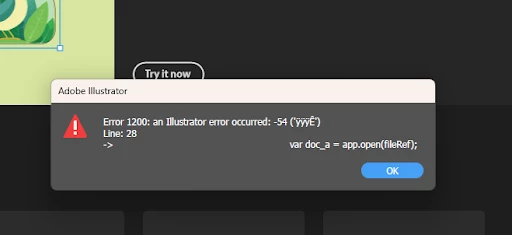
The code for the script is below.
Any help would be appreciated, thanks.
var input = 'G:/Shared drives/Creative Drive/Test Input';
var output = 'G:/Shared drives/Creative Drive/Test Output';
var inputFolder = Folder(input);
var outputFolder = Folder(output);
var theFiles = inputFolder.getFiles();
var thePath = outputFolder.path;
main();
function main(){
	if (theFiles) {
		for (var m = 0; m < theFiles.length; m++) {
			var filename = theFiles[m].name.toString();
			if (filename.indexOf(".ai") > 0){
				var splits = filename.split("_");
				var fileRef = new File( input+'/'+filename );
				var doc_a = app.open(fileRef);
				var illustratorDoc = app.activeDocument;

				// Select everything in the Illustrator document
				illustratorDoc.selectObjectsOnActiveArtboard();

				// Copy selected objects
				app.copy();
				// Launch Photoshop
				var psApp = null;

				try {
					// Try to get a reference to Photoshop
					psApp = BridgeTalk.getSpecifier("photoshop");

					// If Photoshop isn't running, launch it
					if (!psApp) {
						var photoshopApp = new File(app.path + "/../Adobe Photoshop/Photoshop.exe");
						photoshopApp.execute();
						$.sleep(3000); // Wait for Photoshop to launch
					}
				} catch (e) {
					alert("Error: Unable to communicate with Photoshop.");
				}
				if (splits[1].toUpperCase() == "A6"){
					var psWidth = "2719";
					var psHeight = "1987";
				}
				else if (splits[1].toUpperCase() == "7X5"){
					var psWidth = "3275";
					var psHeight = "2375";
				}
				else if (splits[1].toUpperCase() == "SQ"){
					var psWidth = "4404";
					var psHeight = "2340";
				}

				// Create a new Photoshop document
				var bt = new BridgeTalk();
				bt.target = "photoshop";
				var nam = filename.replace(".ai","")
				bt.body = "app.documents.add("+psWidth+", "+psHeight+", 300, '"+nam+"');"; // Adjust dimensions/resolution as needed
				bt.send(5);

				// Now paste the Illustrator contents into Photoshop
				bt.body = "app.activeDocument.paste();";
				bt.send(5);

				// Specify the path to the Photoshop script file
				var scriptFilePath = 'G:/Shared drives/Creative Drive/PS Script.jsx';
				// Read the contents of the script file
				var scriptFile = new File(scriptFilePath);
				scriptFile.open('r');
				var scriptContents = scriptFile.read();
				scriptFile.close();

				// Execute the Photoshop script
				bt.body = scriptContents;
				bt.send(300);
			}
		}
	}
}


 AdChoices