Inspiring
June 5, 2017
Answered

Scripting code for Open AI file in Illustrator......

  • June 5, 2017
  • 2 replies
  • 7956 views

Hello Friends,

I am creating a html extension .

In this extension I am browsing a AI file by clicking a button .

Now I have to open browsed AI file in Illustrator.

I have to open AI TEST.ai file in Illustrator.

so I need the js code for that.

Please assist me.

Regards

Kundan

This topic has been closed for replies.
Correct answer Ten A

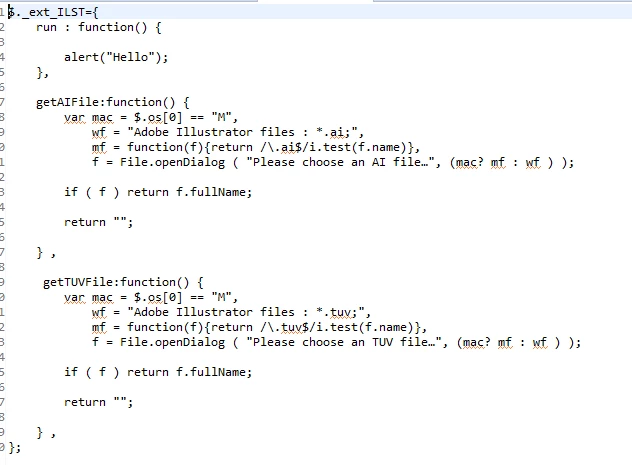
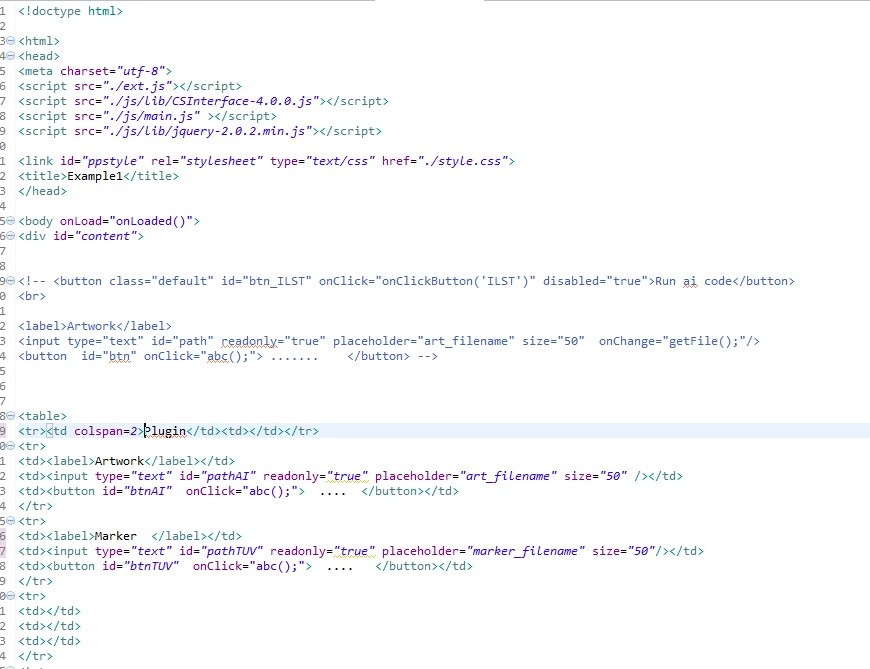
Please find the atteched code.

main.js

Illustrator.jsx

index.html

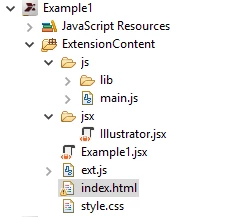
Please find file structure of extension.

Please find the above detail.

Regards

Kundan


Add open method. Before return value like below:

if(f){

app.open(f);

return f.fsName;

}

2 replies

Inspiring
June 5, 2017

Thanks for reply  TenA,

I am trying .

Regards

Kundan

Ten A
Community Expert
Community Expert
June 5, 2017

There are few way to get local files we can use.

Here is an example using Extendscript's File object:

var csi = new CSInterface();

var es = "(function (){"

  + "var f = File.openDialog('Select ai file...');"

  + "return f.fsName;})();"

csi.evalscript(es, function(cb){

  alert(cb);

  });

However, You can use Native function. Probably, its better way.

var f = window.cep.fs.showOpenDialog(false, false, "select ai file...", "", ["ai"]);

Inspiring
June 5, 2017

Hello TenA,

By using above code I am able to browse  AI file.

But it's not opening in Illustrator .

Please assist.

Regards

Kundan

Ten A
Community Expert
Community Expert
June 5, 2017

You can add open method in Extendscript part like below:

var csi = new CSInterface();

var es = "(function (){"

  + "var f = File.openDialog('Select ai file...');"

  + "return f.fsName;"

  + "app.open(f)})();"

csi.evalscript(es, function(cb){

  alert(cb);

  });