
Question
Scroll Area for UI in JSX Script
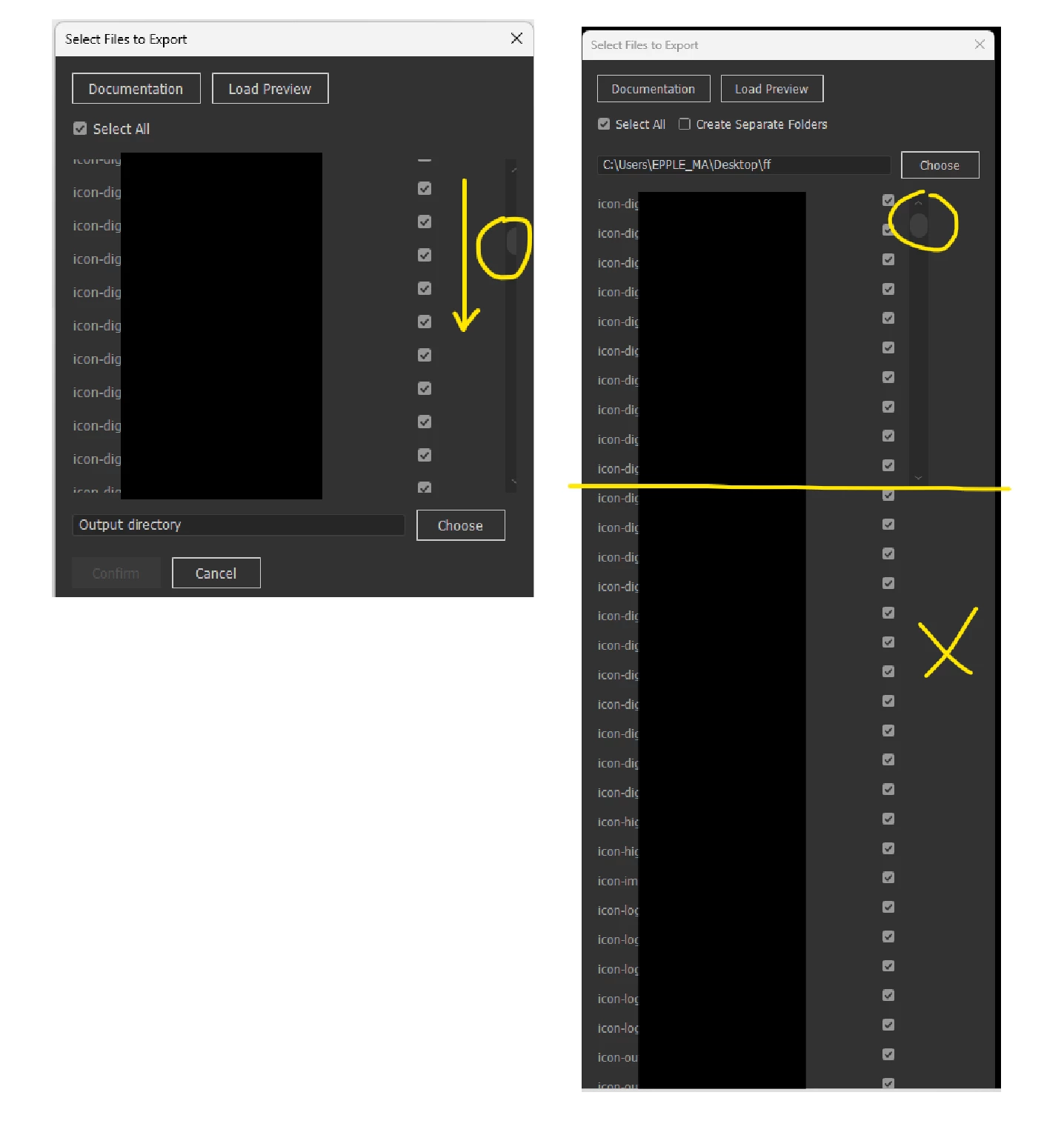
Hello, I have run into an issue with scrollbars in Illustrator JSX Sxripting. The left image shows a previous version of my code where everything worked perfectly. The list of files was displayed correctly, Scrollable and cropped to fit the intended area.
The right picture shows the current version of my code. Whenever I load a large number of files, they extend beyond the bounds of the ScrollView and stretch the UI beyond my computer screen. I drew in a yellow line to show where the list should be cropped.
I have asked ChatGPT multiple times for a solution but to no avail. I would greatly appreciate it if someone could take a look at the provided code snippet and help me identify what’s wrong.
 // Scrollable area for file checkboxes
    var scrollGroup = dialog.add('group');
    scrollGroup.orientation = 'row';
    scrollGroup.alignChildren = 'top';
    scrollGroup.size = [400, 300]; // Fixed size for scrollable area

    var contentGroup = scrollGroup.add('group');
    contentGroup.orientation = 'column';
    contentGroup.alignChildren = 'left';
    contentGroup.size = [380, files.length * 30]; // Dynamic height based on files

    var scrollbar = scrollGroup.add('scrollbar', undefined, 0, 0, Math.max(0, files.length * 30 - 300));
    scrollbar.size = [20, 300];
    scrollbar.onChanging = function () {
        contentGroup.location = [0, -Math.round(scrollbar.value)];
    };

    var checkboxes = [];
    for (var i = 0; i < files.length; i++) {
        var fileGroup = contentGroup.add('group');
        fileGroup.orientation = 'row';
        fileGroup.alignChildren = ['fill', 'center'];

        var fileLabel = fileGroup.add('statictext', undefined, truncateFileName(files[i].name, 35));
        fileLabel.size = [280, 20];

        var checkbox = fileGroup.add('checkbox', undefined, '');
        checkbox.value = selectAllCheckbox.value;
        checkboxes.push(checkbox);
        fileGroups.push(fileGroup);
    }

    selectAllCheckbox.onClick = function () {
        for (var i = 0; i < checkboxes.length; i++) {
            checkboxes[i].value = selectAllCheckbox.value;
        }
    };

    var buttonGroup = dialog.add('group');
    buttonGroup.orientation = 'row';
    var confirmButton = buttonGroup.add('button', undefined, 'Confirm', { name: 'ok' });
    var cancelButton = buttonGroup.add('button', undefined, 'Cancel', { name: 'cancel' });

    confirmButton.enabled = false;
    loadPreviewButton.enabled = false;

    function truncateFileName(fileName, maxLength) {
        if (fileName.length > maxLength) {
            return fileName.substring(0, maxLength - 3) + '...';
        }
        return fileName;
    }

    function updateFileList() {
        while (contentGroup.children.length > 0) {
            contentGroup.remove(contentGroup.children[0]);
        }
        checkboxes.length = 0;
        fileGroups.length = 0;

        if (files.length > 0) {
            contentGroup.size = [380, files.length * 30];
            scrollbar.maxvalue = Math.max(0, files.length * 30 - 300);

            for (var i = 0; i < files.length; i++) {
                var fileGroup = contentGroup.add('group');
                fileGroup.orientation = 'row';
                fileGroup.alignChildren = ['fill', 'center'];

                var fileLabel = fileGroup.add('statictext', undefined, truncateFileName(files[i].name, 35));
                fileLabel.size = [280, 20];

                var checkbox = fileGroup.add('checkbox', undefined, '');
                checkbox.value = selectAllCheckbox.value;
                checkboxes.push(checkbox);
                fileGroups.push(fileGroup);
            }

            confirmButton.enabled = true;
            loadPreviewButton.enabled = true;
        } else {
            confirmButton.enabled = false;
            loadPreviewButton.enabled = false;
        }

        dialog.layout.layout(true);
    }

 AdChoices