
Inspiring
January 2, 2023
Answered

select anchors by dragging while ignoring fills or lines

  • January 2, 2023
  • 3 replies
  • 306 views

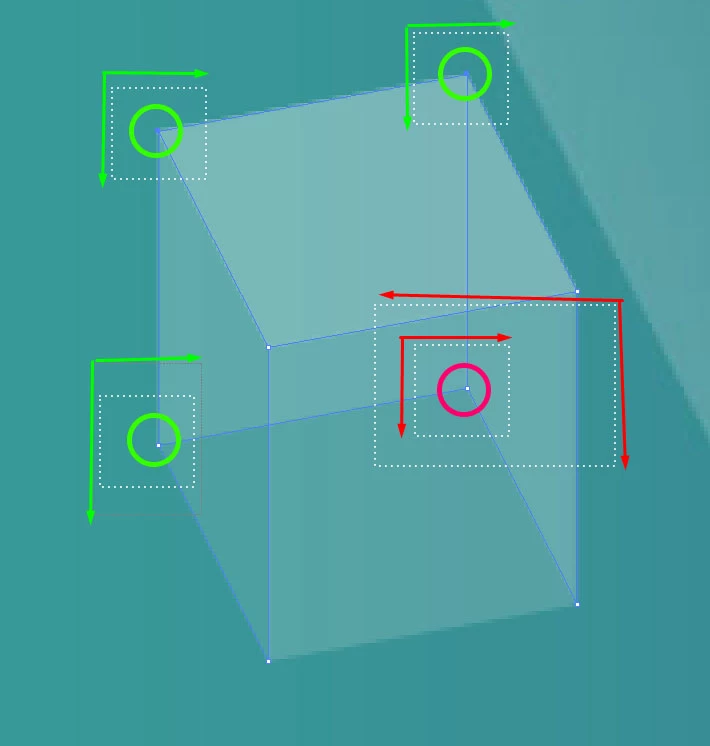
In the image example there is a cube made with 6 shapes (the background is just a locked image).

Each corner has 3 overlapping anchors from 3 different shapes.

While it is easy to drag-select the 3 outer anchor intersections (marked with green), I am not aware of any way to select the 4th group of overlapping anchors while ignoring any clicks on fills or any line selections. Is there any common practice for this matter?
This topic has been closed for replies.
Correct answer Kurt Gold

Using the Lasso tool may also help.


3 replies

Mohammad.Harb
Community Expert
Community Expert
January 2, 2023

1- isolation mode

2- layers panel with lock / unlock objects

Kurt Gold
Community Expert
Kurt GoldCommunity ExpertCorrect answer
Community Expert
January 2, 2023

Using the Lasso tool may also help.


Larry G. Schneider
Community Expert
Community Expert
January 2, 2023

You could try Object Selection by Path Only (in preferences) to drop the selection of the fill of an object.