
Answered
Select and change fill color of multiple onject with the same name
Hello there,
i'm trying to achieve this. I have a script that opens a dialog window in which i can select the color from the swatches and apply it at the corresponding object.
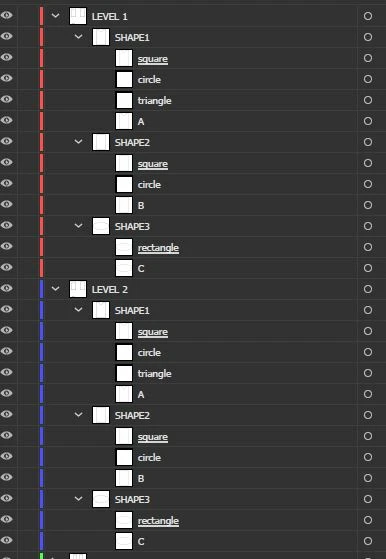
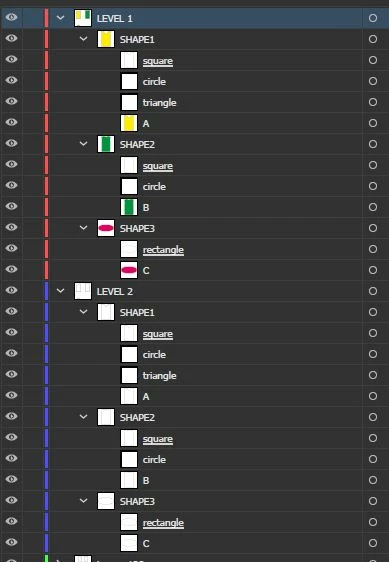
The problem is it works only with the objects in the first layer. I have multiple objecst with the same name in all the different layers of my doc.
Here's the script
#target illustrator

// Create a reference to the active document
var doc = app.activeDocument;

// Create an array of paths with their respective names
var tracciati = [
  { nome: "A", colore: "" },
  { nome: "B", colore: "" },
  { nome: "C", colore: "" }
];

// Create an array with the names of color samples present in the document
var campioni = [];
for (var i = 0; i < doc.swatches.length; i++) {
  var swatch = doc.swatches[i];
  campioni.push(swatch.name);
}

// Create a dialog window
var dialog = new Window("dialog", "Seleziona tracciati e colore di riempimento");
dialog.orientation = "column";

// Add a panel for path selection
var tracciatiPanel = dialog.add("panel", undefined, "Seleziona tracciati");
tracciatiPanel.alignChildren = "left";
tracciatiPanel.orientation = "column";

var dropdownsColori = [];

// Create dropdown menus for color selection for each path
for (var i = 0; i < tracciati.length; i++) {
  var tracciato = tracciati[i];

  var tracciatoGroup = tracciatiPanel.add("group");
  tracciatoGroup.orientation = "row";

// Add path label
var tracciatoLabel = tracciatoGroup.add("statictext", undefined, tracciato.nome);

// Add dropdown menu for color selection
var dropdownColori = tracciatoGroup.add("dropdownlist", undefined, campioni);
  dropdownColori.selection = 0;
  dropdownsColori.push(dropdownColori);
}

// Add an "OK" button to the dialog window
var okButton = dialog.add("button", undefined, "OK");
okButton.onClick = function() {
// Iterate through the color dropdown menus
for (var i = 0; i < tracciati.length; i++) {
    var tracciato = tracciati[i];
    var dropdownColori = dropdownsColori[i];

    // Get the index of the selected color
    var selectedColorIndex = dropdownColori.selection.index;

    // Get the corresponding color sample
    var selectedColor = doc.swatches[selectedColorIndex].color;

    // Select the corresponding path in the illustration
    var tracciatoSelezionato = doc.pathItems.getByName(tracciato.nome);
    tracciatoSelezionato.selected = true;

    // Apply the fill color to the selected path
    tracciatoSelezionato.fillColor = selectedColor;
  }

  // Close the dialog window
  dialog.close();
};

// Show the dialog window
dialog.show();
The layers before the script:
The layers after the script, as you can see not all objects A, B and C are filled.
Any help? Thanks!


 AdChoices