
Inspiring
June 12, 2019
Answered

Select everything inside current layer

  • June 12, 2019
  • 2 replies
  • 48807 views

Hello.

Quite new to adobe scripting so excuse my ignorance.
I want to select everything inside the current active layer through a jsx script.

From previous threads I've seen that this is one way to do it:

  var items = doc.activeLayer.pageItems;

  doc.selection = null;

  for(var i = 0; i<items.length; i++){

   var currentItem = items[i];

   alert(currentItem);

   currentItem.selected = true;

  }

This works for some of my assets, but not all. On the ones that the script does not work on it only gives the first child of the layer and stop there. The selection is applied to a part of the object but not everything. See attached picture for explanation ->
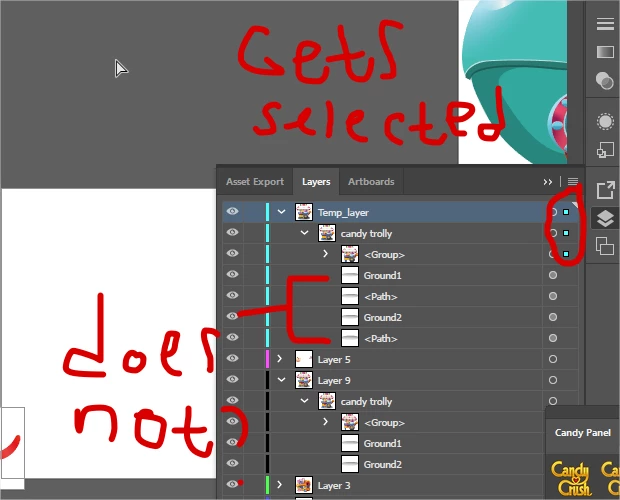
I am very confused, the items not getting selected are pathItems which should be part of the pageitems(?)
Any help is appriciated!

This topic has been closed for replies.
Correct answer Silly-V

Hi, first of all - I like your Candy Panel - curious about what it do and where it came from!

About the actual topic: yes it would be surprising to me too as my expectation of the selection behavior says the contained items should be also selected when you select a top-level group.

But with scripting it's also possible to delete non-deletable swatches and cause a crash, or to create empty groups that have no contents, too. So there's this experimentation that is a layer between how it ought to work and the final way we end up going about things.

For your case, you may try to use the scripting 'select all art in the layer' command, and it goes like this:

app.activeDocument.activeLayer.hasSelectedArtwork = true;

This should select all the stuff on the layer, so I hope it works for you.

2 replies

schroef
Inspiring
January 17, 2020

Why not use the build in function? You can select everything inside a layer by clicking on the open circle on the far right. Therre are quite some functions these layers have which are not well know i guess. But you probably need it for scripting i guess, i wasnt really sure looking at the question.


Silly-V
Silly-VCorrect answer
Legend
June 12, 2019

Hi, first of all - I like your Candy Panel - curious about what it do and where it came from!

About the actual topic: yes it would be surprising to me too as my expectation of the selection behavior says the contained items should be also selected when you select a top-level group.

But with scripting it's also possible to delete non-deletable swatches and cause a crash, or to create empty groups that have no contents, too. So there's this experimentation that is a layer between how it ought to work and the final way we end up going about things.

For your case, you may try to use the scripting 'select all art in the layer' command, and it goes like this:

app.activeDocument.activeLayer.hasSelectedArtwork = true;

This should select all the stuff on the layer, so I hope it works for you.

JojjeSAuthor
Inspiring
June 12, 2019

Thank you very much, that was the solution! Now it acts just as if i would press the selected art button inside illustrator, it selects everything.

Thank you again!