
Answered
Select multiple layers in layers panel, Illustrator CC 2015
Hi!
How can I select many layers at one time in layers panel?
Now I must hold on Shift and click on each layer individually.
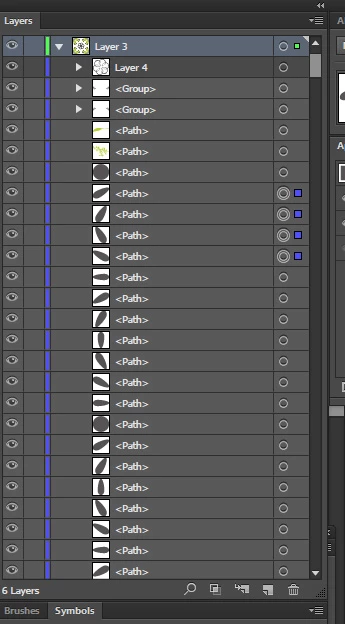

Hi!
How can I select many layers at one time in layers panel?
Now I must hold on Shift and click on each layer individually.
In this particular case it can be solved fast, because all the objects collected in one layer. You can just click on the lock icon of the first object and drag the mouse down through all the objects you need to select and release mouse. So all of them will be locked.
Then use command Object > Unlock All. As a result all the object you need will be selected.
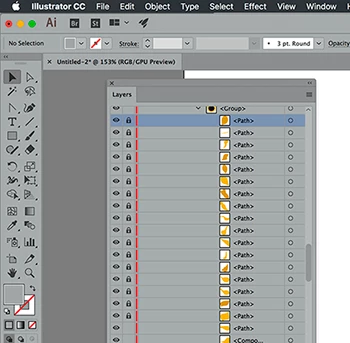
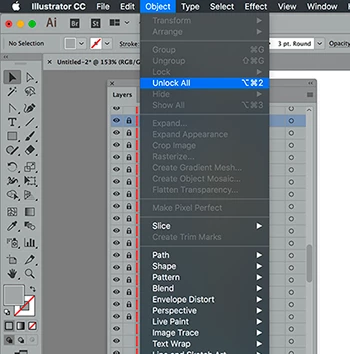
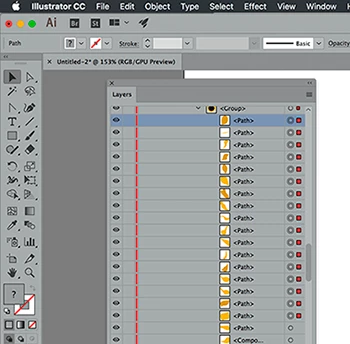
This approach works not only with layer locks but also with layers visibility (eyes in the first column of "Layers" panel) and then using "Object > Show All" command.
Also I can recommend make a selection once and save the selection with "Select > Save Selection" command. All saved selections are available at the bottom of the "Selection" menu.
Already have an account? Login
Enter your E-mail address. We'll send you an e-mail with instructions to reset your password.
 AdChoices