Participant
October 13, 2025
Answered

Select Multiple Objects then Paste much like the Place command with multiple files Illustrator

  • October 13, 2025
  • 5 replies
  • 398 views

Is there a way to select mutiple objects in a Illustrator doc and then paste each selection individually in that same file just like selecting and placing mutiple files into an Illustrator doc? 

Correct answer CarlosCanto

here's a basic test case script that will replace placeholder items in Layer 1, with source items in Layer 0 (top layer)


set up you test file like this
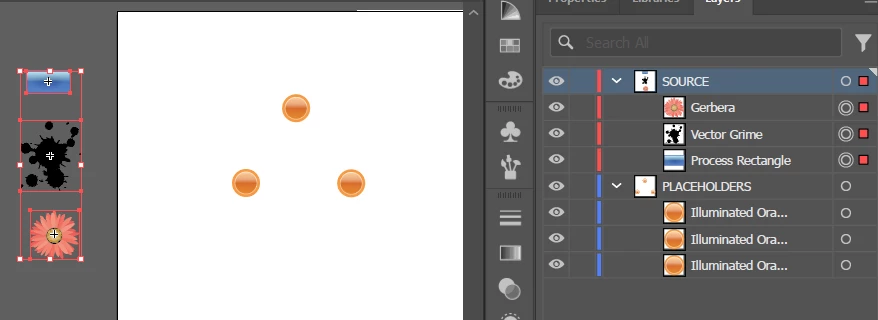
 

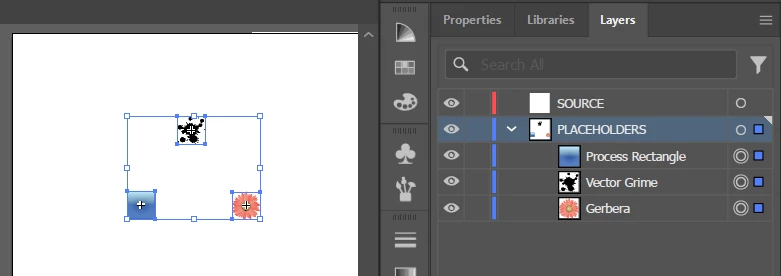
the script will match each Layer 1 placeholder item's size and position to each Layer 0 source item, then it will remove the placeholder item


result
 

// replace placeholder items
// place source items in layer 0
// place placeholder items in layer 1

function main() {
    var idoc = app.activeDocument;
    var sourceLayer = idoc.layers[0];
    
    // if first layer is empty, then skip
    if (sourceLayer.pageItems.length > 0) {
        var sourceItems = sourceLayer.pageItems;
        var sourcecount = sourceItems.length;

        var placeholderLayer = idoc.layers[1];

        var placeholderItems = placeholderLayer.pageItems;

        for (var a=sourceItems.length-1; a>=0; a--){
            sourceItems[a].width = placeholderItems[a].width;
            sourceItems[a].height = placeholderItems[a].height;
            
            sourceItems[a].position = placeholderItems[a].position;
            sourceItems[a].move(placeholderLayer, ElementPlacement.PLACEATEND);
        }

        // REMOVE PREVIOUS PLACEHOLDER ITEMS
        for (var b=0; b<sourcecount; b++) {
            placeholderLayer.pageItems[0].remove();
        }
    }
}

main();


 

5 replies

CarlosCanto
Community Expert
CarlosCantoCommunity ExpertCorrect answer
Community Expert
October 16, 2025

here's a basic test case script that will replace placeholder items in Layer 1, with source items in Layer 0 (top layer)


set up you test file like this


the script will match each Layer 1 placeholder item's size and position to each Layer 0 source item, then it will remove the placeholder item


result


// replace placeholder items
// place source items in layer 0
// place placeholder items in layer 1

function main() {
    var idoc = app.activeDocument;
    var sourceLayer = idoc.layers[0];
    
    // if first layer is empty, then skip
    if (sourceLayer.pageItems.length > 0) {
        var sourceItems = sourceLayer.pageItems;
        var sourcecount = sourceItems.length;

        var placeholderLayer = idoc.layers[1];

        var placeholderItems = placeholderLayer.pageItems;

        for (var a=sourceItems.length-1; a>=0; a--){
            sourceItems[a].width = placeholderItems[a].width;
            sourceItems[a].height = placeholderItems[a].height;
            
            sourceItems[a].position = placeholderItems[a].position;
            sourceItems[a].move(placeholderLayer, ElementPlacement.PLACEATEND);
        }

        // REMOVE PREVIOUS PLACEHOLDER ITEMS
        for (var b=0; b<sourcecount; b++) {
            placeholderLayer.pageItems[0].remove();
        }
    }
}

main();

 

Monika Gause
Community Expert
Community Expert
October 14, 2025

If you are referring to the way a lot of these clipboard extensions do it: no.

And if you use a clipboard extension (system plugin), then most probably Illustrator will give you a lot of issues.

CarlosCanto
Community Expert
Community Expert
October 14, 2025

I think the OP wants to "load" the copied objects to a "Pasting Gun" to click and paste one at a time, similar to the way Placing multiple files works

Participant
October 14, 2025

This is exactly what I am wanting to do. "Pasting Gun" is the perfect description. Exactly like Placing multiple files works.


CarlosCanto
Community Expert
Community Expert
October 14, 2025

can you elaborate on your workflow? why do you need such a feature? since there's no native feature or scripting api for "paste gun" perhaps someone comes up with a different approach to the problem


for example we could do it in reverse. 

1. use the Paintbrush Tool (B) to click as if it was your placing gun. The paths created would be used for placement

2. copy the objects you need to place with the gun

3. use a script to place the selected objects at the locations created by the Paintbrush Tool in step 1


m1b
Community Expert
Community Expert
October 14, 2025

It might be worth elaborating on exactly what you want to do @epic_Eclipse6433. Be as specific as you can, and posting a small example document is good too.

RobOctopus
Inspiring
October 13, 2025

in the simplest form you can do the following

app.executeMenuCommand('selectall');
app.copy(); //loads content to the clipboard
app.activeDocument = /* select new document here */
app.paste(); //pastes the content


if you want to be more selective for what you copy you would just need to do a loop of content and change their .selected value to true and then copy/paste.
