
Inspiring
July 8, 2025
Question

select same fill - two swatches, same color

  • July 8, 2025
  • 3 replies
  • 173 views

The same color under two different swatches is apparently considered two different fills. I guess I understand why but this is a huge issue for me when using select samefill, because I am importing DWGs that assign differently named AutoCAD fills to colors, which differ from drawing to drawing.
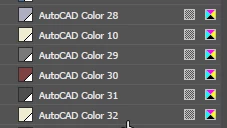
 

is there anyway to mollify this?

3 replies

Kurt Gold
Community Expert
Community Expert
July 8, 2025

How about merging the global swatches that share the same colour values?

Inspiring
July 8, 2025

Something else that is weird -


If I apply a swatch from my library to two different objects. and then use select same fill, it doesn't considerthem to have the same fill. I seemingly can't apply swatches directly from the library, I have to "import" then pick from the swatches toolbar. 

Ton Frederiks
Community Expert
Community Expert
July 8, 2025

Is in Preferences > General the "Select Same Tint %" checked?

Monika Gause
Community Expert
Community Expert
July 8, 2025

So you are importing AutoCAD files. And then exactly what are you doing step by step?