Answered
Selecting objects by fill color
Hi guys
Is possible to select objects by color in CMYK using JavaScript?
All I want to group several objects with the same fill color.
Many thanks for your time...
Please see the picture bellow...
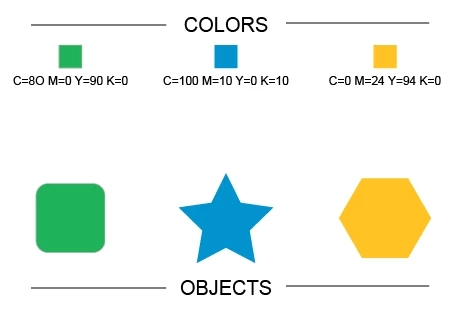

Hi guys
Is possible to select objects by color in CMYK using JavaScript?
All I want to group several objects with the same fill color.
Many thanks for your time...
Please see the picture bellow...
Hello Puthoskey all good?
Well, I wrote something as what I had said, notes:
This code just work to PathItems;
Just CMYKColor;
You need select one pathItem before perform the script;
It should read the fillColor of selected item and looping through all pageItems of the document, if the pageItem is a pathItem and have the same fillColor or strokeColor, it will be grouped with others;
If you want do this in other objects like textItems, you should follow the same logic;
Try, test and enjoy, contact us to more adjusts.
function selSameColor (){

    if(app.activeDocument.selection.length == 0){alert('Select a pathItem.'); return};
    if(app.activeDocument.selection.length > 1){alert('Select just one pathItem.'); return};


    var selFillColor = function(){

        var groupColor =  app.activeDocument.groupItems.add();


        if(app.activeDocument.selection[0].typename == 'PathItem'){
        var colorSel = new CMYKColor;
        colorSel.cyan = app.activeDocument.selection[0].fillColor.cyan;
        colorSel.magenta = app.activeDocument.selection[0].fillColor.magenta;
        colorSel.yellow = app.activeDocument.selection[0].fillColor.yellow;
        colorSel.black = app.activeDocument.selection[0].fillColor.black;
        }else{alert('This is not a pathitem.'); return};

        var itemsLength = app.activeDocument.pageItems.length;
        var items = app.activeDocument.pageItems;


        for (i = 0; i < itemsLength; i++){

            if(items.typename == 'PathItem'){

                if(items.fillColor.cyan == colorSel.cyan && items.fillColor.magenta == colorSel.magenta && items.fillColor.yellow == colorSel.yellow && items.fillColor.black == colorSel.black){
                    items.moveToBeginning(groupColor);
                }else if(items.strokeColor.cyan == colorSel.cyan && items.strokeColor.magenta == colorSel.magenta && items.strokeColor.yellow == colorSel.yellow && items.strokeColor.black == colorSel.black){
                    items.moveToBeginning(groupColor);
                };
            };

        };
    if(groupColor.pageItems.length > 0){groupColor.selected = true};
    };


    selFillColor ();

};


selSameColor ();
I hope it be useful, see ya soon man,
Best Regards,
-Vinícius Baptista
Already have an account? Login
Enter your E-mail address. We'll send you an e-mail with instructions to reset your password.
 AdChoices