leethestrange86
Known Participant
September 5, 2017
Answered

Selecting only one stroke

  • September 5, 2017
  • 1 reply
  • 410 views

Hey guys, I am a total noob and am trying to teach myself Illustrator by using tutorials online.  I am trying to follow this tutorial: How To Create an Editable Retro Text Style in Illustrator  but I get stuck where it says to select the second stroke and move it below the first stroke.

When I try to select one of the strokes I created, Illustrator automatically selects both, and no matter how I click or which tool I try it keeps selecting both.

Please help!

Thank you...
This topic has been closed for replies.
Correct answer Larry G. Schneider

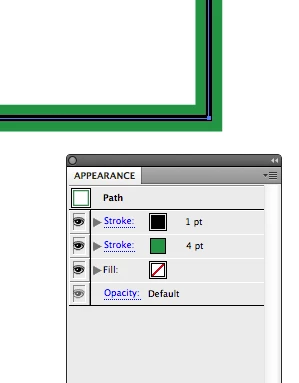
Open the Appearance panel. With that open, Select the path. It should show in the panel that there are two strokes and no fill for the path. Use the Select tool (Black Arrow) to drag the top stroke down in the panel until it is below the second one and release.

Here's the result

1 reply

Larry G. Schneider
Community Expert
Larry G. SchneiderCommunity ExpertCorrect answer
Community Expert
September 5, 2017

Open the Appearance panel. With that open, Select the path. It should show in the panel that there are two strokes and no fill for the path. Use the Select tool (Black Arrow) to drag the top stroke down in the panel until it is below the second one and release.

Here's the result

leethestrange86
Known Participant
September 5, 2017

Thank you so much!  I really appreciate it.