
aaronf31067511
Known Participant
June 17, 2019
Question

Sequential Numbered Callouts or Tags

  • June 17, 2019
  • 4 replies
  • 4299 views

I am looking for a script or plugin or trick to sequentially number callouts (other than CadTools... I have explored this option, not what I am looking for).

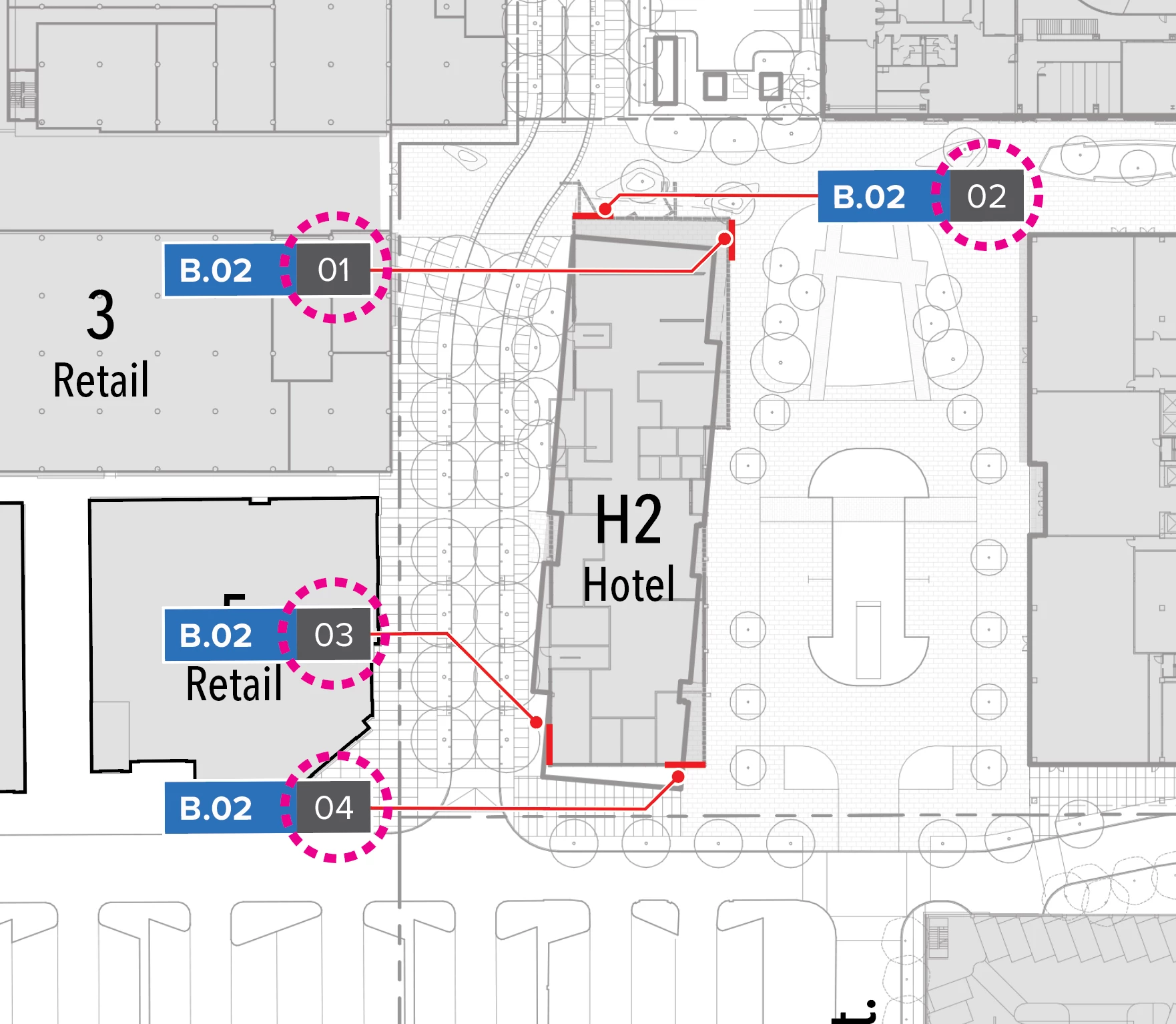
Basically, I need to be able to sequentially number the unique identifier in the pink dashed circle for each of the tags (I have hundreds, so manually changing is not ideal).

I need to create a way to automatically number this portion of the tag. I have made those numbers a different color so they can be easily selected apart from the rest of the tag. Ideally, if I delete one they would automatically re-number.. but I know that is a lot to ask. If that's not the case, at least being able to script the re-numbering. Any help would be much appreciated!!
This topic has been closed for replies.

4 replies

aaronf31067511
Known Participant
July 1, 2019

I am using the below script to number the grey box / "dynamic" portion of the tag. Basically, you select all the objects you want numbered and run the script. So in my case, I select same fill of the grey "dynamic" portion and run the script and it adds number, however formatting isn't quite right. 

I feel like I am almost there..  But I need help to edit a bit to get the formatting...

Basically, here is what I am looking for as the desired outcome. Need to adjust the following elements: 

  1. Change it to a defined font character and style, ie: Proxima Nova Regular, size= 17pt, tracking= -10, paragraph= align center.
  2. Define the color as a specific CMYK value, ie: C0 M0 Y0 K1
  3. Add leading 00's so the outcome would be 001 through 999 (this one I could do without if it's complicated, as I can use the "fix sequential numbers script" below to add the 00's if need be - or maybe you can help incorporate this as part of this script?).
  4. Center the 001 vertically and horizontally on the grey box
  5. Maintain the group, ie: so the number created is grouped with the rest of the tag.

Here is the script I'm using thus far...

Add numbers script

var document = app.activeDocument;           //Use the current open Ai File

var selected = document.selection;           //Use the current selection in Ai

for (var i = 0; i < selected.length; i++) {  //Iterate over every selected object

    var text = document.textFrames.add();    //Add a new text object

    text.contents = i + 1;                   //Set the corresponding number text

    text.top = selected.top - 10;         //Position the text object underneath

    text.left = selected.left;

    text.textRange.characterAttributes.size = 24;

    text.textRange.characterAttributes.fillColor = document.swatches[4].color; // use the 4th swatch's color

}

Fix Sequential Numbers Script

// fixing sequential numbers

// a script for Adobe Illustrator CSx-CCx

// For the selected text objects, change each content so that they become

// a sequential numerical values at even intervals from the backmost value

// to the foremost value.

// For the number of decimal places and the number of zero-filled digits,

// the largest one of the foremost value and the backmost value is adopted.

// (Fractions are rounded off as necessary.)

// ex. (the left end is the backmost and the right end is the foremost)

// 1 1 1 1 5     -> 1 2 3 4 5

// 1.0 x x x 5   -> 1.0  2.0  3.0  4.0  5.0

// 1 1 1 1 5.00  -> 1.00  2.00  3.00  4.00  5.00

// 1.0 1 1 1 6   -> 1.0  2.3  3.5  4.8  6.0

// 1 1 1 1 6     -> 1 2 4 5 6

// 01 1 1 1 5    -> 01 02 03 04 05

// 00 1 1 1 1 10 -> 00 02 04 06 08 10

// Hiroyuki Sato

// http://shspage.blogspot.com/2009/06/fixing-sequential-numbers.html

// 2018-10-03

main();

function main(){

  if( app.documents.length < 1 ){

    alert("ABORT\rthere's no open document");

    return;

  }


  var texts = [];

  var sel = app.activeDocument.selection;


  if(!(sel instanceof Array) || extractTextFrames(sel, texts) < 3){

    alert("ABORT\rplease select 3 or more text objects");

    return;

  }

  var num_to   = texts[0].contents - 0;

  var num_from = texts[ texts.length - 1 ].contents - 0;

  if(isNaN(num_to) || isNaN(num_from)){

    alert("ABORT\rthe foremost and the backmost text objects in the selection must be a number.");

    return;

  }


  var interval = (num_to - num_from) / (texts.length - 1);


  var decimal_places = 0;

  if( texts[0].contents.match(/\.(\d+)/)){

    decimal_places = RegExp.$1.length;

  }

  if( texts[ texts.length - 1 ].contents.match(/\.(\d+)/)){

    decimal_places = Math.max( decimal_places, RegExp.$1.length );

  }


  var zero_fill = 0;

  if( texts[0].contents.match(/^0+\d*/)){

    zero_fill = RegExp.lastMatch.length;

  }

  if( texts[ texts.length - 1 ].contents.match(/^0+\d*/)){

    zero_fill = Math.max( zero_fill, RegExp.lastMatch.length );

  }

  var s;

  for(var i = 0; i < texts.length; i++){

    s = (num_to - interval * i).toFixed(decimal_places);


    if( zero_fill > 1 ){

      while( s.match(/^\d+/)

             && RegExp.lastMatch.length < zero_fill ){

        s = "0" + s;

      }

    }


    texts.contents = s;

  }

}

// --------------------------------------

function extractTextFrames(s, arr){

  for(var i = 0; i < s.length; i++){

    if(s.locked || s.hidden){

        continue;

    } else if(s.typename == "TextFrame"){

      if(s.textRange.characters.length > 0) arr.push(s);

    } else if (s.typename == "GroupItem"){

      extractTextFrames(s.pageItems, arr);

    }

  }

  return arr.length;

}

renél80416020
Inspiring
July 1, 2019

Salut,

J'avais réalisé un script de test pour mettre les vignettes dans l'ordre...

D'après ce que j'avais compris du premier message.

Mais je peux faire à la demande.

Le Cloud d'Orange

de elleere

Toujours le même problème il faut un exemple avant et après l'exécution du script.

aaronf31067511
Known Participant
July 1, 2019

Hi Rene,

I think you have this correct! Thank you so much for your help!!

Here is a sample file to work with. I hope it helps.

Sample Download

renél80416020
Inspiring
June 19, 2019

Salut,

Je peux vous faire le script, il me suffit juste d'un exemple de fichier,

Me contacter par mail.

LR

Hello

I can make you the script, I just need an example file,

Contact me by e-mail.

exemple:

remove 03 05 07 08 09

CarlosCanto
Community Expert
Community Expert
June 19, 2019

I wrote a similar script for a client (sorry I can't share it). PM me if you're interested in getting a script written for your needs.

thanks

Carlos

CarlosCanto
Community Expert
Community Expert
June 19, 2019

here's a link for a manual solution that might help you as well

Can't make dot to dot work

Silly-V
Legend
June 19, 2019

I dug out and re-formatted a script I made from ages ago which did some basic labeling (immediately realized it's not even applicable here in any way), but realized one fundamental problem:

Illustrator has very little respect for a user's order in which they select the art - the stacking order is the law.

Without giving away too many trade secrets, what's another best strategy for re-numbering other than an intuitive approach dependent on the order in which a user selects the stuff?

barbara_a7746676
Community Expert
Community Expert
June 17, 2019

JET (James Talmadge) posted a couple of numbering scripts but I don't see them posted anymore. You might try contacting him.

aaronf31067511
Known Participant
June 17, 2019

I tried finding those scripts (I've read about them). Looks like they have been removed...

Srishti_Bali
Legend
June 18, 2019

Hi Aaron,

Thanks for reaching out. I am moving this discussion to Illustrator Scripting​ forum so that you can get more replies from our scripting experts.

Regards,

Srishti