
borntobeavictor
Participant
March 8, 2023
Answered

Settings to control mesh density/resolution when generating and exporting 3D objects

  • March 8, 2023
  • 1 reply
  • 544 views

I'm using Illustrator to turn some 2D drawings into 3D objects which I export as OBJ/GLTF to other software. The process is really quick and simple, however... I'm having trouble with the total lack of control over the geometry density/resolution of the generated 3D model.


I've experimented with increasing the number of anchor points and size of the drawing to see if I would get a 3D model made of more polygons and vertices, but had no success.


Is there a proper way to control the generated 3D mesh density?
This topic has been closed for replies.
Correct answer Anshul_Saini

Hi @borntobeavictor,


Thank you for reaching out. Unfortunately, at the moment, there is no way to directly control the mesh density or resolution when generating and exporting 3D objects in Illustrator. However, we are continuously working on improving our 3D features and taking user feedback into account for future updates.

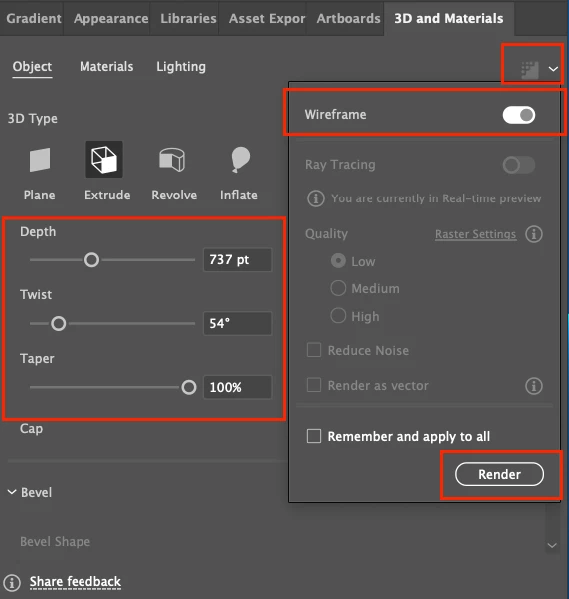
However, you may try rendering as a wireframe: Select Wireframe in Render Settings to easily edit the 3D properties of the object, such as Depth, Taper, and Twist and see if that serves your purpose.


If you would like to suggest any feature or any other ideas for improving our 3D capabilities, please feel free to post on our UserVoice forum here: https://illustrator.uservoice.com/forums/935607-illustrator-features-coming-soon/suggestions/44741965-3d-and-materials-new-feature-map-art-and-other-fe


Thank you for your understanding, and let us know if you have any further questions or concerns.


Best,

Anshul Saini

1 reply

Anshul_Saini
Community Manager
Anshul_SainiCommunity ManagerCorrect answer
Community Manager
March 11, 2023

Hi @borntobeavictor,


Thank you for reaching out. Unfortunately, at the moment, there is no way to directly control the mesh density or resolution when generating and exporting 3D objects in Illustrator. However, we are continuously working on improving our 3D features and taking user feedback into account for future updates.

However, you may try rendering as a wireframe: Select Wireframe in Render Settings to easily edit the 3D properties of the object, such as Depth, Taper, and Twist and see if that serves your purpose.


If you would like to suggest any feature or any other ideas for improving our 3D capabilities, please feel free to post on our UserVoice forum here: https://illustrator.uservoice.com/forums/935607-illustrator-features-coming-soon/suggestions/44741965-3d-and-materials-new-feature-map-art-and-other-fe


Thank you for your understanding, and let us know if you have any further questions or concerns.


Best,

Anshul Saini