tombarden
Participant
June 13, 2020
Answered

Shape dimensions don't adjust when shape rotated

  • June 13, 2020
  • 1 reply
  • 1040 views

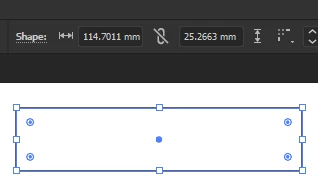
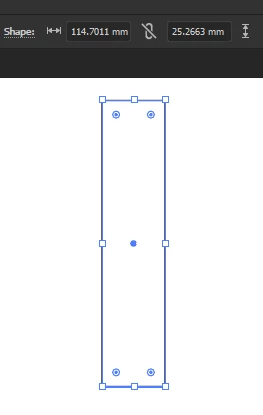
When I create a shape such as a rectangle the dimensions are correct. But if I rotate the shape the horizontal and vertical dimensions don't switch. Is there a way to change this? See screenshot below for clearer example.


This topic has been closed for replies.
Correct answer Ton Frederiks

That is correct, the dimensions of the shape don't change.

Have a look at Window > Transform panel.

You will see that the properties of the shape are different from the W/H.


1 reply

Ton Frederiks
Community Expert
Ton FrederiksCommunity ExpertCorrect answer
Community Expert
June 13, 2020

That is correct, the dimensions of the shape don't change.

Have a look at Window > Transform panel.

You will see that the properties of the shape are different from the W/H.


Participant
February 11, 2022

Is this a recent change with Illustrator? I have been using the program for over 10yrs on a daily bases and the size always swapped when a shape was rotated. Makes it hella confusing when trying to design signage..haha

Ton Frederiks
Community Expert
Community Expert
February 11, 2022

This is true for Shape objects, like ellipses, rectangles and polygons.

Look in the expanded Transform panel. The top part shows the behaviour you want, the bottom part the size of the shape.