
Participant
August 30, 2023
Answered

Shape don't have fill color but looks colored inside in specific layer

  • August 30, 2023
  • 1 reply
  • 288 views

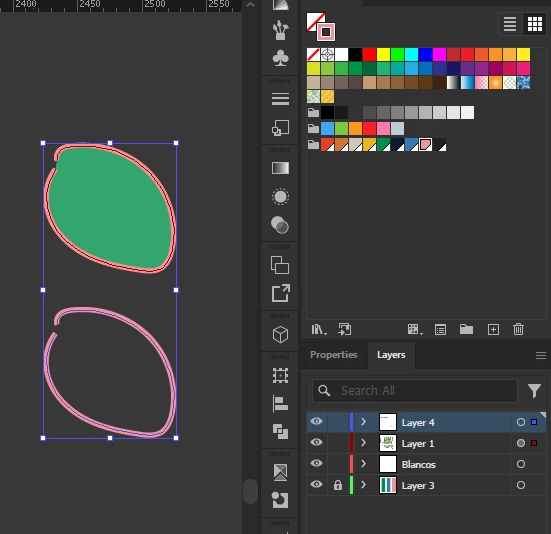
Hi, for some reason my shapes are getting colored in green in 'layer 1', but when I use another layer, it gets fixed. As you can see in the color panel, both shapes are the same, only pink stroke. Does anybody know how to fix this? I'm in Illustrator btw
 

This topic has been closed for replies.
Correct answer Larry G. Schneider

Can you select Layer 1 and show the Appearance panel? The gray color in the circle at the right indicates something is applied to the layer.

1 reply

Larry G. Schneider
Community Expert
Larry G. SchneiderCommunity ExpertCorrect answer
Community Expert
August 30, 2023

Can you select Layer 1 and show the Appearance panel? The gray color in the circle at the right indicates something is applied to the layer.

Participant
August 30, 2023

That was it! Thank you very much. 
I hadn't even noticed that the circle was full gray