Participant
September 24, 2021
Answered

Shape Properties and Transform Issues

  • September 24, 2021
  • 4 replies
  • 1121 views

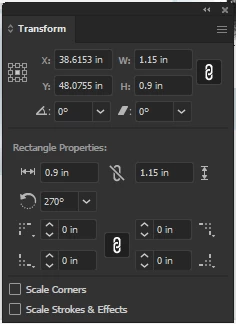
Hello all.  I came across an issue regarding a contradiction of shape hight and width. If I draw a rectangle, its property sizes the transform sizes contradict each other (See attached).  I wonder if this is an issue in coding.

This topic has been closed for replies.
Correct answer tromboniator

There is no contradiction. The information at the top of the panel is the standard path information, which includes the width and height of the bounding both which contains the path and, unless the path is circular, these dimensions will change as the path is rotated. The information at the bottom of the panel is only present if the path is a Live Shape, created by the Rectangle Tool, Rounded Rectangle Tool, Ellipse Tool, Polygon Tool, Shaper Tool, or Line Segment Tool, and it includes with some caveats) the dimensions and rotation of the shape as it was originally established. In general, the dimensions will not change with the rotation of the object, because, unlike the bounding box dimensions, they are independent of orientation. A line segment created using the Line Segment Tool will be shown as a line segment length and an angle. Rotating the shape wil change the bounding box dimensions, but the line segment length will not change. If you go to the Object menu > Shape > Expand Shape the object will cease to be a Live Object, i.e. will become an ordinary path.The Shape information will disappear, leaving only the bounding box dimensions. I hope this makes sense; I'm struggling to give a clear explanation.


Peter
4 replies

Participant
September 24, 2021

Moderator, please close this thread.  The community helped me understand.  Thanks

Ashutosh_Mishra
Inspiring
October 17, 2021

Glad to hear your issue is now resolved. All the threads are open on the community so that other users with similar concerns may take help from these discussions.

Please feel free to reach out if you've any other concerns. We'll be happy to help.


Regards,

Ashutosh

tromboniator
Community Expert
tromboniatorCommunity ExpertCorrect answer
Community Expert
September 24, 2021

There is no contradiction. The information at the top of the panel is the standard path information, which includes the width and height of the bounding both which contains the path and, unless the path is circular, these dimensions will change as the path is rotated. The information at the bottom of the panel is only present if the path is a Live Shape, created by the Rectangle Tool, Rounded Rectangle Tool, Ellipse Tool, Polygon Tool, Shaper Tool, or Line Segment Tool, and it includes with some caveats) the dimensions and rotation of the shape as it was originally established. In general, the dimensions will not change with the rotation of the object, because, unlike the bounding box dimensions, they are independent of orientation. A line segment created using the Line Segment Tool will be shown as a line segment length and an angle. Rotating the shape wil change the bounding box dimensions, but the line segment length will not change. If you go to the Object menu > Shape > Expand Shape the object will cease to be a Live Object, i.e. will become an ordinary path.The Shape information will disappear, leaving only the bounding box dimensions. I hope this makes sense; I'm struggling to give a clear explanation.


Peter

Participant
September 24, 2021

Your emplanation makes sense but why the need to expand?  In my opinion it should reflect the actual height and width when rotated.  I noticed the discrepancy on the top toolbar where it shows H and W of the live shape after the rotation was made.  I now know the solution but the extra step to expand is a little redundant in my opinion.  Thanks!

Jacob Bugge
Community Expert
Community Expert
September 24, 2021

default0,


How about the rectangle rotation (270 degrees)?


michelew83603738
Community Expert
Community Expert
September 24, 2021

@Jacob Bugge they may have rotated the rectangle after initially drawing it. Simply looking at this capture isn't enough to know what the problem is, right?

Participant
September 24, 2021

You are correct.  Shapes were created and then some were rotated.  I assumed the height and width on the shape would update itself since I rely on those measurements on the top tool bar.  Thanks fkr your input

michelew83603738
Community Expert
Community Expert
September 24, 2021

Can you please explain more what problem you are having.