
Inspiring
November 3, 2017
Answered

Shift-click to select multiple artb..

  • November 3, 2017
  • 2 replies
  • 375 views

Hello!

These new updates and what not are really starting to stress me out.. Adding features that doesn't work or if they do work someway they just annoy more than help..

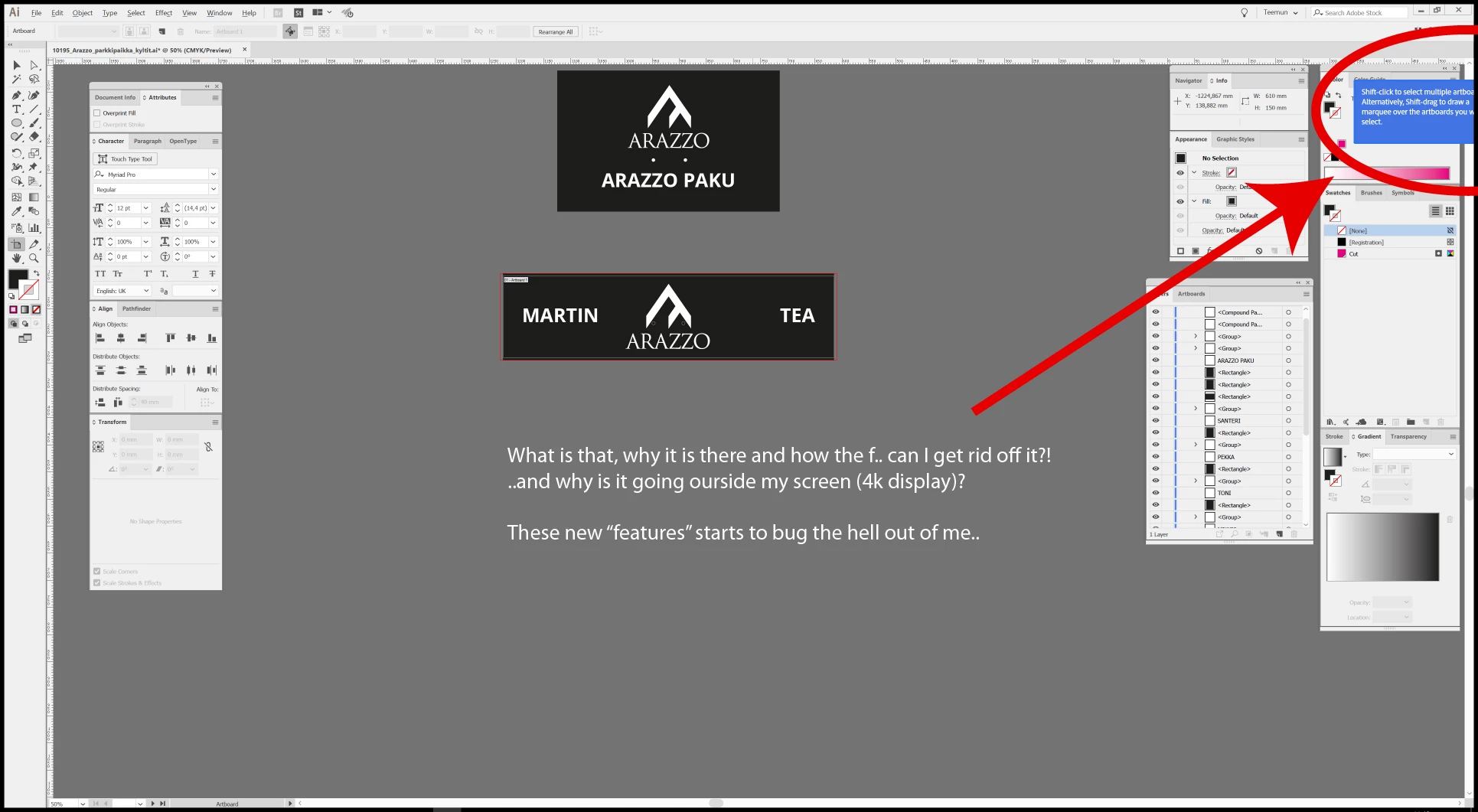
I don't even want to go to 4k scaling issue that all Adobe products have, but I would like to know, that what is that annoying blue box that appears in the corner of my screen when I am in page setup in Illustrator and mostly how to get rid of it?
This topic has been closed for replies.
Correct answer Teemu_Arazzo

Thank you and sorry Mike, if the question was unclear to you;

"..what is that annoying blue box that appears in the corner of my screen when I am in page setup in Illustrator and mostly how to get rid of it?"

Your partially correct answer (there is no option for application frame under Window in WINDOWS), got me thinking that it actually might have something to do with screen mode; I had to go to "Normal" mode, not Full screen, so that I could click that "Okay" -button, which then actually removed the blue box, as my initial question asked.

Anyways thanks for helping, kind of..

2 replies

Teemu_ArazzoAuthorCorrect answer
Inspiring
November 6, 2017

Thank you and sorry Mike, if the question was unclear to you;

"..what is that annoying blue box that appears in the corner of my screen when I am in page setup in Illustrator and mostly how to get rid of it?"

Your partially correct answer (there is no option for application frame under Window in WINDOWS), got me thinking that it actually might have something to do with screen mode; I had to go to "Normal" mode, not Full screen, so that I could click that "Okay" -button, which then actually removed the blue box, as my initial question asked.

Anyways thanks for helping, kind of..

Monika Gause
Community Expert
Community Expert
November 6, 2017

Please mark your own answer as correct, now that the problem is solved. Thank you.

Mike_Gondek10189183
Community Expert
Community Expert
November 3, 2017

Compose your questions better, so we can understand what you need. Since you provided a screenshot, will try to help you.

There is an Okay on the right you need to click., to make this go away.

To get to that

window >> application frame

then slide over you application so you can see the option to lick okay.

Your screenshot appears to be windows, so not 100% sure if application frame exists, but this should get you on the path to resolving your stressful issue.