Participating Frequently
February 19, 2024
Answered

Shift key down in Illustrator

  • February 19, 2024
  • 7 replies
  • 688 views

Is there a way in Illustrator to mantaining shift key down without pressing all the time? And then, of course, Shift key up.


Thanks in advance

This topic is closed to new replies. Start a new post to keep the conversation going.
Correct answer Mike_Gondek10189183

I think you are going to be really happy with this suggestion, but the change will be for all apps.


On mac you can edit the accessibility preference, to turn on sticky keys.  Windows should most likely have the same as they really are similar on so many prefs


.
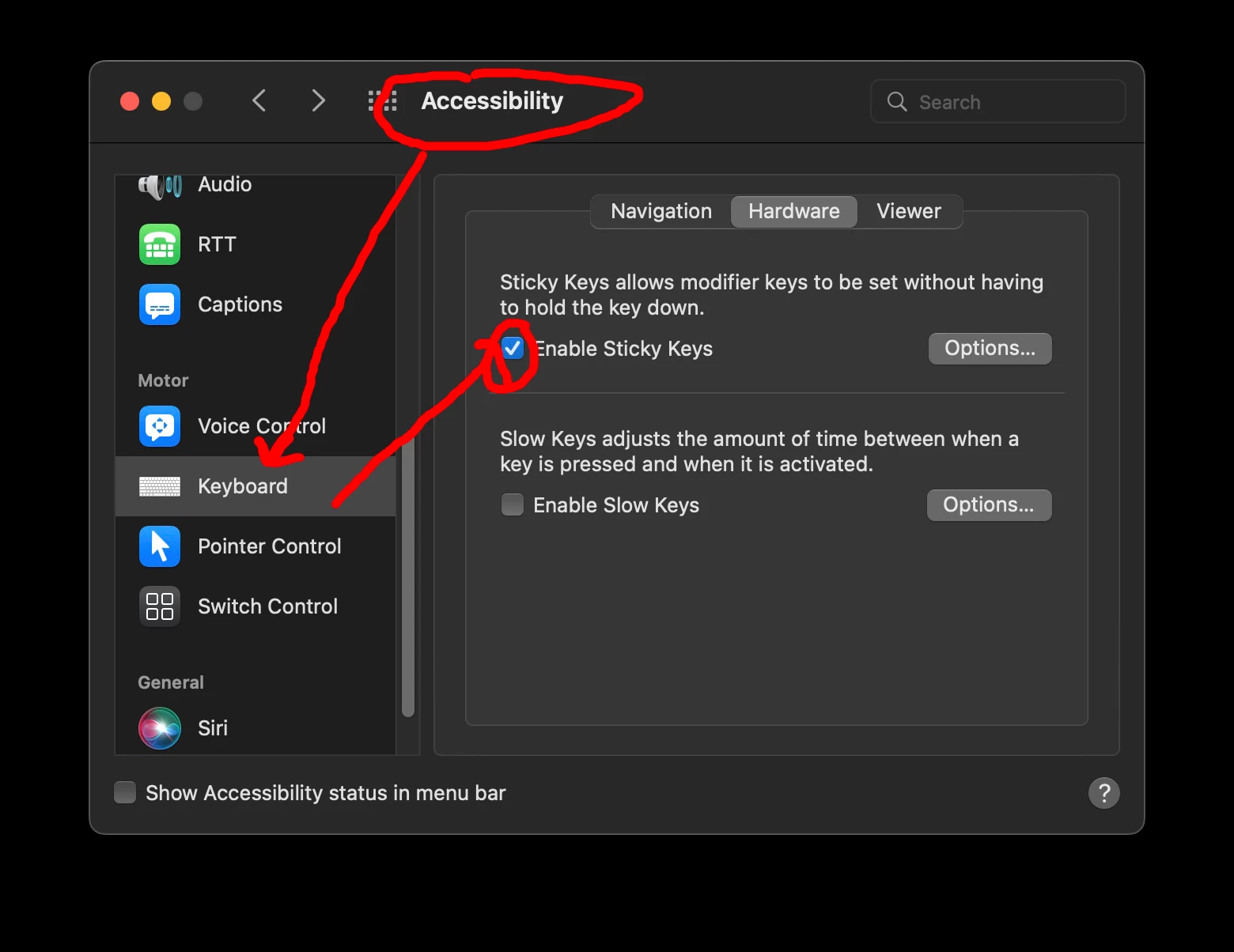
 

Click on the options button to help with features such as enabling disabling.


7 replies

Mike_Gondek10189183
Community Expert
Mike_Gondek10189183Community ExpertCorrect answer
Community Expert
February 20, 2024

I think you are going to be really happy with this suggestion, but the change will be for all apps.


On mac you can edit the accessibility preference, to turn on sticky keys.  Windows should most likely have the same as they really are similar on so many prefs


.


Click on the options button to help with features such as enabling disabling.


Participating Frequently
February 20, 2024

Thank you very much. This s a great suggestion.

Monika Gause
Community Expert
Community Expert
February 19, 2024

In Illustrator you cannot set it up like that.

What is it that you need to achieve with that setting?

Participating Frequently
February 19, 2024

Thank you for answer.

I'd like drawing straight lines or 45° angled without staying with my finger on shift key.

Jacob Bugge
Community Expert
Community Expert
February 19, 2024

N.H.,


Smart Guides are your friends, saying when you are close enough to (snap to) 0/45/90 degrees and further (or other angles that you can choose freely).


You can read on here,

https://helpx.adobe.com/search-results.html?q=smart+guides+illustrator&scope=%5B%22helpx%22%5D&subscope=%5B%5D&limit=10&start_index=0&sort_orderby=relevancy&sort_order=desc&post_facet_filters=%7B%22applicable_products%22%3A%5B%5D%7D


You may wish to turn that help off if/when you wish to draw freely close to those angles, in which case they can be overly helpful.