
HenkeH2
Inspiring
June 15, 2023
Answered

Shortcut for "replace" in "Save as" dialog box

  • June 15, 2023
  • 3 replies
  • 493 views

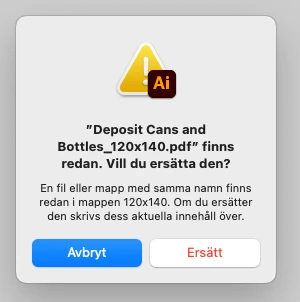
See picture below. You don´t have to understand swedish for this, just focus on the two buttons at the bottom.  I´m looking for keyboard shortcuts. "Enter" on the keyboard will click the left button, what key can I press to click the right button?
This topic has been closed for replies.
Correct answer Kurt Gold

In the Mac System Preferences, you can turn on the Keyboard navigation.


Usually, you should then be able to change the focus of buttons with the Tab key, followed by hitting the space bar to execute.


3 replies

Kurt Gold
Community Expert
Kurt GoldCommunity ExpertCorrect answer
Community Expert
June 15, 2023

In the Mac System Preferences, you can turn on the Keyboard navigation.


Usually, you should then be able to change the focus of buttons with the Tab key, followed by hitting the space bar to execute.


HenkeH2
HenkeH2Author
Inspiring
June 15, 2023

Thanks, it worked! I thought I already had this turned on since I could do some keyboard navigation.

Ton Frederiks
Community Expert
Community Expert
June 15, 2023

Tab?

HenkeH2
HenkeH2Author
Inspiring
June 15, 2023

No, it does nothing.

Ton Frederiks
Community Expert
Community Expert
June 15, 2023

Yes, I see. No shortcut as far as I can tell.

HenkeH2
HenkeH2Author
Inspiring
June 15, 2023

Btw, I´m on a Mac as you probably can see.