


Aug 4, 2017 12:52 AM UTC
Answered

Show all and render anchor point handles

Hi,

I am trying to create a type style logo that shows all the anchor point handles used to create it, and am failing to find an option to view all handles at once on an object. When more than one point of an object is selected using the direct selection tool handles begin disappearing, so I cannot use print screen for a quick solution.

Does anyone know of a way to show all handles of an object at once, or better yet, render them out along with the image?

Bill Silbert
Bill SilbertCorrect answer
Community Expert
Aug 4, 2017 1:22 AM UTC

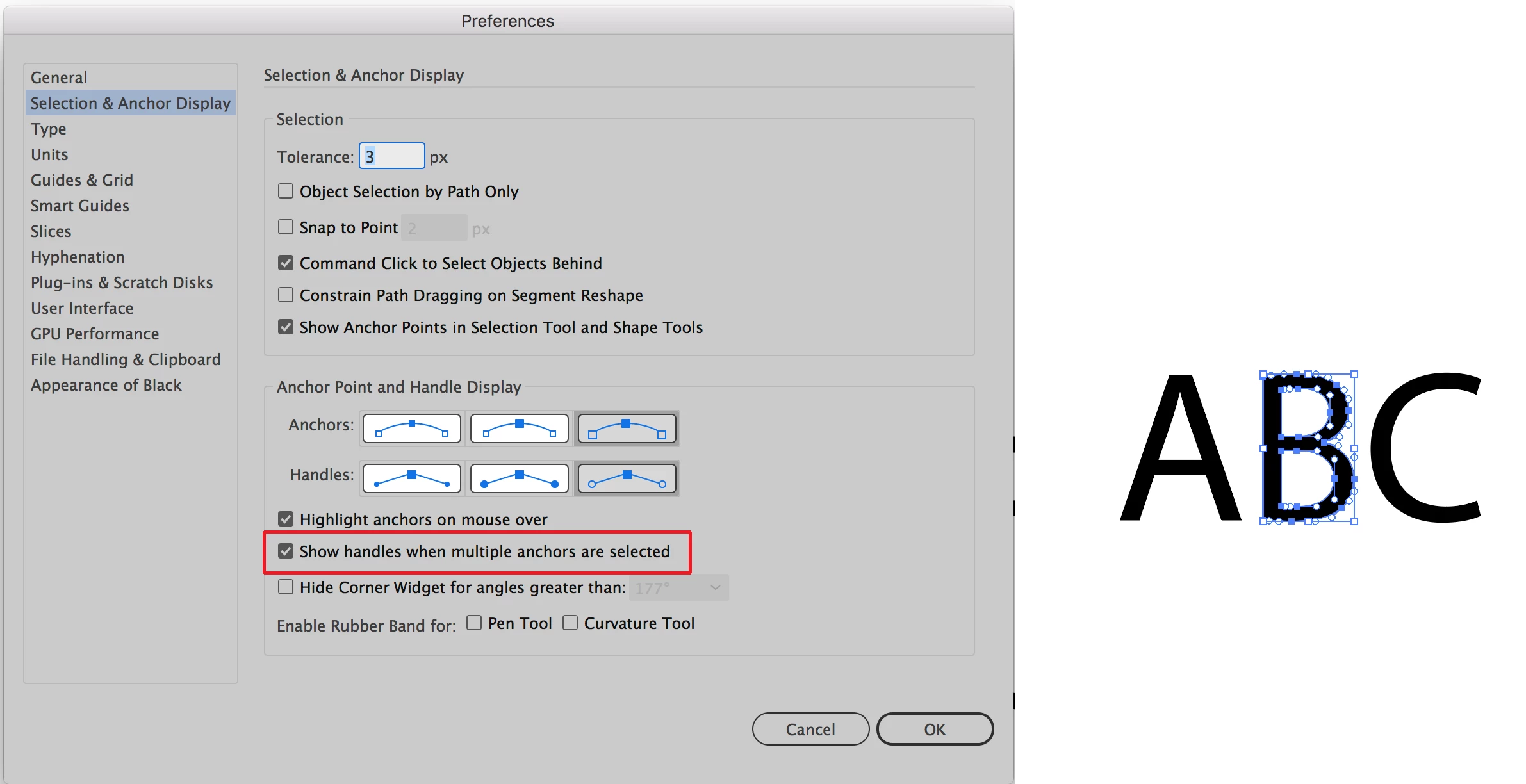
See screen shot below:

In The Selection & Anchor Point section of the Illustrator Preferences check Show handles when multiple anchors are selected. Then marquis (lasso) the object using the direct selection tool as in example above right. Hope that's why you're looking for.

8 replies

Participant
Dec 4, 2024 6:38 PM UTC

CTRL-H

Translate
designer352523165
Participant
Jul 25, 2021 2:12 AM UTC

If you still can't find what you're looking for even after setting up the Preferences menu, you can go to View < Show Edges. 

Translate
Participant
Aug 27, 2021 1:13 PM UTC

And if I still can't see any handles? Everything was working fine yesterday. Today, the handles are gone. I've followed all previous steps, my preferences are correct, still nothing. I've spent 2 hours now trying to get my handles back. 😞  

Translate
Participant
Nov 27, 2017 6:33 PM UTC

Thank you, that worked!

Translate
Monika Gause
Community Expert
Community Expert
Aug 4, 2017 2:18 AM UTC

if you want to deaw the handles as paths, there's a script that does it: generate handles, available from here https://design.tutsplus.com/articles/20-free-and-useful-adobe-illustrator-scripts--vector-3849

Translate
Aug 4, 2017 9:24 AM UTC

Great, I'll take a look into a script solution today. Thanks a bunch Monika

Translate
Bill Silbert
Community Expert
Bill SilbertCommunity ExpertCorrect answer
Community Expert
Aug 4, 2017 1:22 AM UTC

See screen shot below:

In The Selection & Anchor Point section of the Illustrator Preferences check Show handles when multiple anchors are selected. Then marquis (lasso) the object using the direct selection tool as in example above right. Hope that's why you're looking for.

Translate
Aug 4, 2017 9:20 AM UTC

Thanks for the prompt reply Bill. That's what I was looking for to start the process off.

Translate