
Sign Extension not working for Win10 home-edition
Dear Support-Team,
I have two different system:
- Desktop-PC using windows10 professional edition 64-bit.
- Laptop using windows10 home edition 64-bit.
On both systems the old "Adobe Illustrator CC 2018" is installed and running.
One of our customers is still using this old Illustrator version and we have developed a plugin and extension for it.
When I install the plugin and extension on both systems, the extensions only work on the desktop-pc and not on the laptop.
The only way to make the extensions work on the laptop is by opening the registry-editor, browsing to "HKEY_CURRENT_USER\SOFTWARE\Adobe\CSXS.8" and adding the string "PlayerDebugMode" with the value "1". After that, the extensions also work on the laptop. But I dont want the customer to do this.
I have signed the extensions using the "ZXPSignCmd.exe" and a self-signed certificate.
On both desktop-pc and laptop, when I verify the signed package, I get the following output:
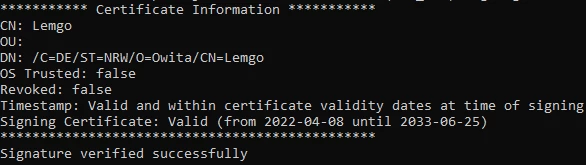
It says "Timestamp valid", but "OS Trusted: false". But nevertheless it is working on the desktop-pc.
Even when I sign the extensions with a new self-signed certificate on the laptop under win10-home, the resulting extension-package is only working on the desktop-pc under win10-professional and not on the laptop itself.
The "manifest.xml" and everything is completely the same.
I copied the extensions on both systems in the folder "C:\Program Files\Adobe\Adobe Illustrator CC 2018\Support Files\Required\CEP\extensions".
What am I missing here?
I am grateful for any help. Thank you very much in advance.
Best Regards,
Fabian Taubitz
 AdChoices