Participant
March 19, 2019
Answered

Simple DATAMATRIX code

  • March 19, 2019
  • 10 replies
  • 4911 views

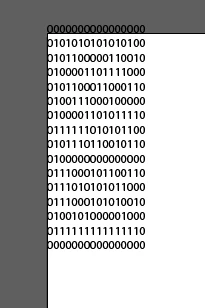
I got this "simple" code for generating DATAMATRIX (ascii) (link).

It works great in Extend Script but doesn't work in Illustrator.

Please help.

This topic is closed to new replies. Start a new post to keep the conversation going.
Correct answer Silly-V

Now is your great opportunity to port Node.js code into ancient EcmaScript 3!

What you have to do it go to https://github.com/tualo/tualo-datamatrix/blob/master/lib/datamatrix.js . and make it work inside of your Illustrator.

At brief look-over it does not appear that this code uses many modern features for ES3, so this will likely be an easy task!

The only modern feature I could see is the "exports" statement at the very bottom. I think you can just get rid of that.

Actually I couldn't help myself and did a test.

If you put in the code above with my exact instructions, it works!

/*

... the datamatrix.js code pasted in above ...

*/

var doc = app.activeDocument;

var str = "ABCDEFG!";

var dm = new Datamatrix();

var ascii = dm.getDigit(str, false);

var newText = doc.textFrames.add();

newText.size = [500, 500];

newText.contents = ascii;

10 replies

Silly-V
Silly-VCorrect answer
Legend
March 19, 2019

Now is your great opportunity to port Node.js code into ancient EcmaScript 3!

What you have to do it go to https://github.com/tualo/tualo-datamatrix/blob/master/lib/datamatrix.js . and make it work inside of your Illustrator.

At brief look-over it does not appear that this code uses many modern features for ES3, so this will likely be an easy task!

The only modern feature I could see is the "exports" statement at the very bottom. I think you can just get rid of that.

Actually I couldn't help myself and did a test.

If you put in the code above with my exact instructions, it works!

/*

... the datamatrix.js code pasted in above ...

*/

var doc = app.activeDocument;

var str = "ABCDEFG!";

var dm = new Datamatrix();

var ascii = dm.getDigit(str, false);

var newText = doc.textFrames.add();

newText.size = [500, 500];

newText.contents = ascii;

Participant
March 19, 2019

Thank you for your fast reply.

I done it as you said

first code datamatrix.js

and at the bottom

your code.

I saved this and run it from Illustrator "Scripts/Other Scripts.."

but doesn't work. I don't know what I am doing wrong.

Do I need node.js installed?

Is it possible for you to send me link to your working version of jsx file.

Thank you very much.

Silly-V
Legend
March 20, 2019

It's easy - you probably just didn't take out the export statement like I have instructed?

Make sure the line "export Datamatrix" or whatever - is gone.