February 2, 2016
Answered

??? Simple Script needed for Illustrator ???

  • February 2, 2016
  • 3 replies
  • 1728 views

Greetings.

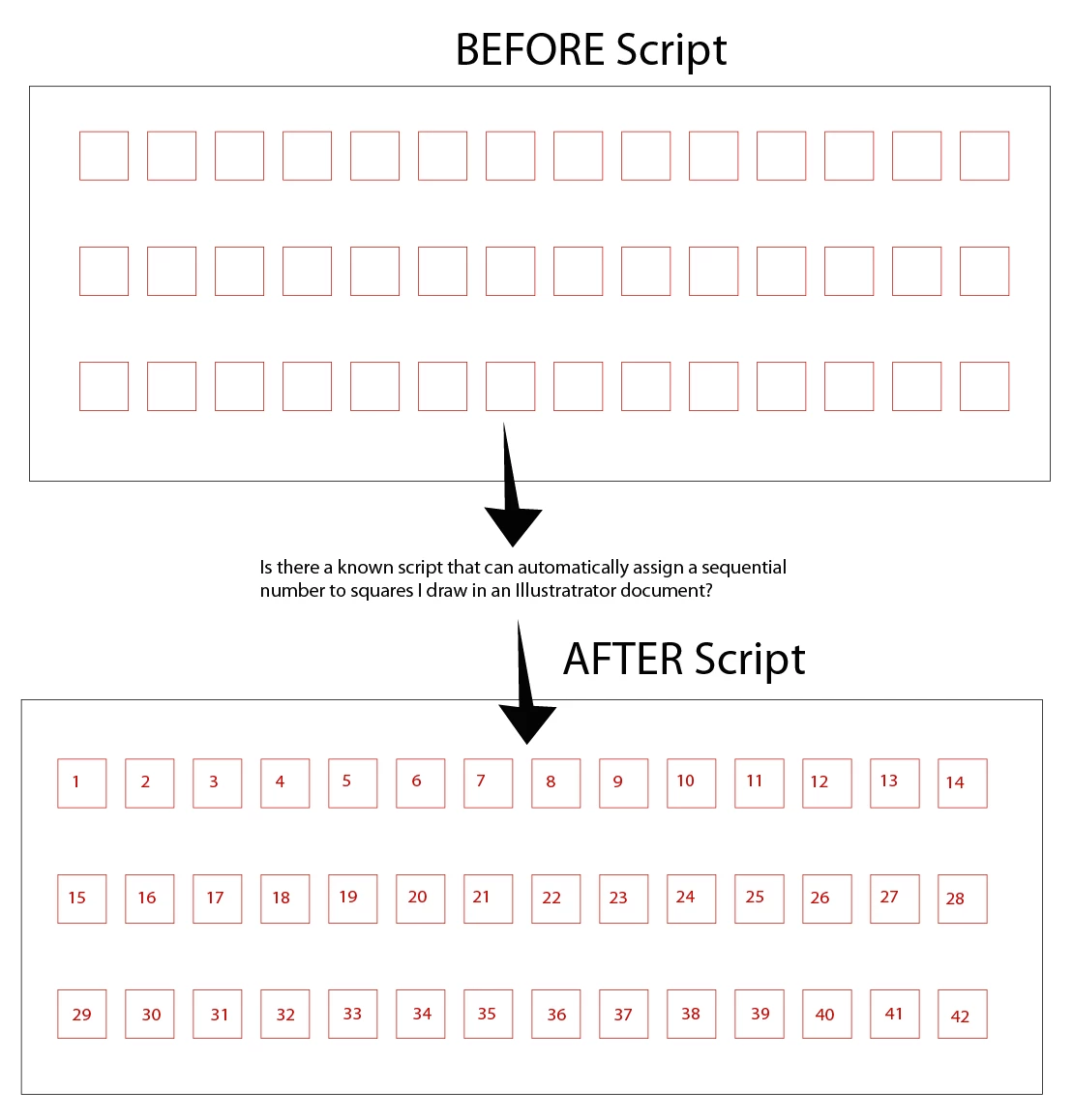
I was wondering if anyone knew of a known script out there that for Illustrator that could automate this process (please see attached file).

Much appreciated!

This topic has been closed for replies.
Correct answer Qwertyfly___

as long as all the boxes are aligned then this should do the trick.

// number Items

var doc = app.activeDocument;

var items = doc.pathItems;

var loc = [];

for(var i = 0; i < items.length; i++){

    var item = items;

    loc.push([item.position[0], item.position[1], item]);

}

loc.sort(function (a, b) {

    if (a[1] > b[1]){

        return -1;

    }else if (a[1] < b[1]){

        return 1;

    }else{

        if (a[0] < b[0]){

            return -1;

        }else if (a[0] > b[0]){

            return 1;

        }

        return 0;

    }

});

for(i = 0; i < loc.length; i++){

    var txt = doc.textFrames.add();

    txt.contents = i+1;

    //alert(loc[1][2].left);

    txt.position = [loc[2].left+10,loc[2].top - 10];

}

3 replies

Qwertyfly___
Qwertyfly___Correct answer
Legend
February 2, 2016

as long as all the boxes are aligned then this should do the trick.

// number Items

var doc = app.activeDocument;

var items = doc.pathItems;

var loc = [];

for(var i = 0; i < items.length; i++){

    var item = items;

    loc.push([item.position[0], item.position[1], item]);

}

loc.sort(function (a, b) {

    if (a[1] > b[1]){

        return -1;

    }else if (a[1] < b[1]){

        return 1;

    }else{

        if (a[0] < b[0]){

            return -1;

        }else if (a[0] > b[0]){

            return 1;

        }

        return 0;

    }

});

for(i = 0; i < loc.length; i++){

    var txt = doc.textFrames.add();

    txt.contents = i+1;

    //alert(loc[1][2].left);

    txt.position = [loc[2].left+10,loc[2].top - 10];

}

Inspiring
February 3, 2016

Nice sort function Qwertyfly.

Qwertyfly___
Legend
February 3, 2016

Thanks!

here is the same sort function for the hard core among us...


loc.sort(function(a,b){return a[1]>b[1]?-1:(a[1]<b[1]?1:(a[0]<b[0]?-1:(a[0]>b[0]?1:0)));});

Zantcor
Inspiring
February 2, 2016

Let me ask this, are all the squares the same size?  I'm sure if they are the same size that a script would be do the following;

Prompt user for number of squares, generate squares and as it is generating them it could place the number in the middle of the square it just created.  I've pasted below a script that I used for step and repeat patterns that fill art boards.  I never got around to finishing it but it might help someone who has some extra time.

// 1-5-15 Daryl R. Smith

// This script copies the artwork to the Small Template and spits out 98 copies on the sheet.

#target illustrator;

//plushresizechoice = true;

//alert (plushresizechoice)

if (plushresizechoice == true)

{

    resizeplushlarge ()

    movetotemp ()

    }/*end if*/ else

{

    movetotemp ()

    }//end else

var thisDoc = app.activeDocument;

    var artSel = thisDoc.selection;

    var selLen = artSel.length;


    var newLayer = thisDoc.layers.add();

        newLayer.name = "Die Layer";

    var artGroup = thisDoc.groupItems.add();

        artGroup.name = "Art Group Build";

    for(i=0;i<selLen;i++)

        artSel.moveToEnd(artGroup);


var artWidth = artGroup.width;

var artHeight =artGroup.height;          

function resizeplushlarge()

{

    if (artWidth > artHeight)

        {

           var a = (144/artWidth)*100;

           artGroup.resize(a,a);

         }  

    if (artHeight > artWidth)    

        {

           var b = (72/artHeight)*100;

           artGroup.resize(b,b);

         }


     var selecteditem = app.activeDocument.groupItems[0];


var artWidth = selecteditem.width;

var artHeight =selecteditem.height;   

if (artHeight > 72)

    {

       var c = (72/artHeight)*100;

      selecteditem.resize(c,c);

      }                

}

function movetotemp()

{

var currDoc = app.activeDocument;

copy();

var xLargeT = File("SERVER LOCATION");

open(xLargeT);

paste();

var thisDoc = app.activeDocument;

        thisDoc.rulerOrigin = [0,0];

        thisDoc.pageOrigin = [0,0];

        var pageWidth = thisDoc.width/2;

        var pageHeight = thisDoc.height/2;

var artGroups = new Array();

var allGroups;

var artW;

var artH;

var artSel;

var horz = 260;

var vert =  930;

var thisLayer = thisDoc.layers.add();

        thisLayer.name = "Art Groups"

var artGroup = thisDoc.groupItems.add();

        artGroup.name = "Art Group";


artSel = thisDoc.selection;

       for(i=0;i<artSel.length;i++)

    {

        artSel.moveToEnd(artGroup); 

    }

artGroup.rotate(90);

artW = (artGroup.width/2);

artH = (artGroup.height/2);

artGroup.selected = true;

copy();

for (c=0;c<39;c++)

    paste();

allGroups = thisDoc.activeLayer.groupItems;

for (j=0;j<allGroups.length;j++)

    if (allGroups.name == "Art Group")

        {

        artGroups.push(allGroups);

        }


for (i=0;i<artGroups.length;i++)

{

    artGroups.position = [horz-artW,vert + artH];

    horz = horz + 90.75;

      if (i==7 || i==15 || i == 23 || i == 31 || i == 39)

            {

            horz = 260;

            vert = vert - 195;

            }

}

//remove ALL swatches

            var doc=app.activeDocument; 

            for(var i=doc.swatches.length-1; i>1; i--){ 

                doc.swatches.remove(); 

            } 


//This last section grabs everything and flips it over

var totalMatrix = app.getScaleMatrix(-100,100); 

newGroup = app.activeDocument.groupItems.add(); 


for ( a = app.activeDocument.layers[0].pageItems.length-1; a > 0; a-- ) 


          app.activeDocument.layers[0].pageItems.moveToBeginning(newGroup); 


newGroup.transform(totalMatrix);

}//end movetotemp function

This take the currently selected item and spits out 98 copies filling an 11x17 artboard.  This could be easily modified to do what you need, really just depends on if your squares are all the same size or not.

pixxxelschubser
Community Expert
Community Expert
February 2, 2016

IMHO it might be easier to drawing the digits together with his rectangle - instead to "fill" the rectangle with digits.  Because of your wish isn't really easy. (With one exception: It is possible/easier, if each rectangle has the correct number in his name and/or the object layers sequence is exactly correct.)

Regards